> ## Documentation Index
> Fetch the complete documentation index at: https://docs.cogniagent.ai/llms.txt
> Use this file to discover all available pages before exploring further.
# Focus modes
> Four modes that control how strictly an actor sticks to its job when users change topics mid-conversation.
Real conversations don't stay on one topic. Users interrupt themselves, change their mind, ask follow-up questions about something completely different. **Focus mode** controls how each actor handles those moments.
You pick one of four modes per actor:
| Mode | What it does | Best for |
| -------------- | --------------------------------------------------------------- | ----------------------------------------------------------------------- |
| **Auto** | The AI decides when to switch topics. Default. | Most general-purpose actors. |
| **Flexible** | Hand off immediately when another actor fits better. | Quick triage agents that should never insist on staying. |
| **Persistent** | Hand off, but remember where this actor left off. Resume later. | Multi-step intake (e.g. order forms) that should resume after a detour. |
| **Strict** | Don't hand off until the actor's job is complete. | Critical flows where dropping out mid-process would break things. |
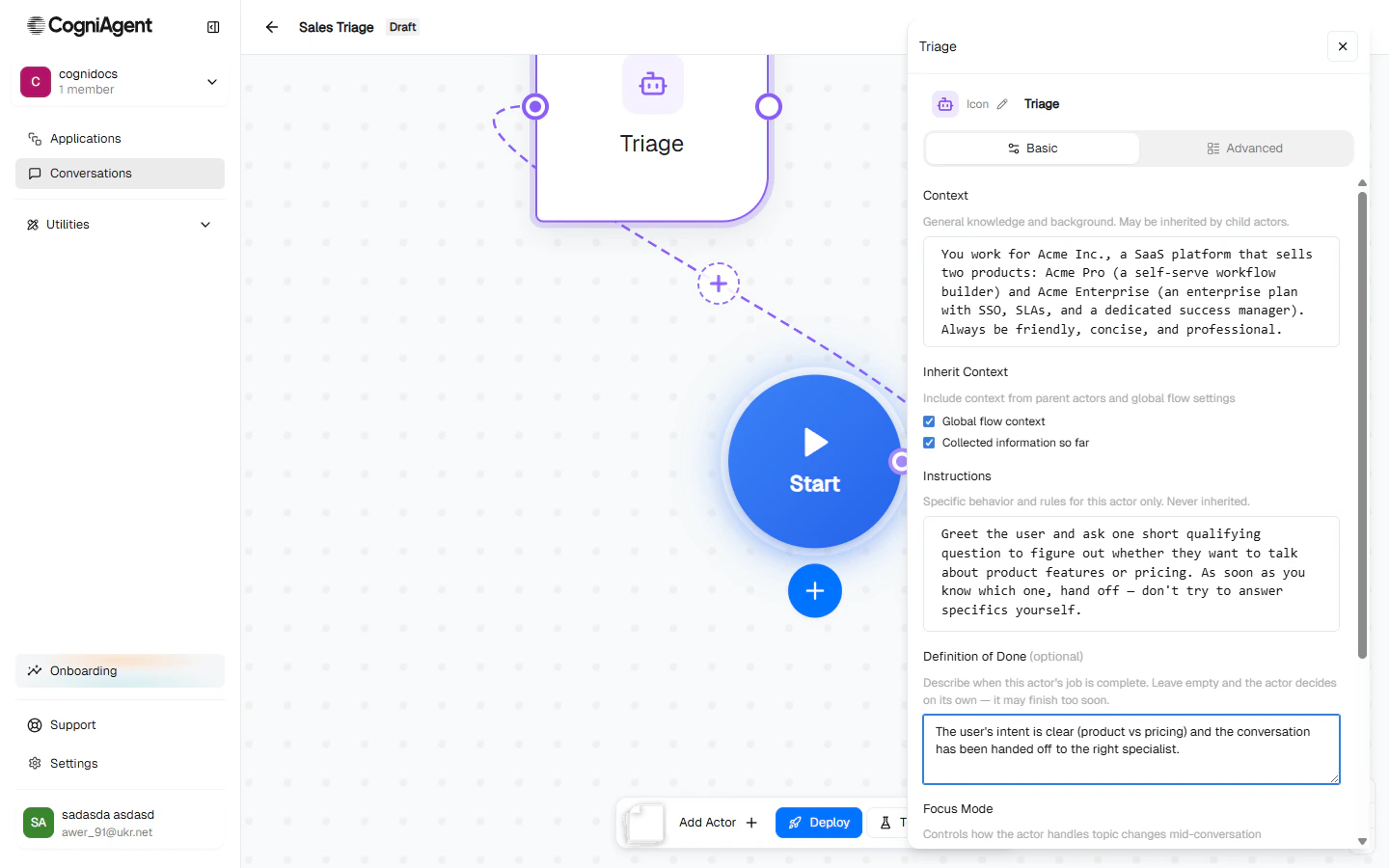
The setting lives in the actor config panel:
 ## When does focus mode matter?
Every turn, before an actor speaks, the platform asks: *"Is this still the right actor for what the user just said?"*
The answer is mode-dependent.
### Auto
The AI evaluates whether the new message is still in this actor's scope. If clearly off-topic, it hands off. If borderline, it tends to stay.
When **Auto** isn't picking the right behaviour, fill in **Focus Mode Guidance** below the mode selector — a one-line hint like *"Always finish collecting the user's email before letting them switch topics"*.
### Flexible
The handoff bar is low. Any signal that another actor fits better triggers an immediate route. Use this for thin triage / dispatcher agents whose job is to forward, not engage.
```mermaid theme={null}
flowchart LR
U1[User: 'I want to return an order'] --> T[Triage
## When does focus mode matter?
Every turn, before an actor speaks, the platform asks: *"Is this still the right actor for what the user just said?"*
The answer is mode-dependent.
### Auto
The AI evaluates whether the new message is still in this actor's scope. If clearly off-topic, it hands off. If borderline, it tends to stay.
When **Auto** isn't picking the right behaviour, fill in **Focus Mode Guidance** below the mode selector — a one-line hint like *"Always finish collecting the user's email before letting them switch topics"*.
### Flexible
The handoff bar is low. Any signal that another actor fits better triggers an immediate route. Use this for thin triage / dispatcher agents whose job is to forward, not engage.
```mermaid theme={null}
flowchart LR
U1[User: 'I want to return an order'] --> T[Triage
flexible]
T -->|immediate handoff| R[Returns Specialist]
```
### Persistent
The actor hands off when needed, **but the platform remembers where it left off**. When the user returns to that topic, the original actor picks up exactly where it stopped — including any data it had already collected.
```mermaid theme={null}
flowchart LR
U1[User: 'I want to return an order...'] --> R1[Returns: 'What's the order number?']
U2[User: 'Actually, can I change my email first?'] --> S[Settings Agent: 'Sure, what's the new one?']
U3[User: 'Done. Back to my return.'] --> R2[Returns: 'You were giving me the order number...']
```
Best for multi-step flows where users naturally take detours.
### Strict
The actor refuses to hand off until its **Definition of Done** is satisfied. The branch router can't override it; the user is gently redirected if they try to change topics.
Strict mode is powerful but risky. If you forget to set a clear Definition of Done, the actor will never finish — and the conversation will stall. Strict actors should *always* have an explicit DoD.
Use strict for things like:
* Identity verification flows (don't let the user skip to billing without proving who they are)
* Payment collection (don't lose the cart because the user got distracted)
* Compliance-required intake (data collection that must complete to be legal)
## How focus mode interacts with routing
Each mode unlocks different actions for the routing system:
| Mode | Stay | Hand off to sibling | Escalate to global | Ask user to clarify |
| -------------- | ---- | ---------------------- | ---------------------- | ------------------- |
| **Auto** | ✓ | ✓ | ✓ | ✓ |
| **Flexible** | ✓ | ✓ | ✓ | ✓ |
| **Persistent** | ✓ | ✓ | ✓ (saves state) | ✓ |
| **Strict** | ✓ | ✓ (only after DoD met) | ✓ (only after DoD met) | ✓ |
You don't trigger these directly — they're enforced by the routing layer. But it helps to know that **strict mode makes routing physically unable to leave the actor** until its Definition of Done is met.
## Choosing a mode
**Auto.** This is the default and the right choice 80% of the time. If the AI's choices ever feel off, write a one-line guidance hint before switching modes.
**Flexible.** A triage agent's job is to figure out where the user belongs and forward them — staying around to chat is the wrong behaviour.
**Persistent.** Users will get distracted and come back. Persistent lets you resume cleanly without re-asking for collected data.
**Strict.** With a tight Definition of Done. The actor refuses to be derailed.
## A worked example
In the Sales Triage flow, each actor uses Auto:
* **Triage** — *Auto.* Once the user's intent is clear, Triage's Definition of Done fires and the routing layer hands off.
* **Product Specialist** — *Auto.* If the user pivots to pricing, Product hands off to Pricing.
* **Pricing Specialist** — *Auto.* Same in reverse.
If you wanted to make Triage even more aggressive about handing off (no chit-chat, just route as soon as you have a signal), you'd switch it to Flexible.
## Next
Initiator vs Responder — how the flow gets kicked off.
Full reference for every field on an actor.