> ## Documentation Index
> Fetch the complete documentation index at: https://docs.cogniagent.ai/llms.txt
> Use this file to discover all available pages before exploring further.
# Test a flow
> Sandbox your flow with a live chat session before you deploy. See routing decisions, tool calls, and slot values inline.
Before exposing a flow to real users, test it. The **Test** drawer gives you a live sandbox chat — the same routing, the same actor turns, the same tool calls as production, but no real channel delivery happens. Outbound emails aren't actually sent; outbound Slack messages don't actually post.
 ## Opening the Test drawer
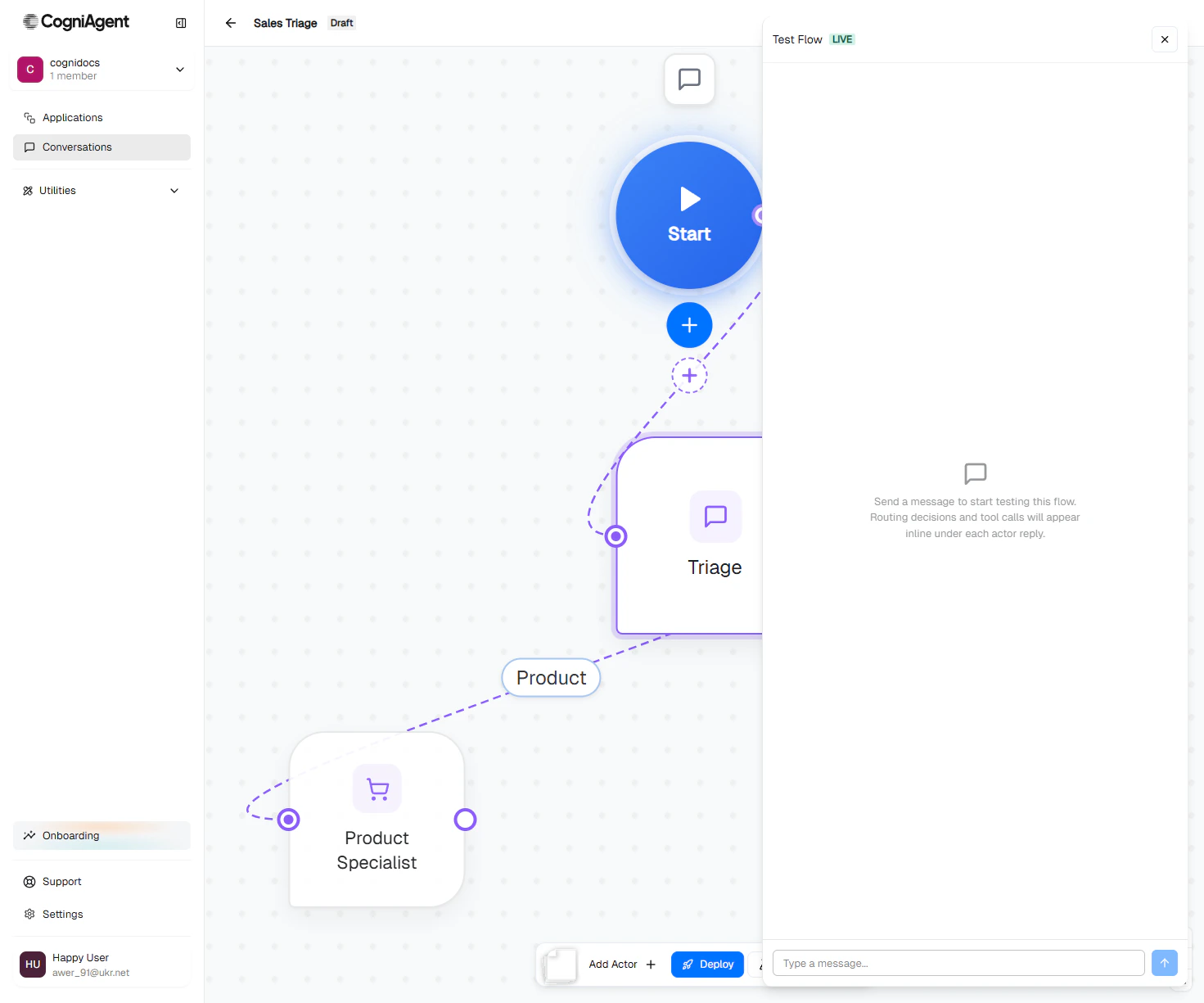
In the bottom toolbar of the flow editor, click **Test**. A drawer opens on the right.
## Opening the Test drawer
In the bottom toolbar of the flow editor, click **Test**. A drawer opens on the right.
 ## Sending a message
Type a message and press Enter. The platform:
1. Creates a test session.
2. Routes your message into the first actor.
3. The actor decides what to do — reply, hand off, ask to clarify, call a tool.
4. The reply appears in the drawer within a few seconds.
Each test session is marked with a **TEST** badge in the conversation history so you don't confuse it with a real session.
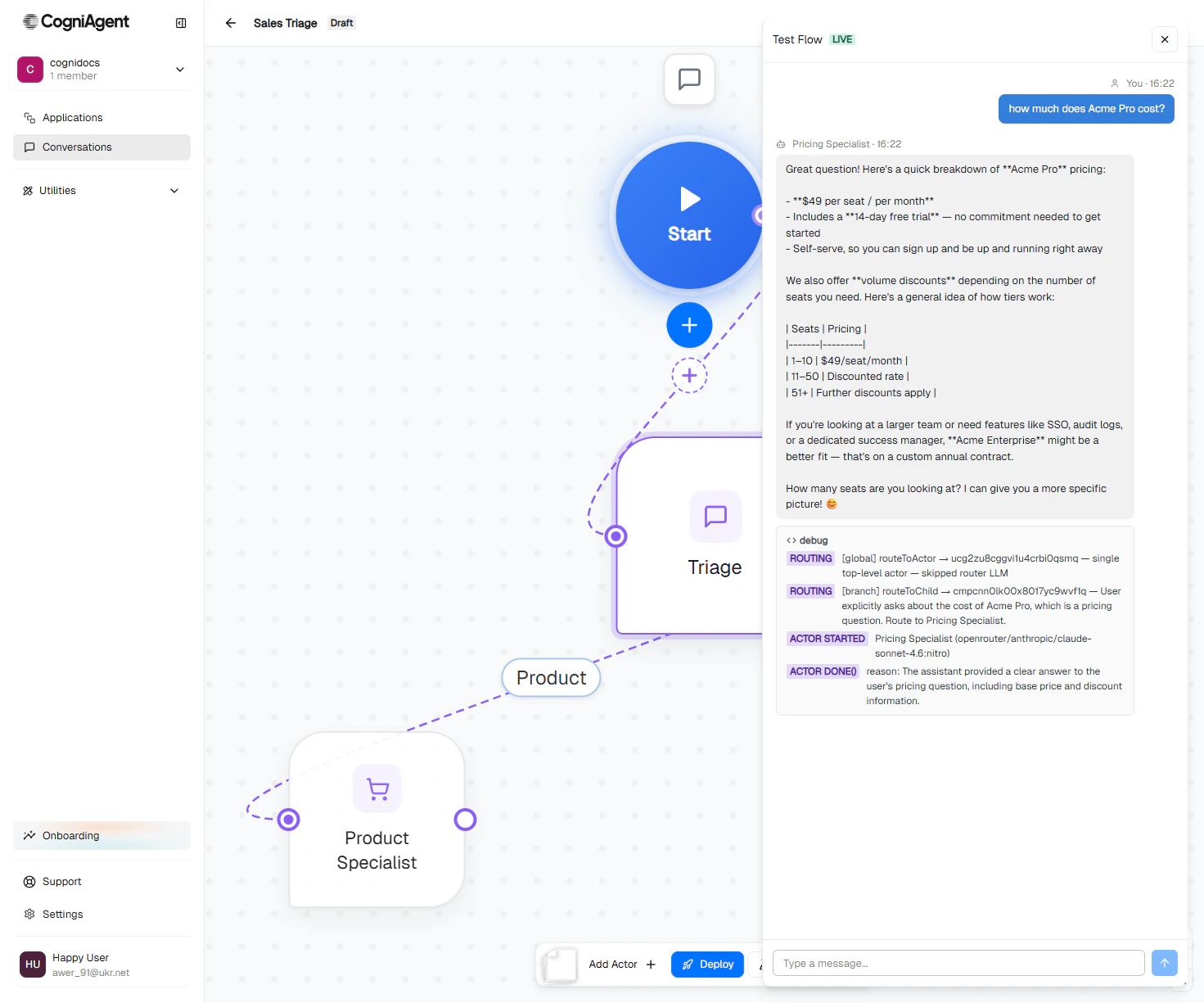
## The routing trace
Below each actor reply is a **debug** panel showing exactly what happened:
```
[global] routeToActor → Triage — single top-level actor — skipped router LLM
[branch] routeToChild → Pricing Specialist — User explicitly asks about the
cost of Acme Pro, which is a pricing question.
Route to Pricing Specialist.
actor started → Pricing Specialist (claude-sonnet-4.6:nitro)
actor done() → reason: The assistant provided a clear answer to the
user's pricing question, including base price
and discount information.
```
This is the single most useful debugging tool in the platform. When routing goes wrong, the trace tells you exactly which decision was made and why.
## What to test
Walk through the canonical case the flow is built for. Does the right actor handle the right question? Does the conversation end cleanly?
Start with one topic, then pivot mid-conversation. Does the right actor pick up the new topic? Does the previous actor's data persist (via slots)?
Ambiguous messages, off-topic questions, things the actors aren't supposed to handle. Does the router escalate cleanly? Does it ask to clarify rather than guessing?
Trigger paths that should invoke an integration action. Does the actor pick the right tool with the right arguments?
In Test mode, integration actions **do execute** for read-only operations. Be careful with write actions on production connections — those will land in real systems. Configure dedicated sandbox connections if you can.
Provide information in one message, then ask a follow-up that depends on it. Does the actor remember? Do other actors see the same context after a handoff?
## Iterating on prompts
Test sessions are the fastest feedback loop for prompt iteration:
1. Open the Test drawer.
2. Send a message that exposes the problem.
3. Read the routing trace and the actor's reply.
4. Open the actor's config in another panel — edit the Instructions.
5. Save.
6. Send the next message. The new prompt is picked up immediately.
You don't need to deploy, undeploy, or even close the test session. Edits apply on the next turn.
## Ending a session
Click the close button on the drawer (X). Any open session is marked **ended**.
The session and its full transcript stay in the **Conversations** history, tagged with a TEST badge. You can re-open it later to review the trace.
## Test vs real sessions
| | Test session | Real session |
| ------------------------------------- | -------------------------------- | -------------------------------- |
| Routing logic | Same | Same |
| Actor turns | Same | Same |
| Tool calls (read) | Execute against real connections | Execute against real connections |
| Tool calls (write) | Execute — be careful | Execute |
| Channel delivery (email, Slack, etc.) | **No** — short-circuited | Yes |
| Visible in Conversations history | Yes, with TEST badge | Yes |
| Triggers channel listeners | No | Yes |
The "no real channel delivery" is the key safety feature — you can fully exercise an outbound email flow without sending mail to anyone.
## Next
Take the flow live.
Review past conversations, including test sessions.
## Sending a message
Type a message and press Enter. The platform:
1. Creates a test session.
2. Routes your message into the first actor.
3. The actor decides what to do — reply, hand off, ask to clarify, call a tool.
4. The reply appears in the drawer within a few seconds.
Each test session is marked with a **TEST** badge in the conversation history so you don't confuse it with a real session.
## The routing trace
Below each actor reply is a **debug** panel showing exactly what happened:
```
[global] routeToActor → Triage — single top-level actor — skipped router LLM
[branch] routeToChild → Pricing Specialist — User explicitly asks about the
cost of Acme Pro, which is a pricing question.
Route to Pricing Specialist.
actor started → Pricing Specialist (claude-sonnet-4.6:nitro)
actor done() → reason: The assistant provided a clear answer to the
user's pricing question, including base price
and discount information.
```
This is the single most useful debugging tool in the platform. When routing goes wrong, the trace tells you exactly which decision was made and why.
## What to test
Walk through the canonical case the flow is built for. Does the right actor handle the right question? Does the conversation end cleanly?
Start with one topic, then pivot mid-conversation. Does the right actor pick up the new topic? Does the previous actor's data persist (via slots)?
Ambiguous messages, off-topic questions, things the actors aren't supposed to handle. Does the router escalate cleanly? Does it ask to clarify rather than guessing?
Trigger paths that should invoke an integration action. Does the actor pick the right tool with the right arguments?
In Test mode, integration actions **do execute** for read-only operations. Be careful with write actions on production connections — those will land in real systems. Configure dedicated sandbox connections if you can.
Provide information in one message, then ask a follow-up that depends on it. Does the actor remember? Do other actors see the same context after a handoff?
## Iterating on prompts
Test sessions are the fastest feedback loop for prompt iteration:
1. Open the Test drawer.
2. Send a message that exposes the problem.
3. Read the routing trace and the actor's reply.
4. Open the actor's config in another panel — edit the Instructions.
5. Save.
6. Send the next message. The new prompt is picked up immediately.
You don't need to deploy, undeploy, or even close the test session. Edits apply on the next turn.
## Ending a session
Click the close button on the drawer (X). Any open session is marked **ended**.
The session and its full transcript stay in the **Conversations** history, tagged with a TEST badge. You can re-open it later to review the trace.
## Test vs real sessions
| | Test session | Real session |
| ------------------------------------- | -------------------------------- | -------------------------------- |
| Routing logic | Same | Same |
| Actor turns | Same | Same |
| Tool calls (read) | Execute against real connections | Execute against real connections |
| Tool calls (write) | Execute — be careful | Execute |
| Channel delivery (email, Slack, etc.) | **No** — short-circuited | Yes |
| Visible in Conversations history | Yes, with TEST badge | Yes |
| Triggers channel listeners | No | Yes |
The "no real channel delivery" is the key safety feature — you can fully exercise an outbound email flow without sending mail to anyone.
## Next
Take the flow live.
Review past conversations, including test sessions.