> ## Documentation Index
> Fetch the complete documentation index at: https://docs.cogniagent.ai/llms.txt
> Use this file to discover all available pages before exploring further.
# How a coworker gets better
> A new AI coworker is competent. One that's been working for you three months is genuinely useful. Here's what changes and how to help it along.
A new coworker is competent. One that's been working for you for three months is genuinely useful. The difference isn't the model — it's everything it has picked up about you.
## The three things that accumulate
Notes about you, your preferences, and the work. Built from corrections you make in passing.
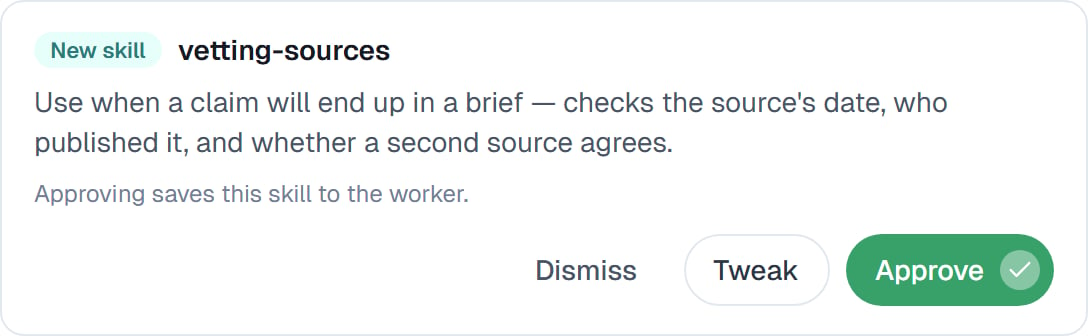
Procedures worth repeating — written by you, or proposed by your coworker and approved by you.
The standing brief, which you tighten as you learn what it gets wrong.
None of it happens behind your back. Every proposed change waits on the **Improvements** tab for your yes.
 ## Your part in it
The single highest-return habit: **correct it in the chat, in plain words, in the moment.**
> "Too long — half that next time."
>
> "Always check the date on a pricing page before you quote it."
>
> "Don't use that source, it's unreliable."
Each of those is a sentence you'd say to a colleague, and each one lands as something your coworker keeps. This is why it improves — not from watching you, but from you telling it.
**The third correction is the signal.** Say something once, it's a note. Say it three times and it should be [a skill](/cowork/skills/creating) or a line in the instructions.
## What your coworker does on its own
It notices patterns in its own work and proposes changes: a new skill for a procedure that worked well, a fix to one that didn't, a note worth keeping.
You approve, tweak or dismiss each one. Tweaking is underrated — a proposal is a decent first draft, and five minutes tightening it turns it into something that actually gets used.
There's also an optional periodic tidy-up of the skills it has written for itself, off by default. See [Skills that improve themselves](/cowork/skills/improving).
## What a month looks like
Format, tone, which sources it trusts, how much detail you want. This feels like work. It is, and it's the whole investment.
You notice you've said the same thing three times. Write the skill.
Its suggestions on the Improvements tab start matching what you'd have written.
The output arrives in your format, with your standards applied, and you check rather than fix.
## Good to know
Improvement belongs to one coworker. Three coworkers each learn their own job. Save a well-tuned one as a [template](/cowork/coworkers/templates) to give a new hire the same starting point — skills and instructions carry, memory doesn't.
A coworker that isn't getting better is usually one nobody corrects. If the output is consistently almost-right and nobody says so, nothing changes.
## Common questions
No. Every change to its skills, memory or instructions waits for your approval on the Improvements tab.
Every couple of weeks. Proposals accumulate harmlessly, and reviewing a few at once is easier than one at a time.
A sentence in the chat costs nothing and saves the same correction every task afterwards. It's the highest-return thing you can do.
Models improve, and you can [switch](/cowork/chat/effort-and-model) to a newer one at any time. What's yours — the skills, memory and instructions — carries across.
Open the [Memory](/cowork/control/memory) tab and delete the note, or edit the skill. Everything it learned is visible and editable.
## Next steps
Reviewing what it proposes.
Reading and fixing its notes.
When a correction becomes a procedure.
Earning unattended work.
## Your part in it
The single highest-return habit: **correct it in the chat, in plain words, in the moment.**
> "Too long — half that next time."
>
> "Always check the date on a pricing page before you quote it."
>
> "Don't use that source, it's unreliable."
Each of those is a sentence you'd say to a colleague, and each one lands as something your coworker keeps. This is why it improves — not from watching you, but from you telling it.
**The third correction is the signal.** Say something once, it's a note. Say it three times and it should be [a skill](/cowork/skills/creating) or a line in the instructions.
## What your coworker does on its own
It notices patterns in its own work and proposes changes: a new skill for a procedure that worked well, a fix to one that didn't, a note worth keeping.
You approve, tweak or dismiss each one. Tweaking is underrated — a proposal is a decent first draft, and five minutes tightening it turns it into something that actually gets used.
There's also an optional periodic tidy-up of the skills it has written for itself, off by default. See [Skills that improve themselves](/cowork/skills/improving).
## What a month looks like
Format, tone, which sources it trusts, how much detail you want. This feels like work. It is, and it's the whole investment.
You notice you've said the same thing three times. Write the skill.
Its suggestions on the Improvements tab start matching what you'd have written.
The output arrives in your format, with your standards applied, and you check rather than fix.
## Good to know
Improvement belongs to one coworker. Three coworkers each learn their own job. Save a well-tuned one as a [template](/cowork/coworkers/templates) to give a new hire the same starting point — skills and instructions carry, memory doesn't.
A coworker that isn't getting better is usually one nobody corrects. If the output is consistently almost-right and nobody says so, nothing changes.
## Common questions
No. Every change to its skills, memory or instructions waits for your approval on the Improvements tab.
Every couple of weeks. Proposals accumulate harmlessly, and reviewing a few at once is easier than one at a time.
A sentence in the chat costs nothing and saves the same correction every task afterwards. It's the highest-return thing you can do.
Models improve, and you can [switch](/cowork/chat/effort-and-model) to a newer one at any time. What's yours — the skills, memory and instructions — carries across.
Open the [Memory](/cowork/control/memory) tab and delete the note, or edit the skill. Everything it learned is visible and editable.
## Next steps
Reviewing what it proposes.
Reading and fixing its notes.
When a correction becomes a procedure.
Earning unattended work.