> ## Documentation Index
> Fetch the complete documentation index at: https://docs.cogniagent.ai/llms.txt
> Use this file to discover all available pages before exploring further.
# Dynamic workflow scripts
> Read, review and edit a dynamic workflow script: the meta header, agent(), parallel(), pipeline(), phase(), log(), budget and args.
Every dynamic workflow runs from a short script your coworker writes, and this page shows you how to read one, check it, and change a saved one.
## What a script is
When a job is too big for one pass, your coworker writes a short JavaScript script for it. The script says what each helper does, which helpers run side by side, and how the results come together.
Your coworker writes a new script for each big job. You don't have to write one yourself. A script you keep with **Make repeatable** is saved in the coworker's own files and reused by name. You can open a saved one, read it, and edit it.
The script itself does no work. It only plans. Every piece of real work happens inside a helper, started with `agent()`.
To turn the capability on and see a run from your side, start with [Dynamic workflows](/cowork/capabilities/dynamic-workflows).
## Anatomy of a script
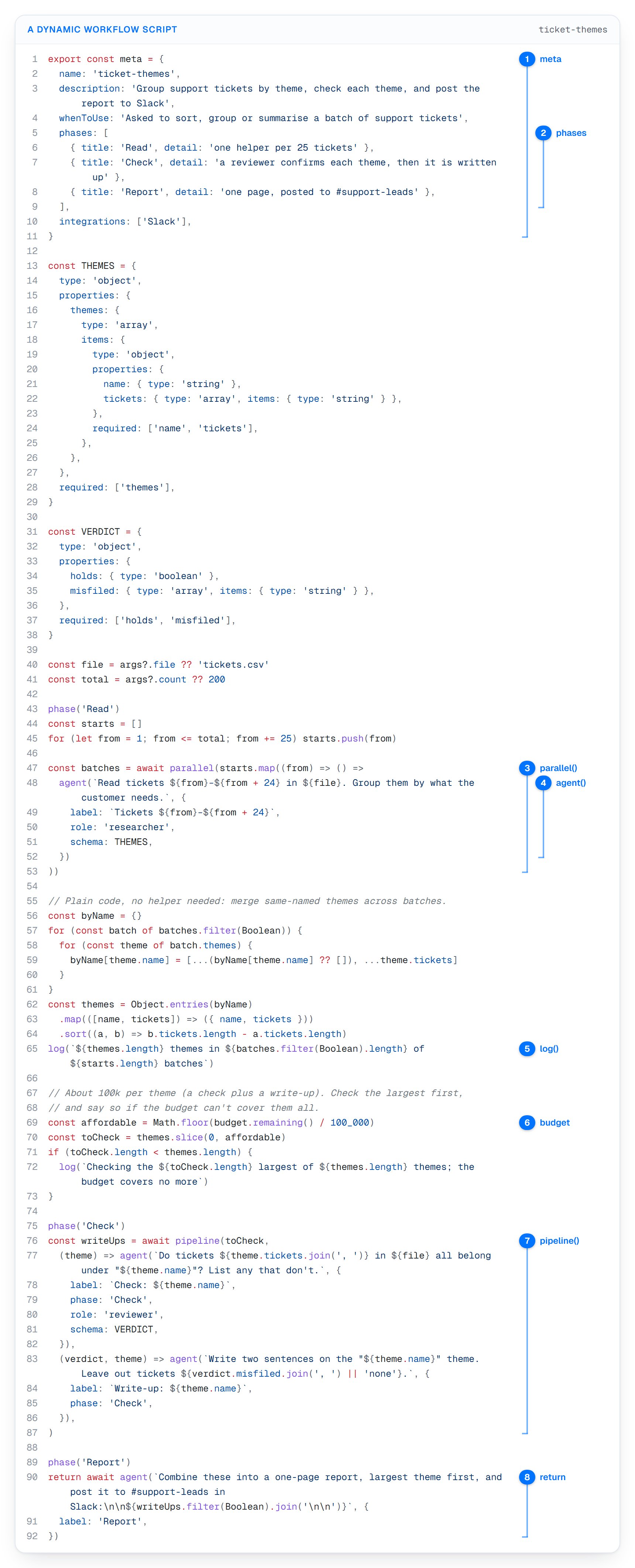
Here is the script Ivy, a support coworker, writes for "Go through all 200 support tickets in tickets.csv and group them by theme. Post the summary to #support-leads."
 ```javascript ticket-themes.js theme={null}
export const meta = {
name: 'ticket-themes',
description: 'Group support tickets by theme, check each theme, and post the report to Slack',
whenToUse: 'Asked to sort, group or summarise a batch of support tickets',
phases: [
{ title: 'Read', detail: 'one helper per 25 tickets' },
{ title: 'Check', detail: 'a reviewer confirms each theme, then it is written up' },
{ title: 'Report', detail: 'one page, posted to #support-leads' },
],
integrations: ['Slack'],
}
const THEMES = {
type: 'object',
properties: {
themes: {
type: 'array',
items: {
type: 'object',
properties: {
name: { type: 'string' },
tickets: { type: 'array', items: { type: 'string' } },
},
required: ['name', 'tickets'],
},
},
},
required: ['themes'],
}
const VERDICT = {
type: 'object',
properties: {
holds: { type: 'boolean' },
misfiled: { type: 'array', items: { type: 'string' } },
},
required: ['holds', 'misfiled'],
}
const file = args?.file ?? 'tickets.csv'
const total = args?.count ?? 200
phase('Read')
const starts = []
for (let from = 1; from <= total; from += 25) starts.push(from)
const batches = await parallel(starts.map((from) => () =>
agent(`Read tickets ${from}–${from + 24} in ${file}. Group them by what the customer needs.`, {
label: `Tickets ${from}–${from + 24}`,
role: 'researcher',
schema: THEMES,
})
))
// Plain code, no helper needed: merge same-named themes across batches.
const byName = {}
for (const batch of batches.filter(Boolean)) {
for (const theme of batch.themes) {
byName[theme.name] = [...(byName[theme.name] ?? []), ...theme.tickets]
}
}
const themes = Object.entries(byName)
.map(([name, tickets]) => ({ name, tickets }))
.sort((a, b) => b.tickets.length - a.tickets.length)
log(`${themes.length} themes in ${batches.filter(Boolean).length} of ${starts.length} batches`)
// About 100k per theme (a check plus a write-up). Check the largest first,
// and say so if the budget can't cover them all.
const affordable = Math.floor(budget.remaining() / 100_000)
const toCheck = themes.slice(0, affordable)
if (toCheck.length < themes.length) {
log(`Checking the ${toCheck.length} largest of ${themes.length} themes; the budget covers no more`)
}
phase('Check')
const writeUps = await pipeline(toCheck,
(theme) => agent(`Do tickets ${theme.tickets.join(', ')} in ${file} all belong under "${theme.name}"? List any that don't.`, {
label: `Check: ${theme.name}`,
phase: 'Check',
role: 'reviewer',
schema: VERDICT,
}),
(verdict, theme) => agent(`Write two sentences on the "${theme.name}" theme. Leave out tickets ${verdict.misfiled.join(', ') || 'none'}.`, {
label: `Write-up: ${theme.name}`,
phase: 'Check',
}),
)
phase('Report')
return await agent(`Combine these into a one-page report, largest theme first, and post it to #support-leads in Slack:\n\n${writeUps.filter(Boolean).join('\n\n')}`, {
label: 'Report',
})
```
Read it in the order the numbers on the figure follow:
1. **The `meta` header.** It names the job and says what it's for. You see it on the run card before any helper starts.
2. **The phases.** Read, Check and Report become the groups on the run card.
3. **`parallel()`.** Eight Read helpers, one per 25 tickets, and the script waits for all of them.
4. **`agent()`.** Each call is one helper with its own instructions. A `schema` makes it hand back data instead of prose.
5. **`log()`.** A line on the run card, here "9 themes in 8 of 8 batches".
6. **`budget`.** The script checks how much it can still spend, and says so if it has to cut.
7. **`pipeline()`.** Each theme is checked and then written up on its own, so one theme's write-up can start while another is still being checked.
8. **`return`.** The final helper's answer goes back to your coworker, which turns it into one reply for you.
Everything between the helper calls is ordinary code. Merging the batches and sorting the themes costs nothing, because no helper is needed for it. The script runs as one async function, so `await` and `return` work at the top level.
## The meta header
Every script begins with `export const meta = { … }`. The header is read before anything runs, so the plan reaches your run card first.
| Field | Required | What it does |
| - | - | - |
| `name` | Yes | Write it as a short lowercase name with dashes, like `ticket-themes`. It heads the run card. A saved dynamic workflow is known by this name. |
| `description` | Yes | One line on what the run does, shown under the name on the run card. For a saved one, it's what your coworker reads when choosing which to use, cut to 120 characters. |
| `phases` | No | A list of `{ title, detail }`. Each title becomes a group on the run card, marked "pending" until work reaches it. `detail` is the one line shown beside the title. |
| `whenToUse` | No | When a saved dynamic workflow fits a request. Your coworker uses it to pick the right one, so say when, not what. Cut to 200 characters. |
| `integrations` | No | The connected apps the helpers need, like `['Slack']`. You're asked to approve them once, before anything runs. See [Apps inside a run](#apps-inside-a-run). |
```javascript theme={null}
export const meta = {
name: 'refund-reasons',
description: 'Find the most common refund reasons in a ticket export',
whenToUse: 'Asked why customers want refunds, or which refund reason comes up most',
phases: [
{ title: 'Count', detail: 'one helper per month' },
{ title: 'Summarise' },
],
}
```
The header must be written out with plain values: text, numbers, lists and `{ }` objects. Variables, function calls and spreads aren't allowed, because the header is read before the script runs.
```javascript theme={null}
const NAME = 'refund-reasons'
export const meta = {
name: NAME, // refused: a variable, not a plain value
description: 'Find the most common refund reasons in a ticket export',
}
```
A header that can't be read stops the script before anything runs. No helper starts, nothing is spent, and your coworker fixes the header and tries again. The same goes for a missing `name` or `description`, or an `integrations` value that isn't a list of names.
Use the same titles in `meta.phases` and in your `phase()` calls. Then each group on the run card fills in as the script reaches it.
## Building blocks
The script has seven building blocks, plus `workflow()` for running a saved dynamic workflow as one step. Each one is described below with what it returns and what happens when something goes wrong.
### `agent(prompt, options)`
Starts one helper with the instructions in `prompt`, waits for it to finish, and returns its answer. Without a `schema`, the answer is the helper's closing summary as text.
```javascript theme={null}
const summary = await agent('Read refunds.csv and say which refund reason comes up most.', {
label: 'Refund reasons',
role: 'researcher',
})
```
Each helper starts fresh. It can't see your conversation with your coworker. So its instructions must stand on their own: name the file, the rows, and the answer you want.
| Option | What it does |
| - | - |
| `label` | The helper's name on its run-card row. If you leave it out, the row shows the custom helper's name, the role, or "agent 1", "agent 2" and so on. |
| `phase` | The run-card group this helper sits in. Defaults to the latest `phase()`. |
| `role` | What the helper is allowed to do: `researcher`, `reviewer`, `coder` or `general`. Defaults to `general`. |
| `schema` | A JSON Schema describing an object. The helper must return an object of that shape, and `agent()` returns that object. |
| `model` | The id of a model your workspace offers, shown on the row. Defaults to your coworker's model, or the custom helper's own model when it sets one. |
| `agentName` | The name of one of your coworker's [custom helpers](/cowork/skills/helpers). That helper's own instructions and tools are used, and `role` is ignored. |
**What each role may do:**
| Role | Can | Can't |
| - | - | - |
| `researcher` | Read and search files. Search the web and read web pages, when your coworker has those capabilities. Told to report concise, sourced findings. | Change files |
| `reviewer` | The same as a researcher. Told to judge the work: what is sound, what is wrong, what to change. | Change files |
| `general` | The same as a researcher, focused on one goal. This is the default. | Change files |
| `coder` | Everything above, plus write and edit files and run shell commands. | — |
A helper with a role can't use your connected apps unless the run's header declared them and you approved them. No helper can start helpers of its own, start another dynamic workflow, or ask you anything. If a step would need your approval, the helper is refused and reports that instead.
A custom helper named with `agentName` gets exactly the tools its definition lists. If its definition lists none, it gets everything your coworker has in that turn, except starting helpers and asking you. Anything that would ask you first is still refused, unless you approved that app for the run.
**Getting data back with `schema`.** Give a helper a schema and you get an object you can count, sort and filter, instead of prose.
```javascript theme={null}
const TOP_REASON = {
type: 'object',
properties: {
reason: { type: 'string' },
count: { type: 'integer' },
},
required: ['reason', 'count'],
}
const top = await agent('Read refunds.csv. Which refund reason comes up most, and how many times?', {
label: 'Top refund reason',
role: 'researcher',
schema: TOP_REASON,
})
log(`${top.reason}: ${top.count} refunds`)
```
If the helper's answer doesn't match the shape, it's told what was wrong and tries again.
**Using a custom helper.** Name it, and it brings its own instructions.
```javascript theme={null}
const notes = await agent('Check the draft reply in drafts/ticket-4182.md against tone-guide.md.', {
label: 'Tone check',
agentName: 'reply-reviewer',
})
```
**When it fails.** `agent()` throws an error, and the script decides what to do. That happens when:
* The helper fails. The error names the helper and points to its transcript.
* A helper with a `schema` ends without returning the object.
* The `prompt` is empty, or the `role`, `model` or `schema` isn't valid. This throws before the helper starts.
* The `agentName` doesn't match a custom helper. That helper fails.
* The run reaches a limit: 30 helpers, or not enough budget left. See [Limits](#limits).
* The run reaches the end of a stretch and pauses. See [Long runs and retries](#long-runs-and-retries).
* The run is stopped.
A helper's cost counts even when it fails. A helper you stop from the run card either throws, or, without a schema, can come back as empty text. A bare `agent()` that throws ends the whole script unless you catch it. Inside `parallel()` and `pipeline()`, a failure only affects its own item.
Each helper's full transcript is saved in the task's files, under `subagents/`. The **transcript** link on its row opens it.
### `parallel(thunks)`
Runs a list of jobs side by side and waits for all of them. Each job is a function that starts the work, usually `() => agent(…)`.
It returns a list of answers in the same order as the jobs, whatever order they finished in. A job that throws comes back as `null`, and the others carry on.
```javascript theme={null}
const months = ['january.csv', 'february.csv', 'march.csv']
const counts = await parallel(months.map((file) => () =>
agent(`Count the refund tickets in ${file}. Reply with the number only.`, {
label: file,
role: 'researcher',
})
))
// A helper that failed comes back as null. Say so rather than hide it.
const missing = months.filter((file, i) => counts[i] === null)
if (missing.length > 0) log(`No count for ${missing.join(', ')}`)
```
* **It waits for everyone.** Nothing after `parallel()` runs until every job has finished or failed. Use it when the next step needs all the results at once, like merging batches.
* **Six helpers work at once.** That limit covers the whole run, including nested calls and saved dynamic workflows run as steps. The rest wait their turn, in order.
* **Up to 256 jobs per call.** Pass more and the call throws before any of them runs. Split the work across several calls instead.
* **Filter before you use the results.** `results.filter(Boolean)` drops the `null`s from failed jobs.
* **Pass functions, not calls.** Write `() => agent(…)`. Anything else comes back as `null` at once, and a helper already started that way still runs and costs.
### `pipeline(items, ...stages)`
Moves each item through a series of stages, on its own. There is no waiting between stages, so one item can be in its last stage while another is still in its first.
Each stage is a function. It gets three things: what the stage before returned, the original item, and the item's position in the list. The first stage gets the item itself.
```javascript theme={null}
const themes = ['Refund', 'Login', 'Billing']
const writeUps = await pipeline(themes,
// The first stage gets the item itself.
(theme) => agent(`Find three tickets in tickets.csv about "${theme}".`, {
label: `Find: ${theme}`,
role: 'researcher',
}),
// Later stages get: what the stage before returned, the original item, its position.
(found, theme, i) => agent(`Write up theme ${i + 1}, "${theme}", in two sentences, using these tickets:\n${found}`, {
label: `Write-up: ${theme}`,
}),
)
```
`pipeline()` returns what each item's last stage returned, in the order of the items. If a stage throws, that item comes back as `null` and its later stages are skipped. The other items carry on.
It shares the same limits as `parallel()`: six helpers at once across the run, and up to 256 items per call.
**Which one to use.** Pipeline is the better default for work with stages. Items don't wait for each other between stages. Use `parallel()` only when a step needs every earlier result at once.
```mermaid theme={null}
flowchart TB
subgraph P["parallel(): everyone waits at the barrier"]
direction LR
A1["Tickets 1–25"] --> B(("all done"))
A2["Tickets 26–50"] --> B
A3["Tickets 51–75"] --> B
B --> N["Next step starts"]
end
subgraph L["pipeline(): each item moves on its own"]
direction LR
C1["Check: Refund"] --> W1["Write-up: Refund"]
C2["Check: Login"] --> W2["Write-up: Login"]
C3["Check: Billing"] --> W3["Write-up: Billing"]
end
```
### `phase(title)`
Starts a group on the run card. Every `agent()` after it goes into that group, unless the helper names its own `phase`.
```javascript theme={null}
phase('Count')
const total = await agent('Count the tickets in tickets.csv. Reply with the number only.', {
label: 'Count tickets',
})
log(`${total} tickets to sort`)
phase('Summarise')
const summary = await agent('Summarise the five most common complaints in tickets.csv.', {
label: 'Summary',
})
```
A phase declared in the header shows as "pending" until the script reaches it. A title the header didn't declare is added to the card when it's first used. An empty title is ignored. `phase()` returns nothing.
### `log(message)`
Adds a line of text to the run card, so you can follow along. Use it to say what the script found, decided or left out.
`log()` takes text. Anything else, and empty text, is ignored. It returns nothing, and the lines aren't part of the result your coworker gets back. After a pause the script runs again from the top, so its `log()` lines appear again.
### `budget`
The run's spending limit, so the script can plan within it. It is counted in tokens, the unit AI models are billed in.
| Part | What it gives you |
| - | - |
| `budget.total` | The limit for this run, or for the current stretch of a long run. |
| `budget.spent()` | Tokens used so far by helpers that have finished, failed ones included. |
| `budget.remaining()` | What is neither spent nor set aside for helpers still running. Reads `0` once the current stretch is over. |
```javascript theme={null}
// Plan for about 150k per helper, and never plan more than the budget can pay for.
const regions = ['north.csv', 'south.csv', 'east.csv', 'west.csv']
const affordable = Math.floor(budget.remaining() / 150_000)
const toRead = regions.slice(0, affordable)
if (toRead.length < regions.length) {
log(`Reading ${toRead.length} of ${regions.length} regions; the budget covers no more`)
}
```
**How the limit is set.** Your coworker picks it when it starts the run. The default is 2,000,000 tokens, and the most is 8,000,000. If a job needs more, ask your coworker for a bigger budget.
**How the limit holds.** Before each helper starts, the run sets aside room for it:
* Until any helper has finished, it sets aside 60,000 tokens, or a tenth of the limit if that's smaller.
* After that, it sets aside the average cost of the helpers that have finished, and never less than that first amount.
That's what stops a whole batch from starting when there's only room for a few. A helper can still cost more than was set aside, so a run can end somewhat over its limit.
When there isn't enough room left, `agent()` throws "Token budget exhausted" and no more helpers start. Catch it and return what you have, and the run completes with partial results. Or let the run fail, and a retry of the same script with a bigger budget reuses every finished helper. See [Long runs and retries](#long-runs-and-retries).
The limit counts the current stretch of a long run, not the run as a whole. Each stretch starts with the limit your coworker passes when continuing, or 2,000,000 if it passes none.
### `args`
The input the script was started with, or `undefined` when there is none. This is how one saved dynamic workflow serves many requests.
```javascript theme={null}
// Every value has a fallback, so the script also runs with no args at all.
const file = args?.file ?? 'tickets.csv'
const team = args?.team ?? 'support'
const summary = await agent(`Summarise the ${team} tickets in ${file}.`, { label: file })
```
Input can arrive three ways:
* **From the [slash menu](/cowork/chat/slash-commands).** Typing `/ticket-themes march-tickets.csv` sends "Run the ticket-themes dynamic workflow, with this as its input: march-tickets.csv". Your coworker passes that input on as `args`, for example `{ file: 'march-tickets.csv' }`. It sees only a saved script's name, `description` and `whenToUse`, so say there what input it expects, like "args: file, the CSV to read".
* **From your coworker.** It can run a saved dynamic workflow with whatever `args` the request calls for.
* **From `workflow(name, args)`.** A script that runs a saved one as a step passes it its own `args`.
Keep `args` small. Over 16 KB of data, it's dropped without an error, and the script sees `undefined`. Pass a file name, not the file's contents, and let a helper read the file.
The same script with different `args` is a different run, so nothing finished in one is reused in the other.
### `workflow(name, args)`
Runs one of your coworker's saved dynamic workflows as a single step, and returns what it returns. Despite its name, `workflow()` runs a saved dynamic workflow, not one of your Workflows. `name` is the saved one's `meta.name`. `args` becomes its `args`.
```javascript theme={null}
export const meta = {
name: 'quarter-compare',
description: 'Group March tickets by theme, then compare with last quarter',
phases: [{ title: 'Compare' }],
integrations: ['Slack'],
}
const report = await workflow('ticket-themes', { file: 'march-tickets.csv', count: 50 })
phase('Compare')
return await agent(`Compare this March report with last quarter's in q4-report.md:\n\n${report}`, {
label: 'Compare',
})
```
* **One run, one card.** Its helpers appear on the same run card, under headings that start with "▸ ticket-themes", like "▸ ticket-themes · Read", with a log line saying it started.
* **Shared limits.** It shares the run's budget, its 30-helper limit, its six-at-once limit and its stop.
* **One level only.** A saved dynamic workflow run this way can't call `workflow()` itself. Trying throws.
* **Failure throws.** If the step fails, or no saved one has that name, `workflow()` throws. Catch it like a failed `agent()`.
* **Apps come from the top.** Its own `integrations` aren't asked about. Declare every app the run needs in the top-level header, the way `quarter-compare` declares Slack for the ticket-themes report.
The saved file is read when the step runs. An edit to it shows up the next time the step runs, even in a run that's already going.
### What the script returns
Whatever the script returns goes back to your coworker as the run's result. Return plain data: text, numbers, lists and objects.
Your coworker reads it, checks it, and turns it into one answer for you. You never have to read the raw result yourself.
A result over 8,000 characters is cut short for your coworker. The whole of it is saved in the task's files, under `runs/`, and your coworker is told where.
## Patterns
Three shapes that make a run's result worth trusting.
### Check the work with a second helper
A helper's report is its own account of its work. Have a different helper check it, and give each checker its own lens rather than asking two of them the same question.
```javascript theme={null}
const CHECK = {
type: 'object',
properties: {
ok: { type: 'boolean' },
problems: { type: 'array', items: { type: 'string' } },
},
required: ['ok', 'problems'],
}
const draft = await agent('Draft a reply to ticket 4182 in tickets.csv.', { label: 'Draft reply' })
// Two checkers, two different lenses. Neither of them wrote the draft.
const [policy, coverage] = await parallel([
() => agent(`Does this reply follow the refund policy in policy.md? List every conflict.\n\n${draft}`, {
label: 'Check: policy',
role: 'reviewer',
schema: CHECK,
}),
() => agent(`Does this reply answer every question in ticket 4182 of tickets.csv? List what it misses.\n\n${draft}`, {
label: 'Check: coverage',
role: 'reviewer',
schema: CHECK,
}),
])
if (!policy || !coverage) log('A check did not come back, so the draft is only partly checked')
const problems = [policy, coverage].filter(Boolean).flatMap((check) => check.problems)
return { draft, problems }
```
### Loop until a round finds nothing new
For open-ended searching, keep going until a round turns up nothing new, rather than stopping after a fixed number of rounds. Bound the loop by the budget, and by a round count, so it can't run away.
```javascript theme={null}
const NEW_KINDS = {
type: 'object',
properties: { kinds: { type: 'array', items: { type: 'string' } } },
required: ['kinds'],
}
let known = []
let round = 0
// Stop when a round finds nothing new, after 10 rounds, or when the budget runs low.
while (round < 10 && budget.remaining() > 300_000) {
round += 1
const found = await agent(
`List kinds of complaint in tickets.csv that are not in this list: ${known.join(', ') || '(none yet)'}.`,
{ label: `Search round ${round}`, role: 'researcher', schema: NEW_KINDS },
)
const fresh = found.kinds.filter((kind) => !known.includes(kind))
if (fresh.length === 0) break
known = [...known, ...fresh]
}
// Keep a helper after the loop: if the run reaches a pause, this is where it pauses.
return await agent(`Describe each of these kinds of complaint in one line: ${known.join(', ')}.`, {
label: 'Describe kinds',
})
```
Keep a helper after a loop like this. At the end of a stretch, `budget.remaining()` reads `0`, so the loop stops without knowing why. The next `agent()` call is what pauses the run so it can continue. A script that simply returns there finishes early, with what it had.
### Cover a bounded set, and say what you dropped
When there's more to cover than a run can hold, cover the most important part and `log()` the rest. A silent cut reads as "covered everything".
```javascript theme={null}
const NAMES = {
type: 'object',
properties: { accounts: { type: 'array', items: { type: 'string' } } },
required: ['accounts'],
}
const { accounts } = await agent('List every account name in accounts.csv, largest first.', {
label: 'List accounts',
role: 'researcher',
schema: NAMES,
})
// One helper above plus 25 below stays inside the limit of 30 per run.
const covered = accounts.slice(0, 25)
if (covered.length < accounts.length) {
log(`Reviewed the ${covered.length} largest of ${accounts.length} accounts; ${accounts.length - covered.length} were not reviewed`)
}
const reviews = await parallel(covered.map((name) => () =>
agent(`Read the open tickets for ${name} in tickets.csv. Is this account at risk of leaving, and why?`, {
label: name,
role: 'reviewer',
})
))
return covered.map((name, i) => ({ name, review: reviews[i] }))
```
## Rules every script follows
A script must give the same instructions every time it runs, so a paused or retried run can pick up where it stopped. These rules keep it that way.
* **No clock, no randomness.** `Date.now()`, `new Date()` and `Math.random()` throw. A date you pass in as text still works. Vary work by position or by input instead.
* **No outside access.** The script has no `require`, no filesystem and no network. Everything happens through a helper.
* **64 KB per script.** A longer script is refused before anything runs. Put the bulk in files your helpers read.
* **Writers need their own files.** Helpers share the task's files, and nothing takes turns between two writing at once. Give each `coder` helper a different path to write to.
Each of the first three lines throws on its own:
```javascript theme={null}
const today = new Date() // throws: the clock isn't available
const pick = Math.random() // throws: randomness isn't available
const fs = require('fs') // throws: there is no require
// Works: a date you pass in as text
const cutoff = new Date(args?.cutoff ?? '2026-09-30')
```
## Limits
| Limit | Value | When it's reached |
| - | - | - |
| Helpers per run | 30 | The next `agent()` throws. Reused helpers and nested steps count too. |
| Helpers at once | 6, across the whole run | The rest wait their turn. Nothing fails. |
| Items per `parallel()` or `pipeline()` call | 256 | The call throws before any of its items runs. |
| Spending limit | 2,000,000 tokens by default, 8,000,000 at most | `agent()` throws and no more helpers start. |
| One stretch | About 10 minutes | The run pauses and continues on its own. |
| Script size | 64 KB | The script is refused before anything runs. |
| `args` size | 16 KB | `args` is dropped, and the script sees `undefined`. |
| Nesting | One level | `workflow()` inside a nested step throws. |
| One kept helper answer | 32 KB | The answer isn't kept for reuse, so that helper runs again on a retry. |
| Result for your coworker | 8,000 characters | Your coworker gets the start; the whole result is saved under `runs/`. |
## Long runs and retries
A big run doesn't have to fit in one go. It works in stretches of about 10 minutes.
**At the end of a stretch:**
* No new helper starts. Helpers already working finish, and their answers are kept.
* `budget.remaining()` reads `0`, and the next `agent()` throws a pause message instead of starting a helper.
* The run card shows its paused notice (see [Long runs](/cowork/capabilities/dynamic-workflows#long-runs)), and its header counts what's done, like "14 done · continuing".
* Catching the pause message and returning doesn't end the run. It still counts as paused.
**Picking up again.** The run continues on its own in a new turn, without you asking. Your coworker continues the same run, with the script and `args` it started with. If a new turn can't be booked, your coworker is told to continue the run itself, or tell you it's unfinished.
The script then runs again from the top. Every helper that already finished hands back its kept answer at once, at no cost, so the script moves quickly to where it stopped.
**Retries work the same way.** In the same task, run the same script with the same `args` again, and finished helpers are reused. That applies after a pause, a crash, a failure, a stop, or a spending-limit error the script didn't catch. Change the script by even one character, or change its `args`, and it's a new run that starts from scratch.
**How a helper is matched.** Within a run, each finished helper is matched by what it does: its instructions, `model`, `role`, `agentName` and `schema`. Its `label`, `phase` and the order it finished in don't matter. A helper whose instructions differ is a new helper.
**What is never reused:**
* A run that completed. Running the same thing again later starts fresh, so you never get last week's answers as new.
* A helper that failed.
* An answer over 32 KB, which wasn't kept.
## Saving a dynamic workflow
A saved dynamic workflow is a script file in your coworker's own files, at `.workflows/.js`. Your coworker can then run it again by name, and so can you, from the slash menu.
**Make repeatable writes it for you.** On a completed run, **Make repeatable** saves the run's script. It also adds a workflow to your **Workflows** that runs it. See [Dynamic workflows](/cowork/capabilities/dynamic-workflows) for what it creates.
* The file name comes from `meta.name`: lowercase, with anything other than letters and numbers turned into a dash, up to 60 characters.
* If the same script is already saved under that name, nothing new is written.
* If a different script holds the name, the new one is saved beside it as `-2.js`, then `-3` and so on. It never overwrites a file.
**Keep `meta.name` and the file name the same.** Your coworker finds a saved dynamic workflow by its `meta.name`. The slash menu lists it by its file name. When the two match, both find the same script.
If Make repeatable saved a run beside an existing one as `ticket-themes-2.js`, open the new file and change its `meta.name` to `ticket-themes-2`. Until you do, the new copy takes over the original's name, because two files with the same `meta.name` can't both be used. Asking for ticket-themes, or running any workflow that runs it, may run the new copy, and `/ticket-themes-2` finds nothing.
**How your coworker picks one.** Every turn, your coworker sees the list of saved dynamic workflows. It sees each one's name, its description, and its `whenToUse`. It's told to prefer a saved one that fits over writing a new script. A clear `whenToUse` is what makes that choice work.
**Reading and editing.** Open the coworker's [Files](/cowork/files/overview) tab and look in the `.workflows/` folder. A saved script opens in the editor, so you can read it and change it.
* An edit applies the next time that dynamic workflow starts.
* A run that's already going keeps the script it started with. A saved one it runs as a step with `workflow()` is read fresh each time.
* A file whose header can't be read, or over 64 KB, is skipped. Only `.js` files directly inside `.workflows/` count.
* The slash menu lists every `.js` file there by its file name, even one that's skipped. A saved one only runs while **Dynamic workflows** and **Code and files** are on.
## Apps inside a run
A helper with a role can't use your connected apps unless the script asks first. Declare the apps in the header:
```javascript theme={null}
integrations: ['Slack'],
```
**You're asked once, before anything runs.** See [Letting a run use your apps](/cowork/capabilities/dynamic-workflows#letting-a-run-use-your-apps) for the card and what Approve and Decline do. The approval ends with the run: a continuing stretch doesn't ask again, an app you connect later isn't added, and a new run asks again.
**Name matching is loose.** "slack", "Slack" and "Slack Bot" all match a connected app called Slack Bot. The approval card names the apps exactly as they're connected. A name that matches no connected app stops the run before anything starts.
**Your "never" rules still win.** Approval lets helpers use the app without asking. It never overrides a [permission rule](/cowork/control/permission-rules) that says never. If an approved app is disconnected by the time a long run continues, the run carries on without it. The run card says so.
**Declare every app in the top-level header.** A saved dynamic workflow run as a step with `workflow()` isn't asked about separately. Its helpers can use only the apps approved for the top-level run.
Often the better shape is no apps at all. Let the run gather its findings and hand them back, and your coworker sends the result itself, with the usual [approvals](/cowork/control/approvals).
## Common questions
No. Your coworker writes one for each big job. You only need this page to read a plan, review a saved one, or make a change to it.
A paused or retried run starts the script again from the top. It can only reuse finished helpers if it gives the same instructions each time. The clock and random numbers would change them, so both are blocked. Pass a date in through `args` instead.
Inside `parallel()` or `pipeline()`, that one answer comes back as `null` and the rest carry on. A bare `agent()` throws, and the script can catch it. Its transcript is saved in the task's files.
Yes. Ask your coworker for a bigger budget, up to 8,000,000. The limit applies to each stretch of a long run.
Yes. Open the coworker's **Files** tab, then the `.workflows/` folder. Your edit applies the next time it starts.
## Next steps
Turn it on and follow a run from your side.
Give your coworker named specialists a script can call.
Run a saved dynamic workflow by name.
What still needs your yes, inside a run and out.
This documentation is built and hosted on [Mintlify](https://mintlify.com), a developer documentation platform.
```javascript ticket-themes.js theme={null}
export const meta = {
name: 'ticket-themes',
description: 'Group support tickets by theme, check each theme, and post the report to Slack',
whenToUse: 'Asked to sort, group or summarise a batch of support tickets',
phases: [
{ title: 'Read', detail: 'one helper per 25 tickets' },
{ title: 'Check', detail: 'a reviewer confirms each theme, then it is written up' },
{ title: 'Report', detail: 'one page, posted to #support-leads' },
],
integrations: ['Slack'],
}
const THEMES = {
type: 'object',
properties: {
themes: {
type: 'array',
items: {
type: 'object',
properties: {
name: { type: 'string' },
tickets: { type: 'array', items: { type: 'string' } },
},
required: ['name', 'tickets'],
},
},
},
required: ['themes'],
}
const VERDICT = {
type: 'object',
properties: {
holds: { type: 'boolean' },
misfiled: { type: 'array', items: { type: 'string' } },
},
required: ['holds', 'misfiled'],
}
const file = args?.file ?? 'tickets.csv'
const total = args?.count ?? 200
phase('Read')
const starts = []
for (let from = 1; from <= total; from += 25) starts.push(from)
const batches = await parallel(starts.map((from) => () =>
agent(`Read tickets ${from}–${from + 24} in ${file}. Group them by what the customer needs.`, {
label: `Tickets ${from}–${from + 24}`,
role: 'researcher',
schema: THEMES,
})
))
// Plain code, no helper needed: merge same-named themes across batches.
const byName = {}
for (const batch of batches.filter(Boolean)) {
for (const theme of batch.themes) {
byName[theme.name] = [...(byName[theme.name] ?? []), ...theme.tickets]
}
}
const themes = Object.entries(byName)
.map(([name, tickets]) => ({ name, tickets }))
.sort((a, b) => b.tickets.length - a.tickets.length)
log(`${themes.length} themes in ${batches.filter(Boolean).length} of ${starts.length} batches`)
// About 100k per theme (a check plus a write-up). Check the largest first,
// and say so if the budget can't cover them all.
const affordable = Math.floor(budget.remaining() / 100_000)
const toCheck = themes.slice(0, affordable)
if (toCheck.length < themes.length) {
log(`Checking the ${toCheck.length} largest of ${themes.length} themes; the budget covers no more`)
}
phase('Check')
const writeUps = await pipeline(toCheck,
(theme) => agent(`Do tickets ${theme.tickets.join(', ')} in ${file} all belong under "${theme.name}"? List any that don't.`, {
label: `Check: ${theme.name}`,
phase: 'Check',
role: 'reviewer',
schema: VERDICT,
}),
(verdict, theme) => agent(`Write two sentences on the "${theme.name}" theme. Leave out tickets ${verdict.misfiled.join(', ') || 'none'}.`, {
label: `Write-up: ${theme.name}`,
phase: 'Check',
}),
)
phase('Report')
return await agent(`Combine these into a one-page report, largest theme first, and post it to #support-leads in Slack:\n\n${writeUps.filter(Boolean).join('\n\n')}`, {
label: 'Report',
})
```
Read it in the order the numbers on the figure follow:
1. **The `meta` header.** It names the job and says what it's for. You see it on the run card before any helper starts.
2. **The phases.** Read, Check and Report become the groups on the run card.
3. **`parallel()`.** Eight Read helpers, one per 25 tickets, and the script waits for all of them.
4. **`agent()`.** Each call is one helper with its own instructions. A `schema` makes it hand back data instead of prose.
5. **`log()`.** A line on the run card, here "9 themes in 8 of 8 batches".
6. **`budget`.** The script checks how much it can still spend, and says so if it has to cut.
7. **`pipeline()`.** Each theme is checked and then written up on its own, so one theme's write-up can start while another is still being checked.
8. **`return`.** The final helper's answer goes back to your coworker, which turns it into one reply for you.
Everything between the helper calls is ordinary code. Merging the batches and sorting the themes costs nothing, because no helper is needed for it. The script runs as one async function, so `await` and `return` work at the top level.
## The meta header
Every script begins with `export const meta = { … }`. The header is read before anything runs, so the plan reaches your run card first.
| Field | Required | What it does |
| - | - | - |
| `name` | Yes | Write it as a short lowercase name with dashes, like `ticket-themes`. It heads the run card. A saved dynamic workflow is known by this name. |
| `description` | Yes | One line on what the run does, shown under the name on the run card. For a saved one, it's what your coworker reads when choosing which to use, cut to 120 characters. |
| `phases` | No | A list of `{ title, detail }`. Each title becomes a group on the run card, marked "pending" until work reaches it. `detail` is the one line shown beside the title. |
| `whenToUse` | No | When a saved dynamic workflow fits a request. Your coworker uses it to pick the right one, so say when, not what. Cut to 200 characters. |
| `integrations` | No | The connected apps the helpers need, like `['Slack']`. You're asked to approve them once, before anything runs. See [Apps inside a run](#apps-inside-a-run). |
```javascript theme={null}
export const meta = {
name: 'refund-reasons',
description: 'Find the most common refund reasons in a ticket export',
whenToUse: 'Asked why customers want refunds, or which refund reason comes up most',
phases: [
{ title: 'Count', detail: 'one helper per month' },
{ title: 'Summarise' },
],
}
```
The header must be written out with plain values: text, numbers, lists and `{ }` objects. Variables, function calls and spreads aren't allowed, because the header is read before the script runs.
```javascript theme={null}
const NAME = 'refund-reasons'
export const meta = {
name: NAME, // refused: a variable, not a plain value
description: 'Find the most common refund reasons in a ticket export',
}
```
A header that can't be read stops the script before anything runs. No helper starts, nothing is spent, and your coworker fixes the header and tries again. The same goes for a missing `name` or `description`, or an `integrations` value that isn't a list of names.
Use the same titles in `meta.phases` and in your `phase()` calls. Then each group on the run card fills in as the script reaches it.
## Building blocks
The script has seven building blocks, plus `workflow()` for running a saved dynamic workflow as one step. Each one is described below with what it returns and what happens when something goes wrong.
### `agent(prompt, options)`
Starts one helper with the instructions in `prompt`, waits for it to finish, and returns its answer. Without a `schema`, the answer is the helper's closing summary as text.
```javascript theme={null}
const summary = await agent('Read refunds.csv and say which refund reason comes up most.', {
label: 'Refund reasons',
role: 'researcher',
})
```
Each helper starts fresh. It can't see your conversation with your coworker. So its instructions must stand on their own: name the file, the rows, and the answer you want.
| Option | What it does |
| - | - |
| `label` | The helper's name on its run-card row. If you leave it out, the row shows the custom helper's name, the role, or "agent 1", "agent 2" and so on. |
| `phase` | The run-card group this helper sits in. Defaults to the latest `phase()`. |
| `role` | What the helper is allowed to do: `researcher`, `reviewer`, `coder` or `general`. Defaults to `general`. |
| `schema` | A JSON Schema describing an object. The helper must return an object of that shape, and `agent()` returns that object. |
| `model` | The id of a model your workspace offers, shown on the row. Defaults to your coworker's model, or the custom helper's own model when it sets one. |
| `agentName` | The name of one of your coworker's [custom helpers](/cowork/skills/helpers). That helper's own instructions and tools are used, and `role` is ignored. |
**What each role may do:**
| Role | Can | Can't |
| - | - | - |
| `researcher` | Read and search files. Search the web and read web pages, when your coworker has those capabilities. Told to report concise, sourced findings. | Change files |
| `reviewer` | The same as a researcher. Told to judge the work: what is sound, what is wrong, what to change. | Change files |
| `general` | The same as a researcher, focused on one goal. This is the default. | Change files |
| `coder` | Everything above, plus write and edit files and run shell commands. | — |
A helper with a role can't use your connected apps unless the run's header declared them and you approved them. No helper can start helpers of its own, start another dynamic workflow, or ask you anything. If a step would need your approval, the helper is refused and reports that instead.
A custom helper named with `agentName` gets exactly the tools its definition lists. If its definition lists none, it gets everything your coworker has in that turn, except starting helpers and asking you. Anything that would ask you first is still refused, unless you approved that app for the run.
**Getting data back with `schema`.** Give a helper a schema and you get an object you can count, sort and filter, instead of prose.
```javascript theme={null}
const TOP_REASON = {
type: 'object',
properties: {
reason: { type: 'string' },
count: { type: 'integer' },
},
required: ['reason', 'count'],
}
const top = await agent('Read refunds.csv. Which refund reason comes up most, and how many times?', {
label: 'Top refund reason',
role: 'researcher',
schema: TOP_REASON,
})
log(`${top.reason}: ${top.count} refunds`)
```
If the helper's answer doesn't match the shape, it's told what was wrong and tries again.
**Using a custom helper.** Name it, and it brings its own instructions.
```javascript theme={null}
const notes = await agent('Check the draft reply in drafts/ticket-4182.md against tone-guide.md.', {
label: 'Tone check',
agentName: 'reply-reviewer',
})
```
**When it fails.** `agent()` throws an error, and the script decides what to do. That happens when:
* The helper fails. The error names the helper and points to its transcript.
* A helper with a `schema` ends without returning the object.
* The `prompt` is empty, or the `role`, `model` or `schema` isn't valid. This throws before the helper starts.
* The `agentName` doesn't match a custom helper. That helper fails.
* The run reaches a limit: 30 helpers, or not enough budget left. See [Limits](#limits).
* The run reaches the end of a stretch and pauses. See [Long runs and retries](#long-runs-and-retries).
* The run is stopped.
A helper's cost counts even when it fails. A helper you stop from the run card either throws, or, without a schema, can come back as empty text. A bare `agent()` that throws ends the whole script unless you catch it. Inside `parallel()` and `pipeline()`, a failure only affects its own item.
Each helper's full transcript is saved in the task's files, under `subagents/`. The **transcript** link on its row opens it.
### `parallel(thunks)`
Runs a list of jobs side by side and waits for all of them. Each job is a function that starts the work, usually `() => agent(…)`.
It returns a list of answers in the same order as the jobs, whatever order they finished in. A job that throws comes back as `null`, and the others carry on.
```javascript theme={null}
const months = ['january.csv', 'february.csv', 'march.csv']
const counts = await parallel(months.map((file) => () =>
agent(`Count the refund tickets in ${file}. Reply with the number only.`, {
label: file,
role: 'researcher',
})
))
// A helper that failed comes back as null. Say so rather than hide it.
const missing = months.filter((file, i) => counts[i] === null)
if (missing.length > 0) log(`No count for ${missing.join(', ')}`)
```
* **It waits for everyone.** Nothing after `parallel()` runs until every job has finished or failed. Use it when the next step needs all the results at once, like merging batches.
* **Six helpers work at once.** That limit covers the whole run, including nested calls and saved dynamic workflows run as steps. The rest wait their turn, in order.
* **Up to 256 jobs per call.** Pass more and the call throws before any of them runs. Split the work across several calls instead.
* **Filter before you use the results.** `results.filter(Boolean)` drops the `null`s from failed jobs.
* **Pass functions, not calls.** Write `() => agent(…)`. Anything else comes back as `null` at once, and a helper already started that way still runs and costs.
### `pipeline(items, ...stages)`
Moves each item through a series of stages, on its own. There is no waiting between stages, so one item can be in its last stage while another is still in its first.
Each stage is a function. It gets three things: what the stage before returned, the original item, and the item's position in the list. The first stage gets the item itself.
```javascript theme={null}
const themes = ['Refund', 'Login', 'Billing']
const writeUps = await pipeline(themes,
// The first stage gets the item itself.
(theme) => agent(`Find three tickets in tickets.csv about "${theme}".`, {
label: `Find: ${theme}`,
role: 'researcher',
}),
// Later stages get: what the stage before returned, the original item, its position.
(found, theme, i) => agent(`Write up theme ${i + 1}, "${theme}", in two sentences, using these tickets:\n${found}`, {
label: `Write-up: ${theme}`,
}),
)
```
`pipeline()` returns what each item's last stage returned, in the order of the items. If a stage throws, that item comes back as `null` and its later stages are skipped. The other items carry on.
It shares the same limits as `parallel()`: six helpers at once across the run, and up to 256 items per call.
**Which one to use.** Pipeline is the better default for work with stages. Items don't wait for each other between stages. Use `parallel()` only when a step needs every earlier result at once.
```mermaid theme={null}
flowchart TB
subgraph P["parallel(): everyone waits at the barrier"]
direction LR
A1["Tickets 1–25"] --> B(("all done"))
A2["Tickets 26–50"] --> B
A3["Tickets 51–75"] --> B
B --> N["Next step starts"]
end
subgraph L["pipeline(): each item moves on its own"]
direction LR
C1["Check: Refund"] --> W1["Write-up: Refund"]
C2["Check: Login"] --> W2["Write-up: Login"]
C3["Check: Billing"] --> W3["Write-up: Billing"]
end
```
### `phase(title)`
Starts a group on the run card. Every `agent()` after it goes into that group, unless the helper names its own `phase`.
```javascript theme={null}
phase('Count')
const total = await agent('Count the tickets in tickets.csv. Reply with the number only.', {
label: 'Count tickets',
})
log(`${total} tickets to sort`)
phase('Summarise')
const summary = await agent('Summarise the five most common complaints in tickets.csv.', {
label: 'Summary',
})
```
A phase declared in the header shows as "pending" until the script reaches it. A title the header didn't declare is added to the card when it's first used. An empty title is ignored. `phase()` returns nothing.
### `log(message)`
Adds a line of text to the run card, so you can follow along. Use it to say what the script found, decided or left out.
`log()` takes text. Anything else, and empty text, is ignored. It returns nothing, and the lines aren't part of the result your coworker gets back. After a pause the script runs again from the top, so its `log()` lines appear again.
### `budget`
The run's spending limit, so the script can plan within it. It is counted in tokens, the unit AI models are billed in.
| Part | What it gives you |
| - | - |
| `budget.total` | The limit for this run, or for the current stretch of a long run. |
| `budget.spent()` | Tokens used so far by helpers that have finished, failed ones included. |
| `budget.remaining()` | What is neither spent nor set aside for helpers still running. Reads `0` once the current stretch is over. |
```javascript theme={null}
// Plan for about 150k per helper, and never plan more than the budget can pay for.
const regions = ['north.csv', 'south.csv', 'east.csv', 'west.csv']
const affordable = Math.floor(budget.remaining() / 150_000)
const toRead = regions.slice(0, affordable)
if (toRead.length < regions.length) {
log(`Reading ${toRead.length} of ${regions.length} regions; the budget covers no more`)
}
```
**How the limit is set.** Your coworker picks it when it starts the run. The default is 2,000,000 tokens, and the most is 8,000,000. If a job needs more, ask your coworker for a bigger budget.
**How the limit holds.** Before each helper starts, the run sets aside room for it:
* Until any helper has finished, it sets aside 60,000 tokens, or a tenth of the limit if that's smaller.
* After that, it sets aside the average cost of the helpers that have finished, and never less than that first amount.
That's what stops a whole batch from starting when there's only room for a few. A helper can still cost more than was set aside, so a run can end somewhat over its limit.
When there isn't enough room left, `agent()` throws "Token budget exhausted" and no more helpers start. Catch it and return what you have, and the run completes with partial results. Or let the run fail, and a retry of the same script with a bigger budget reuses every finished helper. See [Long runs and retries](#long-runs-and-retries).
The limit counts the current stretch of a long run, not the run as a whole. Each stretch starts with the limit your coworker passes when continuing, or 2,000,000 if it passes none.
### `args`
The input the script was started with, or `undefined` when there is none. This is how one saved dynamic workflow serves many requests.
```javascript theme={null}
// Every value has a fallback, so the script also runs with no args at all.
const file = args?.file ?? 'tickets.csv'
const team = args?.team ?? 'support'
const summary = await agent(`Summarise the ${team} tickets in ${file}.`, { label: file })
```
Input can arrive three ways:
* **From the [slash menu](/cowork/chat/slash-commands).** Typing `/ticket-themes march-tickets.csv` sends "Run the ticket-themes dynamic workflow, with this as its input: march-tickets.csv". Your coworker passes that input on as `args`, for example `{ file: 'march-tickets.csv' }`. It sees only a saved script's name, `description` and `whenToUse`, so say there what input it expects, like "args: file, the CSV to read".
* **From your coworker.** It can run a saved dynamic workflow with whatever `args` the request calls for.
* **From `workflow(name, args)`.** A script that runs a saved one as a step passes it its own `args`.
Keep `args` small. Over 16 KB of data, it's dropped without an error, and the script sees `undefined`. Pass a file name, not the file's contents, and let a helper read the file.
The same script with different `args` is a different run, so nothing finished in one is reused in the other.
### `workflow(name, args)`
Runs one of your coworker's saved dynamic workflows as a single step, and returns what it returns. Despite its name, `workflow()` runs a saved dynamic workflow, not one of your Workflows. `name` is the saved one's `meta.name`. `args` becomes its `args`.
```javascript theme={null}
export const meta = {
name: 'quarter-compare',
description: 'Group March tickets by theme, then compare with last quarter',
phases: [{ title: 'Compare' }],
integrations: ['Slack'],
}
const report = await workflow('ticket-themes', { file: 'march-tickets.csv', count: 50 })
phase('Compare')
return await agent(`Compare this March report with last quarter's in q4-report.md:\n\n${report}`, {
label: 'Compare',
})
```
* **One run, one card.** Its helpers appear on the same run card, under headings that start with "▸ ticket-themes", like "▸ ticket-themes · Read", with a log line saying it started.
* **Shared limits.** It shares the run's budget, its 30-helper limit, its six-at-once limit and its stop.
* **One level only.** A saved dynamic workflow run this way can't call `workflow()` itself. Trying throws.
* **Failure throws.** If the step fails, or no saved one has that name, `workflow()` throws. Catch it like a failed `agent()`.
* **Apps come from the top.** Its own `integrations` aren't asked about. Declare every app the run needs in the top-level header, the way `quarter-compare` declares Slack for the ticket-themes report.
The saved file is read when the step runs. An edit to it shows up the next time the step runs, even in a run that's already going.
### What the script returns
Whatever the script returns goes back to your coworker as the run's result. Return plain data: text, numbers, lists and objects.
Your coworker reads it, checks it, and turns it into one answer for you. You never have to read the raw result yourself.
A result over 8,000 characters is cut short for your coworker. The whole of it is saved in the task's files, under `runs/`, and your coworker is told where.
## Patterns
Three shapes that make a run's result worth trusting.
### Check the work with a second helper
A helper's report is its own account of its work. Have a different helper check it, and give each checker its own lens rather than asking two of them the same question.
```javascript theme={null}
const CHECK = {
type: 'object',
properties: {
ok: { type: 'boolean' },
problems: { type: 'array', items: { type: 'string' } },
},
required: ['ok', 'problems'],
}
const draft = await agent('Draft a reply to ticket 4182 in tickets.csv.', { label: 'Draft reply' })
// Two checkers, two different lenses. Neither of them wrote the draft.
const [policy, coverage] = await parallel([
() => agent(`Does this reply follow the refund policy in policy.md? List every conflict.\n\n${draft}`, {
label: 'Check: policy',
role: 'reviewer',
schema: CHECK,
}),
() => agent(`Does this reply answer every question in ticket 4182 of tickets.csv? List what it misses.\n\n${draft}`, {
label: 'Check: coverage',
role: 'reviewer',
schema: CHECK,
}),
])
if (!policy || !coverage) log('A check did not come back, so the draft is only partly checked')
const problems = [policy, coverage].filter(Boolean).flatMap((check) => check.problems)
return { draft, problems }
```
### Loop until a round finds nothing new
For open-ended searching, keep going until a round turns up nothing new, rather than stopping after a fixed number of rounds. Bound the loop by the budget, and by a round count, so it can't run away.
```javascript theme={null}
const NEW_KINDS = {
type: 'object',
properties: { kinds: { type: 'array', items: { type: 'string' } } },
required: ['kinds'],
}
let known = []
let round = 0
// Stop when a round finds nothing new, after 10 rounds, or when the budget runs low.
while (round < 10 && budget.remaining() > 300_000) {
round += 1
const found = await agent(
`List kinds of complaint in tickets.csv that are not in this list: ${known.join(', ') || '(none yet)'}.`,
{ label: `Search round ${round}`, role: 'researcher', schema: NEW_KINDS },
)
const fresh = found.kinds.filter((kind) => !known.includes(kind))
if (fresh.length === 0) break
known = [...known, ...fresh]
}
// Keep a helper after the loop: if the run reaches a pause, this is where it pauses.
return await agent(`Describe each of these kinds of complaint in one line: ${known.join(', ')}.`, {
label: 'Describe kinds',
})
```
Keep a helper after a loop like this. At the end of a stretch, `budget.remaining()` reads `0`, so the loop stops without knowing why. The next `agent()` call is what pauses the run so it can continue. A script that simply returns there finishes early, with what it had.
### Cover a bounded set, and say what you dropped
When there's more to cover than a run can hold, cover the most important part and `log()` the rest. A silent cut reads as "covered everything".
```javascript theme={null}
const NAMES = {
type: 'object',
properties: { accounts: { type: 'array', items: { type: 'string' } } },
required: ['accounts'],
}
const { accounts } = await agent('List every account name in accounts.csv, largest first.', {
label: 'List accounts',
role: 'researcher',
schema: NAMES,
})
// One helper above plus 25 below stays inside the limit of 30 per run.
const covered = accounts.slice(0, 25)
if (covered.length < accounts.length) {
log(`Reviewed the ${covered.length} largest of ${accounts.length} accounts; ${accounts.length - covered.length} were not reviewed`)
}
const reviews = await parallel(covered.map((name) => () =>
agent(`Read the open tickets for ${name} in tickets.csv. Is this account at risk of leaving, and why?`, {
label: name,
role: 'reviewer',
})
))
return covered.map((name, i) => ({ name, review: reviews[i] }))
```
## Rules every script follows
A script must give the same instructions every time it runs, so a paused or retried run can pick up where it stopped. These rules keep it that way.
* **No clock, no randomness.** `Date.now()`, `new Date()` and `Math.random()` throw. A date you pass in as text still works. Vary work by position or by input instead.
* **No outside access.** The script has no `require`, no filesystem and no network. Everything happens through a helper.
* **64 KB per script.** A longer script is refused before anything runs. Put the bulk in files your helpers read.
* **Writers need their own files.** Helpers share the task's files, and nothing takes turns between two writing at once. Give each `coder` helper a different path to write to.
Each of the first three lines throws on its own:
```javascript theme={null}
const today = new Date() // throws: the clock isn't available
const pick = Math.random() // throws: randomness isn't available
const fs = require('fs') // throws: there is no require
// Works: a date you pass in as text
const cutoff = new Date(args?.cutoff ?? '2026-09-30')
```
## Limits
| Limit | Value | When it's reached |
| - | - | - |
| Helpers per run | 30 | The next `agent()` throws. Reused helpers and nested steps count too. |
| Helpers at once | 6, across the whole run | The rest wait their turn. Nothing fails. |
| Items per `parallel()` or `pipeline()` call | 256 | The call throws before any of its items runs. |
| Spending limit | 2,000,000 tokens by default, 8,000,000 at most | `agent()` throws and no more helpers start. |
| One stretch | About 10 minutes | The run pauses and continues on its own. |
| Script size | 64 KB | The script is refused before anything runs. |
| `args` size | 16 KB | `args` is dropped, and the script sees `undefined`. |
| Nesting | One level | `workflow()` inside a nested step throws. |
| One kept helper answer | 32 KB | The answer isn't kept for reuse, so that helper runs again on a retry. |
| Result for your coworker | 8,000 characters | Your coworker gets the start; the whole result is saved under `runs/`. |
## Long runs and retries
A big run doesn't have to fit in one go. It works in stretches of about 10 minutes.
**At the end of a stretch:**
* No new helper starts. Helpers already working finish, and their answers are kept.
* `budget.remaining()` reads `0`, and the next `agent()` throws a pause message instead of starting a helper.
* The run card shows its paused notice (see [Long runs](/cowork/capabilities/dynamic-workflows#long-runs)), and its header counts what's done, like "14 done · continuing".
* Catching the pause message and returning doesn't end the run. It still counts as paused.
**Picking up again.** The run continues on its own in a new turn, without you asking. Your coworker continues the same run, with the script and `args` it started with. If a new turn can't be booked, your coworker is told to continue the run itself, or tell you it's unfinished.
The script then runs again from the top. Every helper that already finished hands back its kept answer at once, at no cost, so the script moves quickly to where it stopped.
**Retries work the same way.** In the same task, run the same script with the same `args` again, and finished helpers are reused. That applies after a pause, a crash, a failure, a stop, or a spending-limit error the script didn't catch. Change the script by even one character, or change its `args`, and it's a new run that starts from scratch.
**How a helper is matched.** Within a run, each finished helper is matched by what it does: its instructions, `model`, `role`, `agentName` and `schema`. Its `label`, `phase` and the order it finished in don't matter. A helper whose instructions differ is a new helper.
**What is never reused:**
* A run that completed. Running the same thing again later starts fresh, so you never get last week's answers as new.
* A helper that failed.
* An answer over 32 KB, which wasn't kept.
## Saving a dynamic workflow
A saved dynamic workflow is a script file in your coworker's own files, at `.workflows/.js`. Your coworker can then run it again by name, and so can you, from the slash menu.
**Make repeatable writes it for you.** On a completed run, **Make repeatable** saves the run's script. It also adds a workflow to your **Workflows** that runs it. See [Dynamic workflows](/cowork/capabilities/dynamic-workflows) for what it creates.
* The file name comes from `meta.name`: lowercase, with anything other than letters and numbers turned into a dash, up to 60 characters.
* If the same script is already saved under that name, nothing new is written.
* If a different script holds the name, the new one is saved beside it as `-2.js`, then `-3` and so on. It never overwrites a file.
**Keep `meta.name` and the file name the same.** Your coworker finds a saved dynamic workflow by its `meta.name`. The slash menu lists it by its file name. When the two match, both find the same script.
If Make repeatable saved a run beside an existing one as `ticket-themes-2.js`, open the new file and change its `meta.name` to `ticket-themes-2`. Until you do, the new copy takes over the original's name, because two files with the same `meta.name` can't both be used. Asking for ticket-themes, or running any workflow that runs it, may run the new copy, and `/ticket-themes-2` finds nothing.
**How your coworker picks one.** Every turn, your coworker sees the list of saved dynamic workflows. It sees each one's name, its description, and its `whenToUse`. It's told to prefer a saved one that fits over writing a new script. A clear `whenToUse` is what makes that choice work.
**Reading and editing.** Open the coworker's [Files](/cowork/files/overview) tab and look in the `.workflows/` folder. A saved script opens in the editor, so you can read it and change it.
* An edit applies the next time that dynamic workflow starts.
* A run that's already going keeps the script it started with. A saved one it runs as a step with `workflow()` is read fresh each time.
* A file whose header can't be read, or over 64 KB, is skipped. Only `.js` files directly inside `.workflows/` count.
* The slash menu lists every `.js` file there by its file name, even one that's skipped. A saved one only runs while **Dynamic workflows** and **Code and files** are on.
## Apps inside a run
A helper with a role can't use your connected apps unless the script asks first. Declare the apps in the header:
```javascript theme={null}
integrations: ['Slack'],
```
**You're asked once, before anything runs.** See [Letting a run use your apps](/cowork/capabilities/dynamic-workflows#letting-a-run-use-your-apps) for the card and what Approve and Decline do. The approval ends with the run: a continuing stretch doesn't ask again, an app you connect later isn't added, and a new run asks again.
**Name matching is loose.** "slack", "Slack" and "Slack Bot" all match a connected app called Slack Bot. The approval card names the apps exactly as they're connected. A name that matches no connected app stops the run before anything starts.
**Your "never" rules still win.** Approval lets helpers use the app without asking. It never overrides a [permission rule](/cowork/control/permission-rules) that says never. If an approved app is disconnected by the time a long run continues, the run carries on without it. The run card says so.
**Declare every app in the top-level header.** A saved dynamic workflow run as a step with `workflow()` isn't asked about separately. Its helpers can use only the apps approved for the top-level run.
Often the better shape is no apps at all. Let the run gather its findings and hand them back, and your coworker sends the result itself, with the usual [approvals](/cowork/control/approvals).
## Common questions
No. Your coworker writes one for each big job. You only need this page to read a plan, review a saved one, or make a change to it.
A paused or retried run starts the script again from the top. It can only reuse finished helpers if it gives the same instructions each time. The clock and random numbers would change them, so both are blocked. Pass a date in through `args` instead.
Inside `parallel()` or `pipeline()`, that one answer comes back as `null` and the rest carry on. A bare `agent()` throws, and the script can catch it. Its transcript is saved in the task's files.
Yes. Ask your coworker for a bigger budget, up to 8,000,000. The limit applies to each stretch of a long run.
Yes. Open the coworker's **Files** tab, then the `.workflows/` folder. Your edit applies the next time it starts.
## Next steps
Turn it on and follow a run from your side.
Give your coworker named specialists a script can call.
Run a saved dynamic workflow by name.
What still needs your yes, inside a run and out.
This documentation is built and hosted on [Mintlify](https://mintlify.com), a developer documentation platform.