> ## Documentation Index
> Fetch the complete documentation index at: https://docs.cogniagent.ai/llms.txt
> Use this file to discover all available pages before exploring further.
# Message channels
> Your team reaches your AI coworker in Slack, email or Telegram — no logging in, no new tool — and only the people you name can talk to it.
Your team reaches your coworker where they already work — Slack, email, or Telegram — without opening CogniAgent.
## What it does
A coworker nobody can reach is a coworker nobody uses. Message channels put yours into the tools your team already has open: a Slack channel, a shared inbox, a Telegram chat.
Someone posts a question; your coworker picks it up, does the work, and replies on the same thread. To everyone else it looks like a colleague who answers quickly.
This is the **inbound** half — people reaching your coworker. For your coworker reaching out first, see [Talking to people](/cowork/capabilities/talking-to-people).
## When you'd use it
* A support coworker that answers in `#support-triage` for the three people on the rota
* An assistant reading a shared inbox, filtered to just the `Requests` label
* A Telegram bot the field team messages from their phones
* A coworker that replies in a DM so the conversation stays private
* A channel where anyone on the team can ask for a report without learning a new tool
## Setting it up
Channels live on the coworker's own **Channels** tab — not on Capabilities, where the outbound half sits.
Open your coworker and choose **Channels**. Each channel you add gets a row with a name, an on/off switch, and the connection it runs on.
Slack, Gmail or Telegram, and which connected account it should listen on.
This differs per platform and it's the step people get wrong. See the table below.
Add each person who may reach this coworker. This step is not optional — see the warning below.
The switch on the row starts the channel listening.
### Where to listen
| Platform | What to enter | Leave it empty and… |
| ------------ | ---------------------------------------------------------------------------------- | ------------------------------------ |
| **Slack** | A channel ID like `C0123ABCDEF`, or a member ID like `U0123ABCDEF` to talk in a DM | — |
| **Gmail** | An optional label to filter on | it listens to the whole inbox |
| **Telegram** | A user ID for a private chat, or a group ID to pin one group | it answers in any chat the bot is in |
### Who's allowed to talk to it
Each person is one entry — a Slack member ID, an email address, or a Telegram user ID or `@username` — with an optional name so the list stays readable.
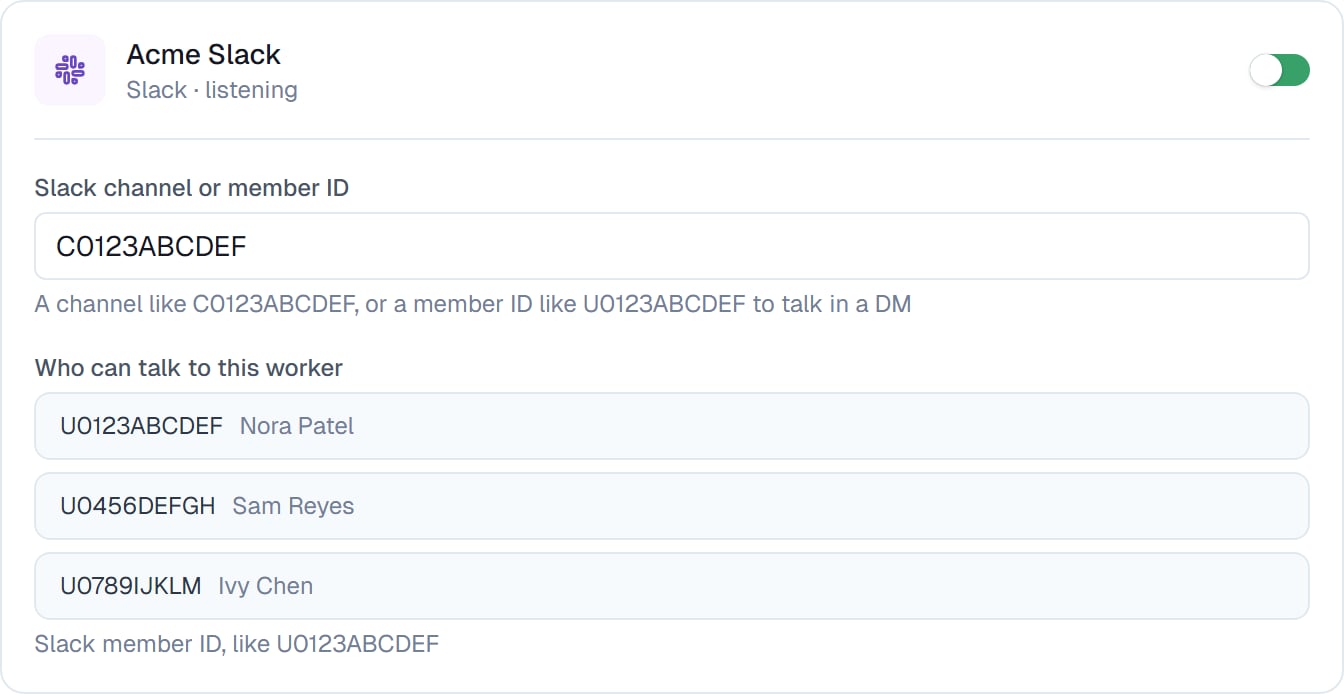 **An empty list lets nobody through.** This is deliberate. A message from someone who isn't on the list never reaches your coworker at all — it isn't read, answered, or seen.
If you add a channel and nothing happens, this is almost always why.
That behaviour is the point. A coworker listening on a Slack channel is a coworker anyone in that channel could instruct, so the list is what makes putting one in a shared space safe. Your coworker only listens to people you've named.
## What it looks like
Replies come back on the same thread, so a channel conversation reads like any other. Nobody has to quote anything or repeat themselves.
If several messages arrive in quick succession, your coworker handles them together rather than treating each as a fresh interruption — so someone typing three lines in a row gets one considered answer, not three half-answers.
## Good to know
**Start with a DM or a quiet channel.** Point a new coworker at a channel only you are in, check how it answers, then move it somewhere busier once you're happy.
A channel uses the same connected accounts as everything else. The Gmail connection that lets your coworker send is the one it can listen on. See [Connecting your apps](/cowork/capabilities/connecting-your-apps).
## Common questions
Almost always the allowed-senders list. If it's empty, nothing gets through. Check that the person messaging is on it, and that their ID is the right one for that platform.
Open their profile in Slack, then the overflow menu, then **Copy member ID**. It looks like `U0123ABCDEF`. Channel IDs start with `C` and come from the channel's details.
Only if you leave the label filter empty, which is what that setting means. Set a label and it sees only messages carrying it.
Yes. Add a row per place — a Slack channel and a shared inbox, each with its own list of allowed people.
Yes, and you can follow it in CogniAgent like any other. The person messaging never sees that side of it.
The switch on the channel row. It stops listening immediately; nothing else about the coworker changes.
## Next steps
The other direction.
Where the connections come from.
Tighten what it may do once asked.
Follow what a channel started.
**An empty list lets nobody through.** This is deliberate. A message from someone who isn't on the list never reaches your coworker at all — it isn't read, answered, or seen.
If you add a channel and nothing happens, this is almost always why.
That behaviour is the point. A coworker listening on a Slack channel is a coworker anyone in that channel could instruct, so the list is what makes putting one in a shared space safe. Your coworker only listens to people you've named.
## What it looks like
Replies come back on the same thread, so a channel conversation reads like any other. Nobody has to quote anything or repeat themselves.
If several messages arrive in quick succession, your coworker handles them together rather than treating each as a fresh interruption — so someone typing three lines in a row gets one considered answer, not three half-answers.
## Good to know
**Start with a DM or a quiet channel.** Point a new coworker at a channel only you are in, check how it answers, then move it somewhere busier once you're happy.
A channel uses the same connected accounts as everything else. The Gmail connection that lets your coworker send is the one it can listen on. See [Connecting your apps](/cowork/capabilities/connecting-your-apps).
## Common questions
Almost always the allowed-senders list. If it's empty, nothing gets through. Check that the person messaging is on it, and that their ID is the right one for that platform.
Open their profile in Slack, then the overflow menu, then **Copy member ID**. It looks like `U0123ABCDEF`. Channel IDs start with `C` and come from the channel's details.
Only if you leave the label filter empty, which is what that setting means. Set a label and it sees only messages carrying it.
Yes. Add a row per place — a Slack channel and a shared inbox, each with its own list of allowed people.
Yes, and you can follow it in CogniAgent like any other. The person messaging never sees that side of it.
The switch on the channel row. It stops listening immediately; nothing else about the coworker changes.
## Next steps
The other direction.
Where the connections come from.
Tighten what it may do once asked.
Follow what a channel started.