> ## Documentation Index
> Fetch the complete documentation index at: https://docs.cogniagent.ai/llms.txt
> Use this file to discover all available pages before exploring further.
# Effort and model
> Turn the dial up for a hard problem or down for a quick one, and pick which AI does the work — both from the message box.
Some jobs deserve more thought than others. Two controls next to the message box let you say which is which.
## Effort
Effort is **how much your coworker thinks before answering**. The control says it plainly:
> Reasoning effort: how much the model thinks before answering. Higher is more thorough but slower and costs more.
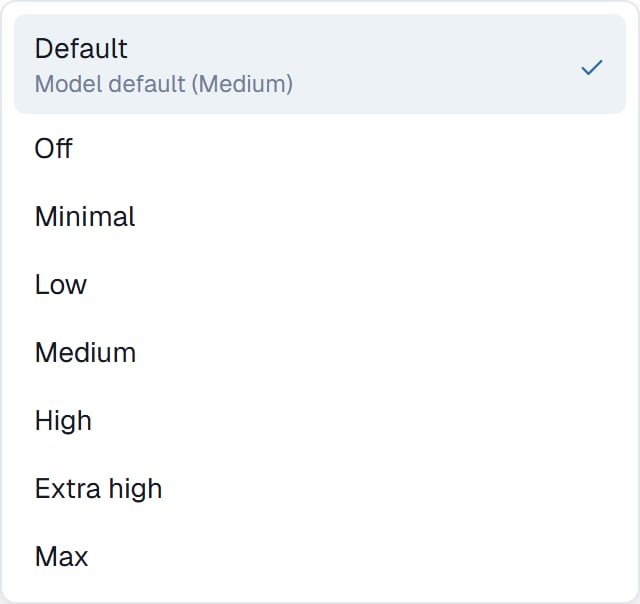
The levels run from **Off** through **Minimal**, **Low**, **Medium**, **High**, **Extra high** to **Max**. There's also **Default**, which uses whatever the chosen model is happiest with — and is the right answer most of the time.
 ### Turning it up
* A problem with genuine ambiguity in it
* Analysis where the conclusion matters more than the speed
* A job that went wrong at a lower setting
* Anything you'd describe as "think about this properly"
### Turning it down
* Reformatting, extracting, tidying
* Bulk work over many similar items, where speed compounds
* Simple lookups
* Anything where the answer is obvious and you just want it done
**Leave it on Default until something goes wrong.** Then turn it up for that task rather than for everything. Effort is a per-task decision, not a setting to configure once.
## Model
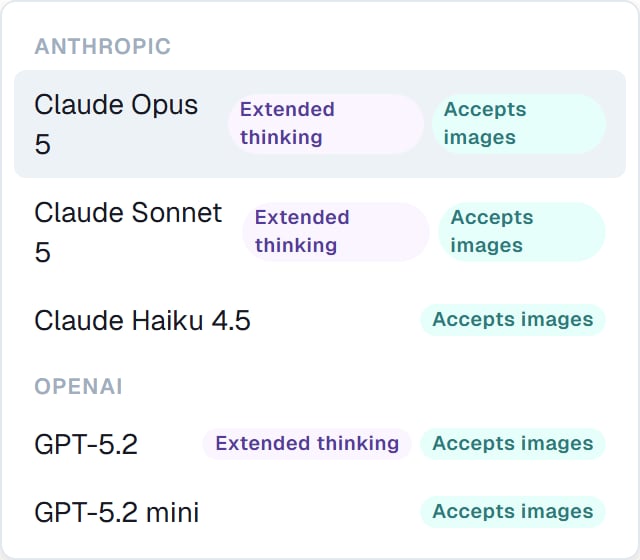
The model picker chooses which AI does the work. Models are grouped by who makes them, with friendly names rather than version strings.
Two badges are worth noticing:
* **Extended thinking** — this model supports the higher effort levels. Without it, turning effort up does less.
* **Accepts images** — this model can look at pictures. Necessary if your task involves screenshots, scans or photos.
### Turning it up
* A problem with genuine ambiguity in it
* Analysis where the conclusion matters more than the speed
* A job that went wrong at a lower setting
* Anything you'd describe as "think about this properly"
### Turning it down
* Reformatting, extracting, tidying
* Bulk work over many similar items, where speed compounds
* Simple lookups
* Anything where the answer is obvious and you just want it done
**Leave it on Default until something goes wrong.** Then turn it up for that task rather than for everything. Effort is a per-task decision, not a setting to configure once.
## Model
The model picker chooses which AI does the work. Models are grouped by who makes them, with friendly names rather than version strings.
Two badges are worth noticing:
* **Extended thinking** — this model supports the higher effort levels. Without it, turning effort up does less.
* **Accepts images** — this model can look at pictures. Necessary if your task involves screenshots, scans or photos.
 Not every model supports every effort level. The menu only offers the ones the chosen model actually supports, so you can't set a combination that quietly does nothing.
## Which to reach for
They solve different problems, and people reach for the wrong one.
| Problem | Reach for |
| ---------------------------------------------------- | --------------------------------------------------------------- |
| The answer is shallow, or it missed something subtle | **More effort** |
| It needs to look at an image | **A model that accepts images** |
| It's too slow on simple bulk work | **Less effort** |
| The output is wrong in a factual way | **[Thorough review](/cowork/chat/thorough-review)**, not effort |
| It did the wrong job entirely | **[Plan mode](/cowork/chat/plan-and-build)**, not effort |
That last pair matters. Effort makes your coworker think harder about the task it has. It does not make it think harder about *whether that's the right task*.
## Good to know
Both are per task. Changing them doesn't affect your other tasks or your other coworkers.
You can also switch with `/model` from the keyboard. See [Slash commands](/cowork/chat/slash-commands).
## Common questions
The default, unless you have a reason. It's chosen to be a good balance. Switch when you need images, or when a task is genuinely hard and you want the strongest option.
More thorough, not infallible. For correctness, [Thorough review](/cowork/chat/thorough-review) does more than raising effort.
Yes. It applies from the next thing your coworker does — useful when a task turns out harder than it looked.
Yes, meaningfully, which is why Default exists. Raise it for the task that needs it rather than as a standing setting.
## Next steps
For correctness, not depth.
For doing the right job.
Switching from the keyboard.
Where the controls live.
Not every model supports every effort level. The menu only offers the ones the chosen model actually supports, so you can't set a combination that quietly does nothing.
## Which to reach for
They solve different problems, and people reach for the wrong one.
| Problem | Reach for |
| ---------------------------------------------------- | --------------------------------------------------------------- |
| The answer is shallow, or it missed something subtle | **More effort** |
| It needs to look at an image | **A model that accepts images** |
| It's too slow on simple bulk work | **Less effort** |
| The output is wrong in a factual way | **[Thorough review](/cowork/chat/thorough-review)**, not effort |
| It did the wrong job entirely | **[Plan mode](/cowork/chat/plan-and-build)**, not effort |
That last pair matters. Effort makes your coworker think harder about the task it has. It does not make it think harder about *whether that's the right task*.
## Good to know
Both are per task. Changing them doesn't affect your other tasks or your other coworkers.
You can also switch with `/model` from the keyboard. See [Slash commands](/cowork/chat/slash-commands).
## Common questions
The default, unless you have a reason. It's chosen to be a good balance. Switch when you need images, or when a task is genuinely hard and you want the strongest option.
More thorough, not infallible. For correctness, [Thorough review](/cowork/chat/thorough-review) does more than raising effort.
Yes. It applies from the next thing your coworker does — useful when a task turns out harder than it looked.
Yes, meaningfully, which is why Default exists. Raise it for the task that needs it rather than as a standing setting.
## Next steps
For correctness, not depth.
For doing the right job.
Switching from the keyboard.
Where the controls live.