> ## Documentation Index
> Fetch the complete documentation index at: https://docs.cogniagent.ai/llms.txt
> Use this file to discover all available pages before exploring further.
# Plan mode and Build mode
> Have your AI coworker research and propose an approach before it changes anything — then switch it loose to do the work.
Agree the approach before the work starts. It's the cheapest way to avoid a confidently wrong afternoon.
## The two modes
**Plan mode** — your coworker can look but not touch. It researches, reads files, works out what's involved, and comes back with a proposed approach. Nothing is changed, nothing is sent.
**Build mode** — the full toolset. This is the normal way a coworker works.
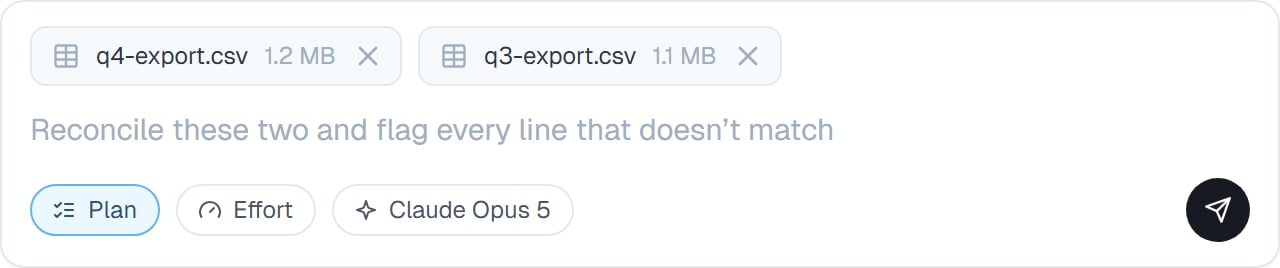
Switch with `/plan` and `/build`. The current mode shows as a chip under the message box, so you always know which one you're in.
 ## Why plan first
Your coworker is fast, which is exactly the problem on a job where the wrong approach is expensive. Plan mode puts a checkpoint between "I understand the task" and "I've done it".
It's also the fastest way to find out you were misunderstood. A plan takes seconds to read; an afternoon's work takes an afternoon to undo.
## When you'd use it
* Anything touching live customer data
* A job you can't easily undo — sending, deleting, publishing
* Work you're going to be judged on
* A task you've described badly and know it
* The first time you give a coworker an unfamiliar kind of job
* Anything expensive, so you're not paying for the wrong thing twice
## How it goes
Type `/plan`, then describe the job. Your coworker researches without changing anything.
Steps, and usually the assumptions it's making. The assumptions are the interesting part — that's where a misunderstanding shows.
"Skip step 3" or "the file is the second one, not the first". Still nothing has happened.
`/build`, and it does the work you agreed.
## Good to know
**Read the assumptions, not just the steps.** The steps usually look fine. The line that says "I'll treat blank rows as zero" is the one that matters.
Plan mode is genuinely read-only, not a promise to behave. It's a safe way to point a coworker at something sensitive.
You don't need it for everyday work. Reserve it for jobs that are expensive, irreversible, or badly described.
## Common questions
It's the agreed approach, not a script. If reality differs — a file isn't what it expected — your coworker adapts and tells you, rather than following a plan that's stopped making sense.
Yes. Switch back at any point, which is useful when a task turns out bigger than expected.
A little, and it routinely saves more by preventing work you'd have thrown away.
Plan mode checks the approach **before**. [Thorough review](/cowork/chat/thorough-review) checks the result **after**. On genuinely important work, use both.
## Next steps
The check at the other end.
What pauses for you anyway.
How to switch.
Following the plan as it runs.
## Why plan first
Your coworker is fast, which is exactly the problem on a job where the wrong approach is expensive. Plan mode puts a checkpoint between "I understand the task" and "I've done it".
It's also the fastest way to find out you were misunderstood. A plan takes seconds to read; an afternoon's work takes an afternoon to undo.
## When you'd use it
* Anything touching live customer data
* A job you can't easily undo — sending, deleting, publishing
* Work you're going to be judged on
* A task you've described badly and know it
* The first time you give a coworker an unfamiliar kind of job
* Anything expensive, so you're not paying for the wrong thing twice
## How it goes
Type `/plan`, then describe the job. Your coworker researches without changing anything.
Steps, and usually the assumptions it's making. The assumptions are the interesting part — that's where a misunderstanding shows.
"Skip step 3" or "the file is the second one, not the first". Still nothing has happened.
`/build`, and it does the work you agreed.
## Good to know
**Read the assumptions, not just the steps.** The steps usually look fine. The line that says "I'll treat blank rows as zero" is the one that matters.
Plan mode is genuinely read-only, not a promise to behave. It's a safe way to point a coworker at something sensitive.
You don't need it for everyday work. Reserve it for jobs that are expensive, irreversible, or badly described.
## Common questions
It's the agreed approach, not a script. If reality differs — a file isn't what it expected — your coworker adapts and tells you, rather than following a plan that's stopped making sense.
Yes. Switch back at any point, which is useful when a task turns out bigger than expected.
A little, and it routinely saves more by preventing work you'd have thrown away.
Plan mode checks the approach **before**. [Thorough review](/cowork/chat/thorough-review) checks the result **after**. On genuinely important work, use both.
## Next steps
The check at the other end.
What pauses for you anyway.
How to switch.
Following the plan as it runs.