> ## Documentation Index
> Fetch the complete documentation index at: https://docs.cogniagent.ai/llms.txt
> Use this file to discover all available pages before exploring further.
# Watching progress
> See exactly what your AI coworker is doing as it works — every step, its checklist, and what it produced. Nothing is hidden.
You can watch every step as it happens, or ignore it entirely and read the recap. Both are fine — but the option matters, because it's how you learn to trust the thing.
## What you see
As your coworker works, the conversation fills with a row per step. Searched for something. Opened a file. Ran the numbers. Sent a message.
Each row is a summary you can expand for the detail — what it actually searched for, what came back, what it changed. Nothing is hidden behind a spinner.
You'll also see rows where it was **thinking** rather than doing. Those are collapsed by default; expand one when you want to know why it made a particular choice.
 ## The checklist
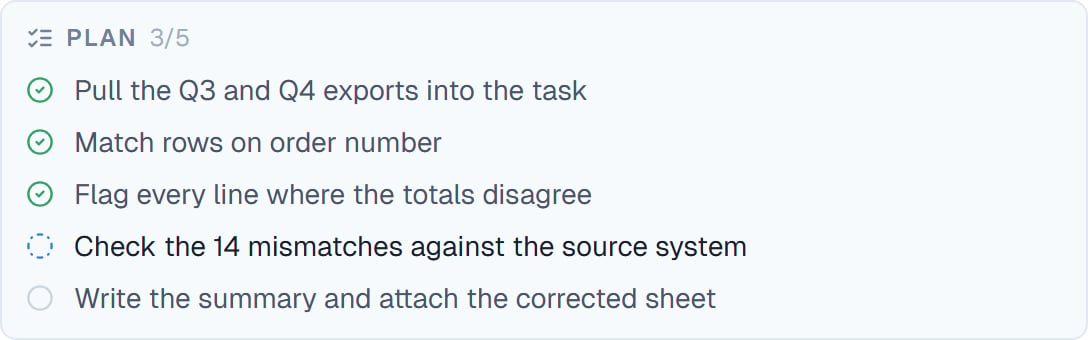
On a job with several parts, your coworker keeps a visible to-do list and ticks items off as it goes.
This is the fastest way to tell whether a long task is going well. If the list matches what you expected, you can stop watching. If item two is something you didn't ask for, you've caught it early — say so and it adjusts.
## The checklist
On a job with several parts, your coworker keeps a visible to-do list and ticks items off as it goes.
This is the fastest way to tell whether a long task is going well. If the list matches what you expected, you can stop watching. If item two is something you didn't ask for, you've caught it early — say so and it adjusts.
 ## Special cards
Some steps get their own card rather than a plain row, because they're worth seeing properly.
| Card | What it is |
| ---------------------- | ------------------------------------------------------------------------------------------------------------- |
| **Approval** | Something needs your yes. See [Approvals](/cowork/control/approvals) |
| **A question for you** | It's stuck on something only you know |
| **Browser handoff** | It hit a login and wants the keyboard. See [The live browser](/cowork/capabilities/live-browser) |
| **Delegation** | It handed work to another coworker. See [Working with coworkers](/cowork/capabilities/working-with-coworkers) |
| **Workflow run** | A team of helpers is working. See [Dynamic workflows](/cowork/capabilities/dynamic-workflows) |
| **File change** | It edited a file, and you can see exactly what changed |
| **Image** | It generated a picture, shown inline |
## Finishing
When it's done, your coworker posts a quiet wrap-up line you can expand for the full account of what happened.
It's deliberately understated. The work is in the conversation above and in the files panel; the wrap-up just tells you it's finished and what the outcome was.
## When you were away
If your coworker worked while you weren't watching — because you closed the tab, or because it [scheduled its own follow-up](/cowork/capabilities/self-scheduling) — you get a notice saying it woke up, why, and what it did.
Nothing happens off the record. Everything it did while you were away is in the conversation, in order.
## Good to know
**Watch the first few tasks closely, then stop.** The point of watching isn't supervision, it's calibration — learning where this coworker is reliable and where it needs a tighter brief.
Every coworker also has an **Activity** tab with its complete history across all tasks, if you want the wider view rather than one conversation.
## Common questions
No. Close the tab; it keeps working. The conversation is all there when you come back.
Yes. Stop the task and it halts. Everything done so far stays, including any files it produced.
Usually a hard problem, or a high [effort setting](/cowork/chat/effort-and-model). Expand the thinking row to see what it's weighing.
Yes, line by line. See [Seeing what changed](/cowork/files/changes).
Type a correction. It's picked up as soon as the current step settles, without stopping the task. If it's badly off, stop it and re-ask.
## Next steps
The cards that need your yes.
Several jobs at once.
Checking its work.
When a task runs long.
## Special cards
Some steps get their own card rather than a plain row, because they're worth seeing properly.
| Card | What it is |
| ---------------------- | ------------------------------------------------------------------------------------------------------------- |
| **Approval** | Something needs your yes. See [Approvals](/cowork/control/approvals) |
| **A question for you** | It's stuck on something only you know |
| **Browser handoff** | It hit a login and wants the keyboard. See [The live browser](/cowork/capabilities/live-browser) |
| **Delegation** | It handed work to another coworker. See [Working with coworkers](/cowork/capabilities/working-with-coworkers) |
| **Workflow run** | A team of helpers is working. See [Dynamic workflows](/cowork/capabilities/dynamic-workflows) |
| **File change** | It edited a file, and you can see exactly what changed |
| **Image** | It generated a picture, shown inline |
## Finishing
When it's done, your coworker posts a quiet wrap-up line you can expand for the full account of what happened.
It's deliberately understated. The work is in the conversation above and in the files panel; the wrap-up just tells you it's finished and what the outcome was.
## When you were away
If your coworker worked while you weren't watching — because you closed the tab, or because it [scheduled its own follow-up](/cowork/capabilities/self-scheduling) — you get a notice saying it woke up, why, and what it did.
Nothing happens off the record. Everything it did while you were away is in the conversation, in order.
## Good to know
**Watch the first few tasks closely, then stop.** The point of watching isn't supervision, it's calibration — learning where this coworker is reliable and where it needs a tighter brief.
Every coworker also has an **Activity** tab with its complete history across all tasks, if you want the wider view rather than one conversation.
## Common questions
No. Close the tab; it keeps working. The conversation is all there when you come back.
Yes. Stop the task and it halts. Everything done so far stays, including any files it produced.
Usually a hard problem, or a high [effort setting](/cowork/chat/effort-and-model). Expand the thinking row to see what it's weighing.
Yes, line by line. See [Seeing what changed](/cowork/files/changes).
Type a correction. It's picked up as soon as the current step settles, without stopping the task. If it's badly off, stop it and re-ask.
## Next steps
The cards that need your yes.
Several jobs at once.
Checking its work.
When a task runs long.