> ## Documentation Index
> Fetch the complete documentation index at: https://docs.cogniagent.ai/llms.txt
> Use this file to discover all available pages before exploring further.
# Hiring a coworker
> Add an AI coworker to your team in one click — pick a ready-made role or build your own — and know what every tab on its page is for.
Hiring a coworker takes about ten seconds. Knowing what you've hired takes about five minutes, and this page is that five minutes.
## Two ways to hire
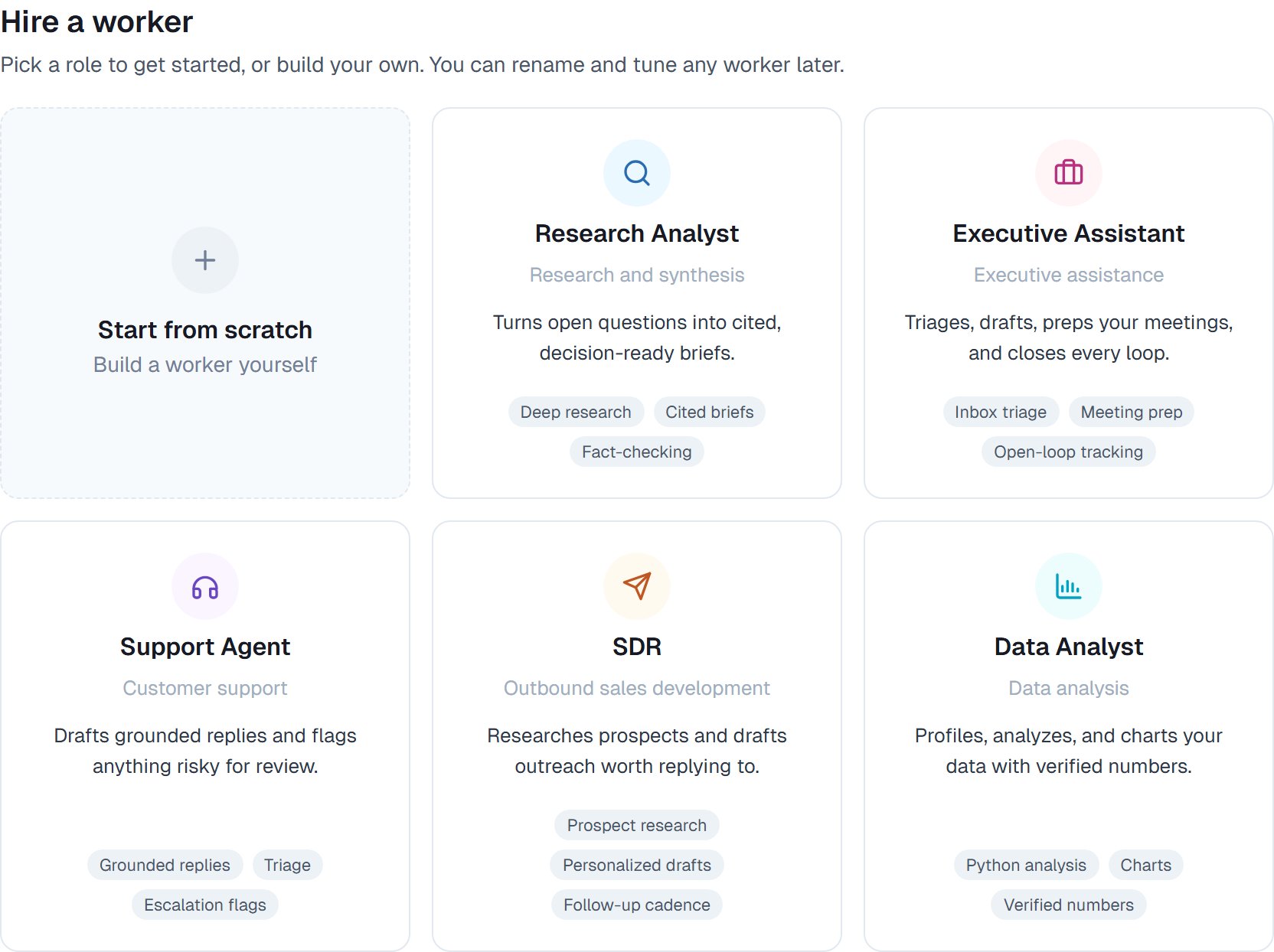
Open **Cowork → Roster** and choose **Hire**. You get six cards, with **Start from scratch** first.
Arrives knowing the job — instructions, personality, skills and the right capabilities already set.
An empty coworker with every capability switched on, waiting for you to say what it's for.
 Most people should start with a ready-made one, even if it isn't an exact fit. It's easier to adjust something that already works than to write a job description from nothing.
## What happens next
Your new coworker appears on the roster with a name, a one-line role, and an avatar generated for it. Give it a task and it starts working.
You can rename it and rewrite its role straight from its page — click the text and type.
## The eight tabs
Every coworker has the same eight tabs. Here's what each is for, in the order you'll actually need them.
| Tab | What it's for |
| ---------------- | ---------------------------------------------------------------------------- |
| **Overview** | Who this coworker is and what it's been doing lately |
| **Capabilities** | What it's allowed to do — [the important one](/cowork/capabilities/overview) |
| **Schedules** | Work that should [happen on its own](/cowork/autonomy/schedules) |
| **Channels** | Where people can [reach it](/cowork/capabilities/message-channels) |
| **Memory** | What it [remembers](/cowork/control/memory) between tasks |
| **Improvements** | Changes it wants to make to itself, waiting for your yes |
| **Files** | Its instructions, personality, and the skills it has learned |
| **Activity** | Everything it has done, in order |
Most people should start with a ready-made one, even if it isn't an exact fit. It's easier to adjust something that already works than to write a job description from nothing.
## What happens next
Your new coworker appears on the roster with a name, a one-line role, and an avatar generated for it. Give it a task and it starts working.
You can rename it and rewrite its role straight from its page — click the text and type.
## The eight tabs
Every coworker has the same eight tabs. Here's what each is for, in the order you'll actually need them.
| Tab | What it's for |
| ---------------- | ---------------------------------------------------------------------------- |
| **Overview** | Who this coworker is and what it's been doing lately |
| **Capabilities** | What it's allowed to do — [the important one](/cowork/capabilities/overview) |
| **Schedules** | Work that should [happen on its own](/cowork/autonomy/schedules) |
| **Channels** | Where people can [reach it](/cowork/capabilities/message-channels) |
| **Memory** | What it [remembers](/cowork/control/memory) between tasks |
| **Improvements** | Changes it wants to make to itself, waiting for your yes |
| **Files** | Its instructions, personality, and the skills it has learned |
| **Activity** | Everything it has done, in order |
 The **Improvements** tab shows a count when something's waiting for you. See [How a coworker gets better](/cowork/autonomy/getting-better).
## Your first five minutes
Open **Capabilities**. This is the one tab worth reading before the first task — it tells you what your coworker can reach, and what it can't.
On the **Files** tab you'll find its standing instructions and its personality. A ready-made coworker's are worth reading once so you know how it will approach things.
Not a test. Hand it something you were going to do yourself this week — that's the only way to judge it.
When it does something not quite your way, say so in plain words. It [remembers](/cowork/control/memory).
## Good to know
**Name it something a person would say.** You'll refer to it out loud in meetings sooner than you expect, and "Nora" works better than "Research Assistant 1".
A coworker built from scratch starts with every built-in capability on. A ready-made one starts narrowed to what its role needs. Either way, the Capabilities tab is the truth.
## Common questions
Start with one and give it real work. Add a second when you catch yourself wishing the first one were better at something specific — that's the signal for a specialist, not a bigger generalist.
Yes. The name, role, instructions, personality and capabilities are all editable at any point. Nothing about hiring is permanent.
Pause it. It stops working and stops costing, and everything it learned is still there if you bring it back. See [Retiring and re-hiring](/cowork/coworkers/templates).
Connections belong to the workspace; which ones a coworker may use, and which actions inside them, is set per coworker. See [Connecting your apps](/cowork/capabilities/connecting-your-apps).
## Next steps
What each one is for.
The two things that define behaviour.
Read this before the first task.
Managing more than one.
The **Improvements** tab shows a count when something's waiting for you. See [How a coworker gets better](/cowork/autonomy/getting-better).
## Your first five minutes
Open **Capabilities**. This is the one tab worth reading before the first task — it tells you what your coworker can reach, and what it can't.
On the **Files** tab you'll find its standing instructions and its personality. A ready-made coworker's are worth reading once so you know how it will approach things.
Not a test. Hand it something you were going to do yourself this week — that's the only way to judge it.
When it does something not quite your way, say so in plain words. It [remembers](/cowork/control/memory).
## Good to know
**Name it something a person would say.** You'll refer to it out loud in meetings sooner than you expect, and "Nora" works better than "Research Assistant 1".
A coworker built from scratch starts with every built-in capability on. A ready-made one starts narrowed to what its role needs. Either way, the Capabilities tab is the truth.
## Common questions
Start with one and give it real work. Add a second when you catch yourself wishing the first one were better at something specific — that's the signal for a specialist, not a bigger generalist.
Yes. The name, role, instructions, personality and capabilities are all editable at any point. Nothing about hiring is permanent.
Pause it. It stops working and stops costing, and everything it learned is still there if you bring it back. See [Retiring and re-hiring](/cowork/coworkers/templates).
Connections belong to the workspace; which ones a coworker may use, and which actions inside them, is set per coworker. See [Connecting your apps](/cowork/capabilities/connecting-your-apps).
## Next steps
What each one is for.
The two things that define behaviour.
Read this before the first task.
Managing more than one.