> ## Documentation Index
> Fetch the complete documentation index at: https://docs.cogniagent.ai/llms.txt
> Use this file to discover all available pages before exploring further.
# The five ready-made coworkers
> Hire an AI research analyst, executive assistant, support agent, SDR or data analyst in one click — each arrives already knowing how to do the job.
Five coworkers come ready to hire. Each one arrives already knowing how to do its job — not a blank assistant you have to explain everything to.
## What "ready-made" actually means
A ready-made coworker isn't a name and an icon. Each arrives with four things already in place:
* **Standing instructions** — how to approach the work, what good looks like, when to stop and ask
* **A personality** — how it writes and how it talks to people
* **The right capabilities switched on**, and the wrong ones switched off
* **Skills and specialist helpers** — procedures for the parts of the job that have a right way of being done
That last one is what makes the difference. A Research Analyst doesn't just have web search; it has a written method for running deep research, vetting a source, and laying out a brief — plus a fact-checker it can hand a claim to.
## The five
**Role:** Research and synthesis
**What it's for:** the questions that need a real answer before a decision — market sizing, competitor positioning, whether a claim holds up. It comes back with a brief you can act on, and every claim carries its source.
**Comes with:** deep research, source vetting and brief-writing procedures, plus two specialist helpers — a source scout and a fact-checker.
**Switched on:** web search, reading web pages, code and files.
**Best first task:** "Research the three biggest players in \[your market] and tell me how they price."
**Role:** Executive assistance
**What it's for:** the administrative weight that eats a morning. It reads the inbox, decides what matters, drafts the replies, prepares you for the meetings, and keeps track of everything you said you'd do.
**Comes with:** inbox triage, meeting preparation and commitment-tracking procedures, plus a background researcher it can send off to find out who you're about to meet.
**Switched on:** web search, reading web pages, code and files, self-scheduling, and talking to people — so it can chase a reply on your behalf and pick up when it arrives.
**Best first task:** "Go through my inbox and tell me what actually needs me today."
**Role:** Customer support
**What it's for:** the first pass on a support queue. It triages what comes in, drafts replies grounded in what you actually know rather than invented, and escalates anything it shouldn't answer alone.
**Comes with:** ticket triage and customer-reply procedures, plus two helpers — one that digs through your knowledge base, and a reviewer that checks a reply before it goes out.
**Switched on:** web search, reading web pages, code and files, and talking to people.
**Best first task:** "Here are ten open tickets — group them and draft a reply to each."
**Role:** Outbound sales development
**What it's for:** the research that makes outreach land. It finds out what's actually going on at a company before it writes, so the email says something true and specific rather than generic.
**Comes with:** prospect research and outreach-writing procedures, plus two helpers — a prospect researcher and a copy critic that tears the draft apart before you see it.
**Switched on:** web search, reading web pages, code and files, and self-scheduling for follow-up timing.
**Best first task:** "Research these five companies and draft a first email to each."
**Role:** Data analysis
**What it's for:** the export nobody has time to open. It profiles the data, finds what's interesting, charts it, and — importantly — checks its own arithmetic before telling you anything.
**Comes with:** dataset analysis and charting procedures, plus a dedicated numbers checker whose only job is verifying the figures.
**Switched on:** web search, reading web pages, code and files.
**Best first task:** "Here's last quarter's sales export — what should I be worried about?"
## Hiring one
Open **Cowork → Roster** and choose **Hire**. Pick a card and it's yours — no configuration step, no wizard. The coworker appears on your roster ready for its first task.
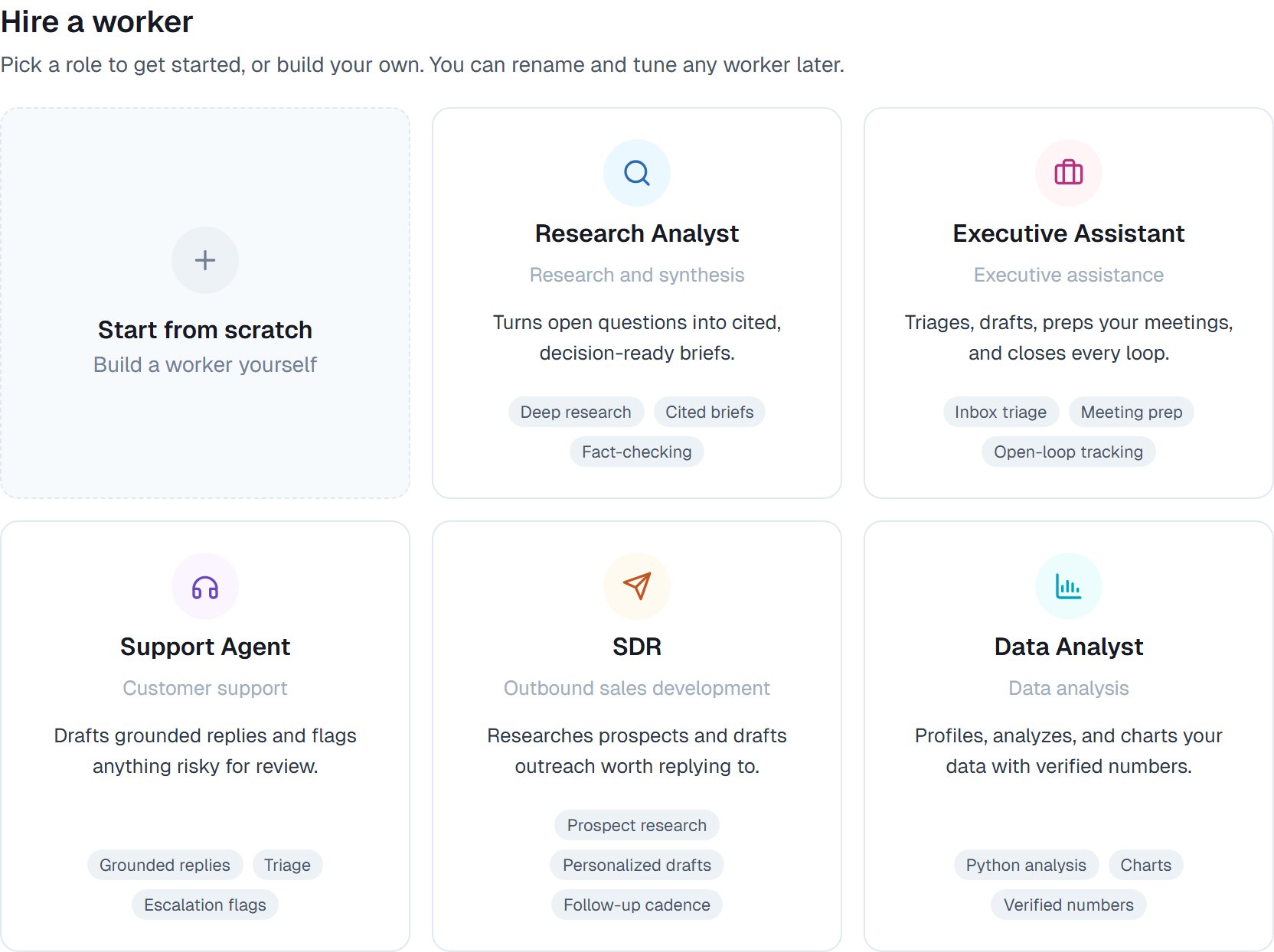 The first card, **Start from scratch**, builds an empty coworker you write yourself. See [Hiring a coworker](/cowork/coworkers/hiring).
## Good to know
**Hire one and give it a real task on day one.** These aren't demos — the fastest way to judge one is to hand it something you'd otherwise have done yourself this week.
Every ready-made coworker arrives with a deliberately narrow set of capabilities — what its job needs, and nothing else. If yours needs more, switch it on. Anything in the [capabilities list](/cowork/capabilities/overview) is available to any coworker.
Hire more than one. Three specialists that hand work to each other beat one generalist — see [Working with coworkers](/cowork/capabilities/working-with-coworkers).
## Common questions
Yes, completely. The instructions, personality, capabilities and skills are all yours to edit. A template is a starting point, not a fixed thing.
Start from scratch, or hire the closest one and rewrite its instructions. People often find the Executive Assistant is a decent base for anything administrative.
Yes — two Research Analysts pointed at different subjects is a perfectly reasonable setup. Give them different names so you can tell them apart on the roster.
Not to start. All five do real work with just their built-in capabilities. Connecting your inbox or CRM makes them considerably more useful — see [Connecting your apps](/cowork/capabilities/connecting-your-apps).
Yes. Once you've tuned one, save it as a template and hire that same setup again. See [Retiring, re-hiring and templates](/cowork/coworkers/templates).
## Next steps
Both ways to hire, step by step.
Make one your own.
Every capability, explained.
First task in ten minutes.
The first card, **Start from scratch**, builds an empty coworker you write yourself. See [Hiring a coworker](/cowork/coworkers/hiring).
## Good to know
**Hire one and give it a real task on day one.** These aren't demos — the fastest way to judge one is to hand it something you'd otherwise have done yourself this week.
Every ready-made coworker arrives with a deliberately narrow set of capabilities — what its job needs, and nothing else. If yours needs more, switch it on. Anything in the [capabilities list](/cowork/capabilities/overview) is available to any coworker.
Hire more than one. Three specialists that hand work to each other beat one generalist — see [Working with coworkers](/cowork/capabilities/working-with-coworkers).
## Common questions
Yes, completely. The instructions, personality, capabilities and skills are all yours to edit. A template is a starting point, not a fixed thing.
Start from scratch, or hire the closest one and rewrite its instructions. People often find the Executive Assistant is a decent base for anything administrative.
Yes — two Research Analysts pointed at different subjects is a perfectly reasonable setup. Give them different names so you can tell them apart on the roster.
Not to start. All five do real work with just their built-in capabilities. Connecting your inbox or CRM makes them considerably more useful — see [Connecting your apps](/cowork/capabilities/connecting-your-apps).
Yes. Once you've tuned one, save it as a template and hire that same setup again. See [Retiring, re-hiring and templates](/cowork/coworkers/templates).
## Next steps
Both ways to hire, step by step.
Make one your own.
Every capability, explained.
First task in ten minutes.