> ## Documentation Index
> Fetch the complete documentation index at: https://docs.cogniagent.ai/llms.txt
> Use this file to discover all available pages before exploring further.
# Editing and file history
> Edit text files in place, save with Ctrl+S, and keep changes safe: three recent versions, named checkpoints, compare, restore and conflicted copies.
Fix a figure in a report yourself, see exactly what changed since yesterday, and roll back in two clicks, without ever losing someone else's work.
 Everything on this page is for [Workspace files](/cowork/files/workspace-files). A coworker's own files and a task's files keep no change history.
## Edit a file
Open a text file in the editor from **Edit** in its menu, in Quick Look or in its details, or double-click it in the list. Plain text, Markdown, CSV, web pages, data files and code all open there. Markdown, CSV, web pages and data files also have a **Preview** beside **Code**. Text files up to 1 MB are editable; a bigger one opens to read:
> View only: files over 1 MB open read-only here.
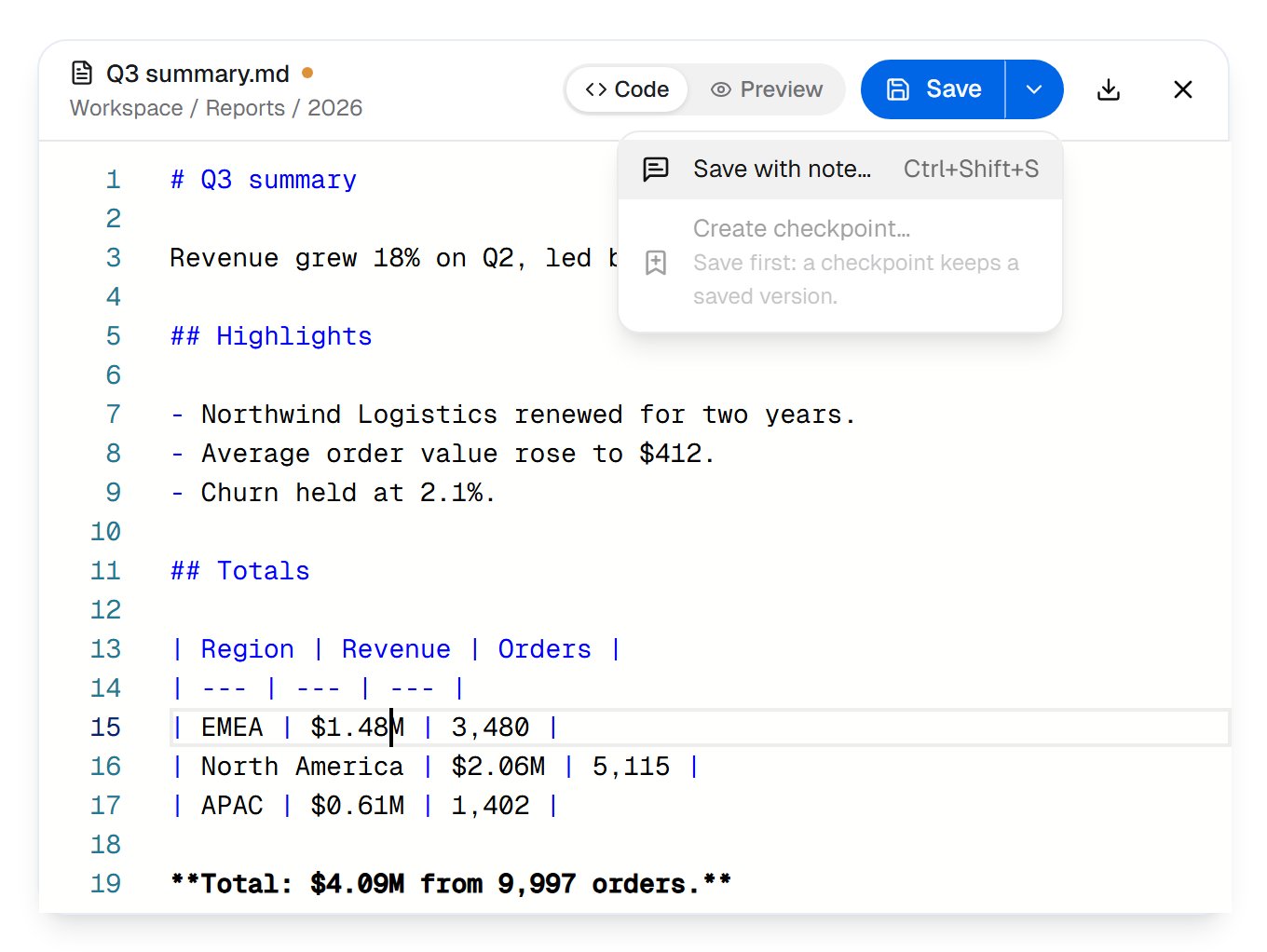
**Save** (Ctrl+S, Cmd+S on a Mac) saves your change as a new version. The orange dot beside the name means there's something unsaved, and closing the editor with unsaved text asks first.
**Save with note…** (Ctrl+Shift+S) does the same and adds a line to the version's history, so the next person knows why it changed:
Everything on this page is for [Workspace files](/cowork/files/workspace-files). A coworker's own files and a task's files keep no change history.
## Edit a file
Open a text file in the editor from **Edit** in its menu, in Quick Look or in its details, or double-click it in the list. Plain text, Markdown, CSV, web pages, data files and code all open there. Markdown, CSV, web pages and data files also have a **Preview** beside **Code**. Text files up to 1 MB are editable; a bigger one opens to read:
> View only: files over 1 MB open read-only here.
**Save** (Ctrl+S, Cmd+S on a Mac) saves your change as a new version. The orange dot beside the name means there's something unsaved, and closing the editor with unsaved text asks first.
**Save with note…** (Ctrl+Shift+S) does the same and adds a line to the version's history, so the next person knows why it changed:
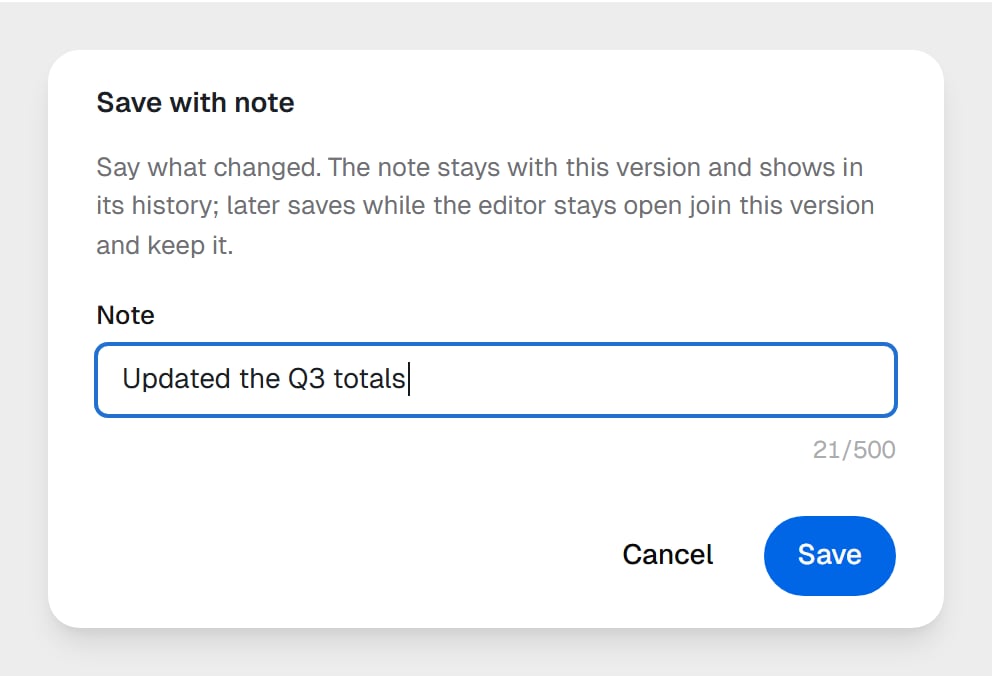 > Say what changed. The note stays with this version and shows in its history; later saves while the editor stays open join this version and keep it.
### If someone saved while you were editing
A notice tells you as soon as it happens, and your unsaved text stays put:
> Changed by Maya Chen. Your unsaved edits are kept until you choose.
When you save, you choose what to keep:
> Say what changed. The note stays with this version and shows in its history; later saves while the editor stays open join this version and keep it.
### If someone saved while you were editing
A notice tells you as soon as it happens, and your unsaved text stays put:
> Changed by Maya Chen. Your unsaved edits are kept until you choose.
When you save, you choose what to keep:
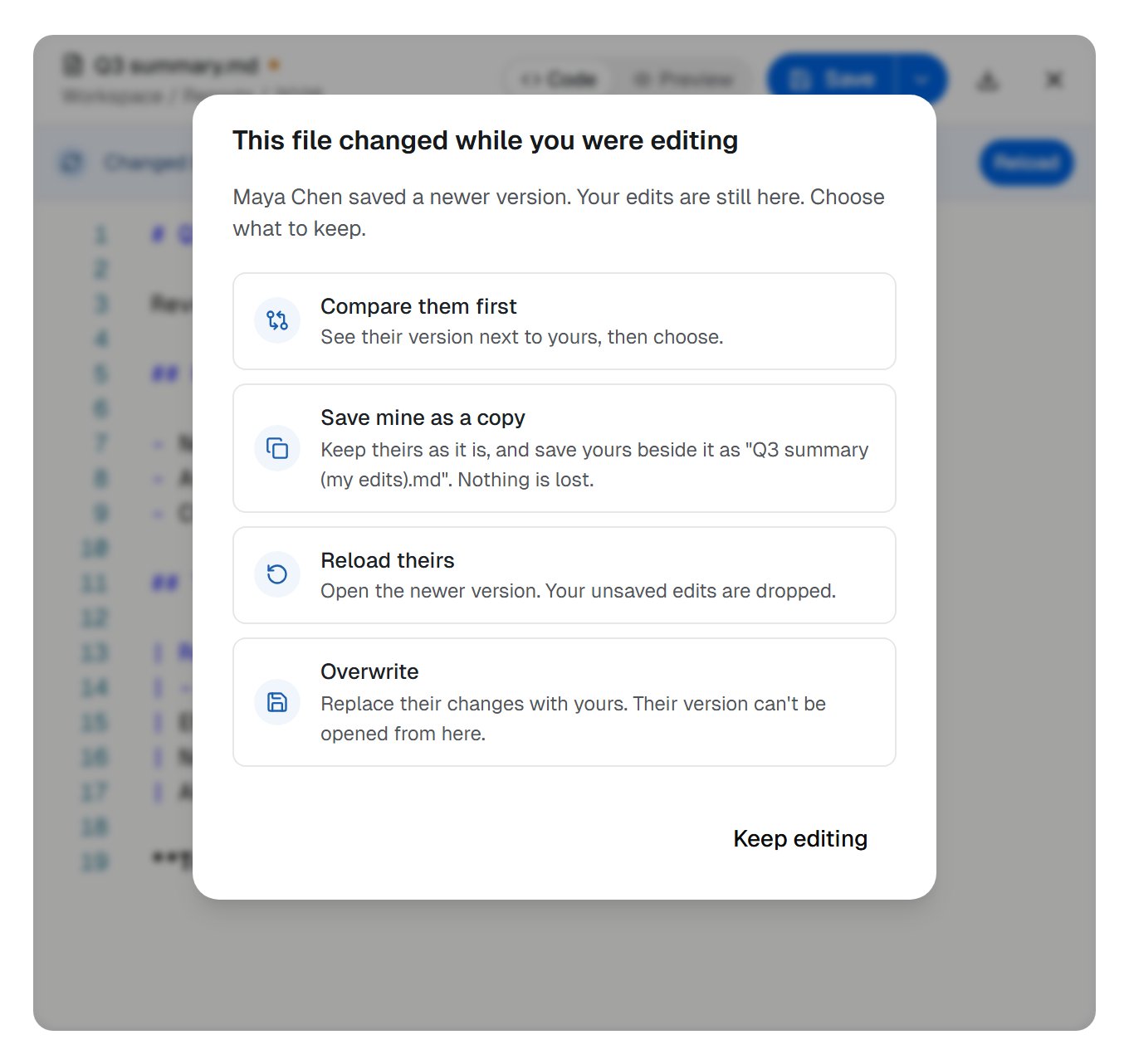 | Choice | What happens |
| - | - |
| **Compare them first** | See their version next to yours, then choose. |
| **Save mine as a copy** | Theirs stays as it is; yours is saved beside it, as "Q3 summary (my edits).md". |
| **Reload theirs** | Opens the newer version. Your unsaved edits are dropped. |
| **Overwrite** | Replaces their changes with yours. |
## Versions
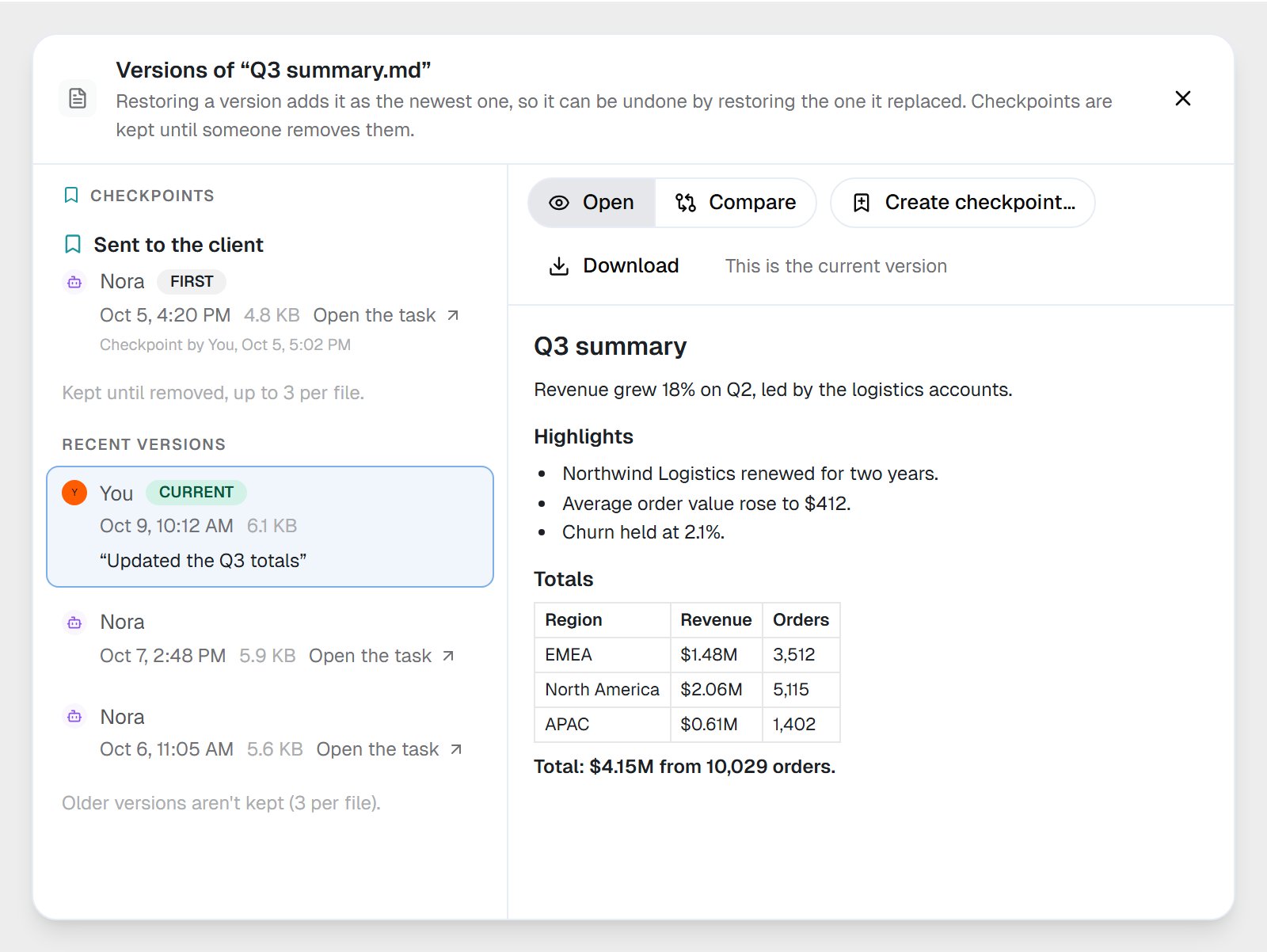
Every save is a version. A file keeps its **last three**, the current one included, and the list says so:
> A file keeps its last 3 versions.
What counts as one version:
* **An editing session.** Your saves while the editor stays open join one version, as long as each comes within 10 minutes of the last.
* **A coworker's task, or a workflow run.** Its saves to the same file within 10 minutes join one version, so a coworker rewriting a report thirty times leaves one version, not thirty.
* **Nothing new.** Saving exactly what's already there makes no version.
**A coworker's or a workflow's save never pushes out a version a person wrote.** When a file already has three, an automation's save drops only versions automations wrote, so however often a coworker or a workflow saves, your edit stays in the file's history. A version that's replaced is kept for up to 30 days.
| Choice | What happens |
| - | - |
| **Compare them first** | See their version next to yours, then choose. |
| **Save mine as a copy** | Theirs stays as it is; yours is saved beside it, as "Q3 summary (my edits).md". |
| **Reload theirs** | Opens the newer version. Your unsaved edits are dropped. |
| **Overwrite** | Replaces their changes with yours. |
## Versions
Every save is a version. A file keeps its **last three**, the current one included, and the list says so:
> A file keeps its last 3 versions.
What counts as one version:
* **An editing session.** Your saves while the editor stays open join one version, as long as each comes within 10 minutes of the last.
* **A coworker's task, or a workflow run.** Its saves to the same file within 10 minutes join one version, so a coworker rewriting a report thirty times leaves one version, not thirty.
* **Nothing new.** Saving exactly what's already there makes no version.
**A coworker's or a workflow's save never pushes out a version a person wrote.** When a file already has three, an automation's save drops only versions automations wrote, so however often a coworker or a workflow saves, your edit stays in the file's history. A version that's replaced is kept for up to 30 days.
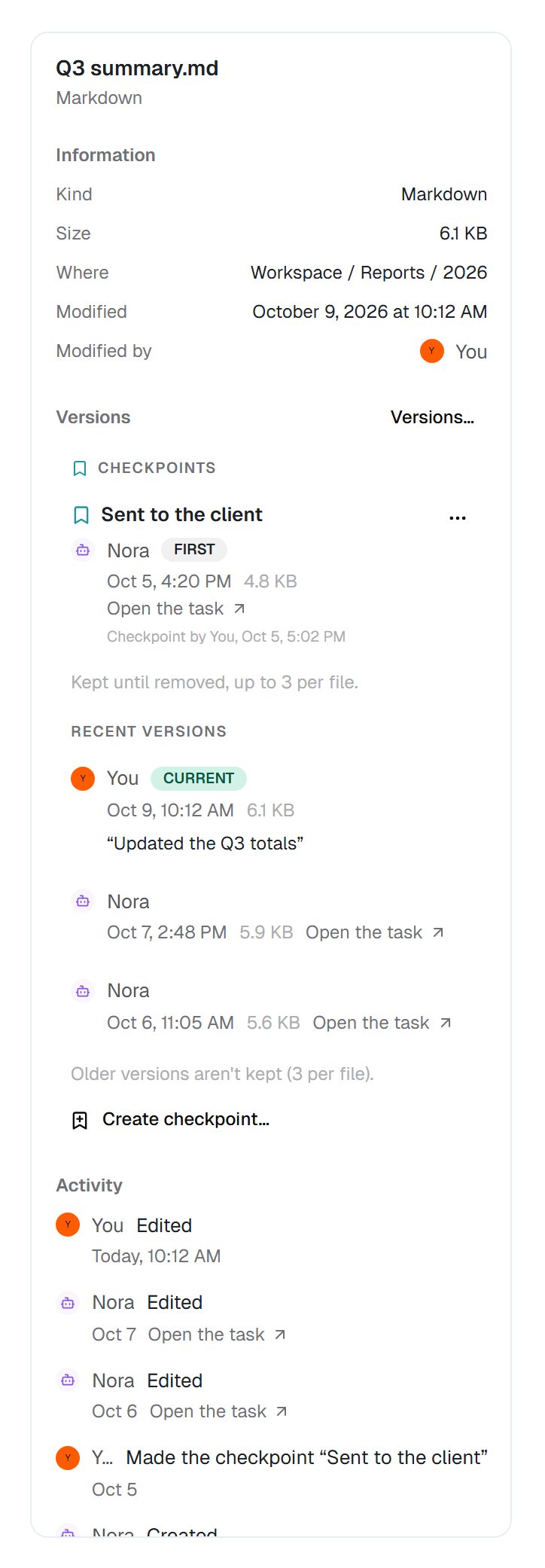 **Versions…**, in a file's menu or its details, opens them all side by side with a preview of each:
 ## Compare two versions
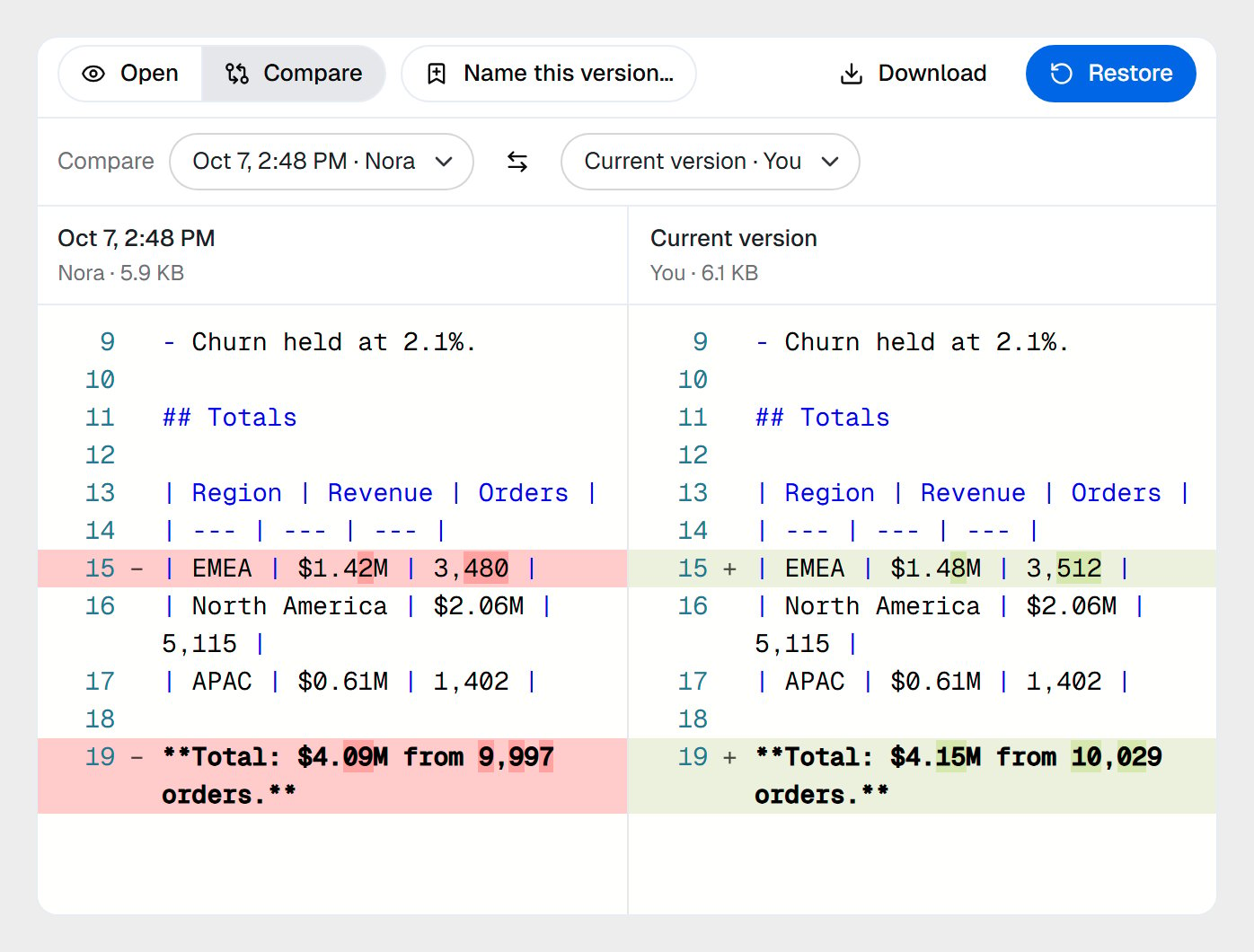
Choose **Compare** to put two versions side by side, any two you like. Changed lines are tinted and the changed characters stand out. Text files are compared line by line, up to 1 MB per side; images side by side. Anything else, a database for instance, you download to compare.
## Compare two versions
Choose **Compare** to put two versions side by side, any two you like. Changed lines are tinted and the changed characters stand out. Text files are compared line by line, up to 1 MB per side; images side by side. Anything else, a database for instance, you download to compare.
 ## Restore an older version
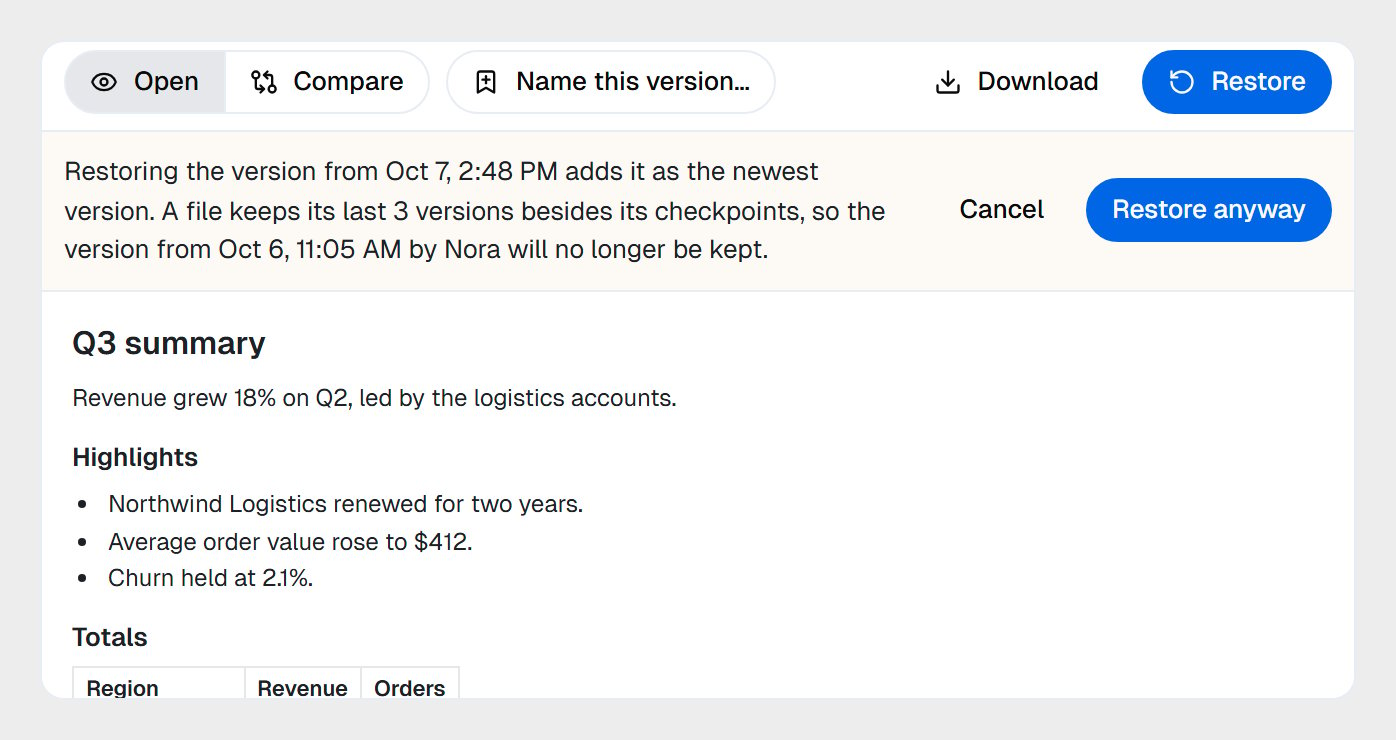
Select a version and choose **Restore**. Its content becomes the newest version, so nothing is rewritten, and the message that confirms it offers **Undo**. When the file already has three versions, the dialog says which one will no longer be kept before you go ahead:
## Restore an older version
Select a version and choose **Restore**. Its content becomes the newest version, so nothing is rewritten, and the message that confirms it offers **Undo**. When the file already has three versions, the dialog says which one will no longer be kept before you go ahead:
 A restore is never refused for lack of space.
## Keep a version for good: checkpoints
A checkpoint is a version with a name, kept until someone removes it. Checkpoints sit outside the three recent versions, so no amount of saving pushes them out.
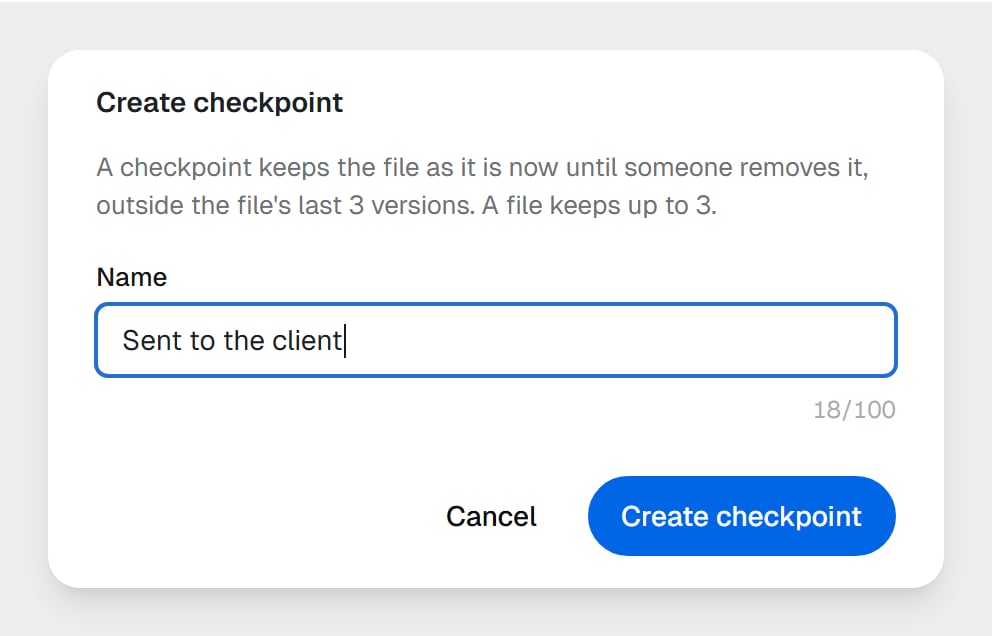
* **Create checkpoint…** names the file as it is now; **Name this version…** names an older one.
* A file keeps up to **three** checkpoints. At three, you're asked which one to replace.
* **Rename checkpoint…** and **Remove checkpoint…** are on the checkpoint itself.
* An older version kept as a checkpoint counts toward your storage.
A restore is never refused for lack of space.
## Keep a version for good: checkpoints
A checkpoint is a version with a name, kept until someone removes it. Checkpoints sit outside the three recent versions, so no amount of saving pushes them out.
* **Create checkpoint…** names the file as it is now; **Name this version…** names an older one.
* A file keeps up to **three** checkpoints. At three, you're asked which one to replace.
* **Rename checkpoint…** and **Remove checkpoint…** are on the checkpoint itself.
* An older version kept as a checkpoint counts toward your storage.
 Coworkers can make checkpoints too, before a risky or large edit or when you ask, and bring a file back to one. A coworker on **Can view** can only list them. Workflows and the AI tools you connect don't make checkpoints.
**Make a checkpoint before you let a coworker or a workflow rework an important file.** If you don't like the result, restore the checkpoint and you're back where you started.
## Delete a version
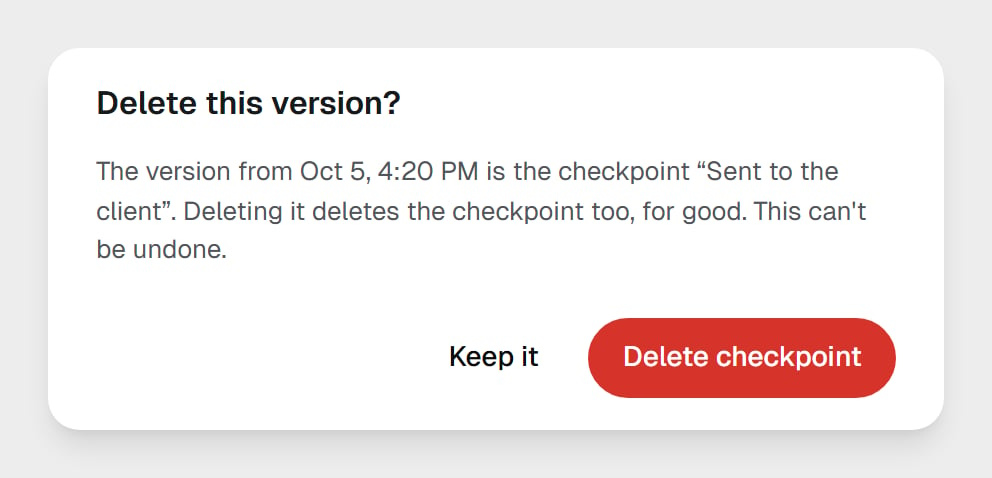
People can delete a single version for good, any but the current one. Choose **Delete this version…** on it. For a checkpoint, the question names it first:
Coworkers can make checkpoints too, before a risky or large edit or when you ask, and bring a file back to one. A coworker on **Can view** can only list them. Workflows and the AI tools you connect don't make checkpoints.
**Make a checkpoint before you let a coworker or a workflow rework an important file.** If you don't like the result, restore the checkpoint and you're back where you started.
## Delete a version
People can delete a single version for good, any but the current one. Choose **Delete this version…** on it. For a checkpoint, the question names it first:
 ## Who changed what
A file's **Activity**, in its details, lists each change newest first: who made it (you, a teammate, a coworker, the Concierge or a workflow) and what they did, such as Created, Edited, Renamed, Moved to the Trash, Restored from the Trash or Made the checkpoint. A coworker's change links to **Open the task** when it's your task; a workflow's links to **Open the run**; the Concierge's says **In your Concierge chat**.
## Conflicted copies
When a coworker's save, or a workflow's **Execute Code** step, crosses someone else's change to the same file, nothing is overwritten. The second change is saved beside the file as **name (conflicted copy).ext**, then **(conflicted copy 2)**, and so on. Its details say so:
## Who changed what
A file's **Activity**, in its details, lists each change newest first: who made it (you, a teammate, a coworker, the Concierge or a workflow) and what they did, such as Created, Edited, Renamed, Moved to the Trash, Restored from the Trash or Made the checkpoint. A coworker's change links to **Open the task** when it's your task; a workflow's links to **Open the run**; the Concierge's says **In your Concierge chat**.
## Conflicted copies
When a coworker's save, or a workflow's **Execute Code** step, crosses someone else's change to the same file, nothing is overwritten. The second change is saved beside the file as **name (conflicted copy).ext**, then **(conflicted copy 2)**, and so on. Its details say so:
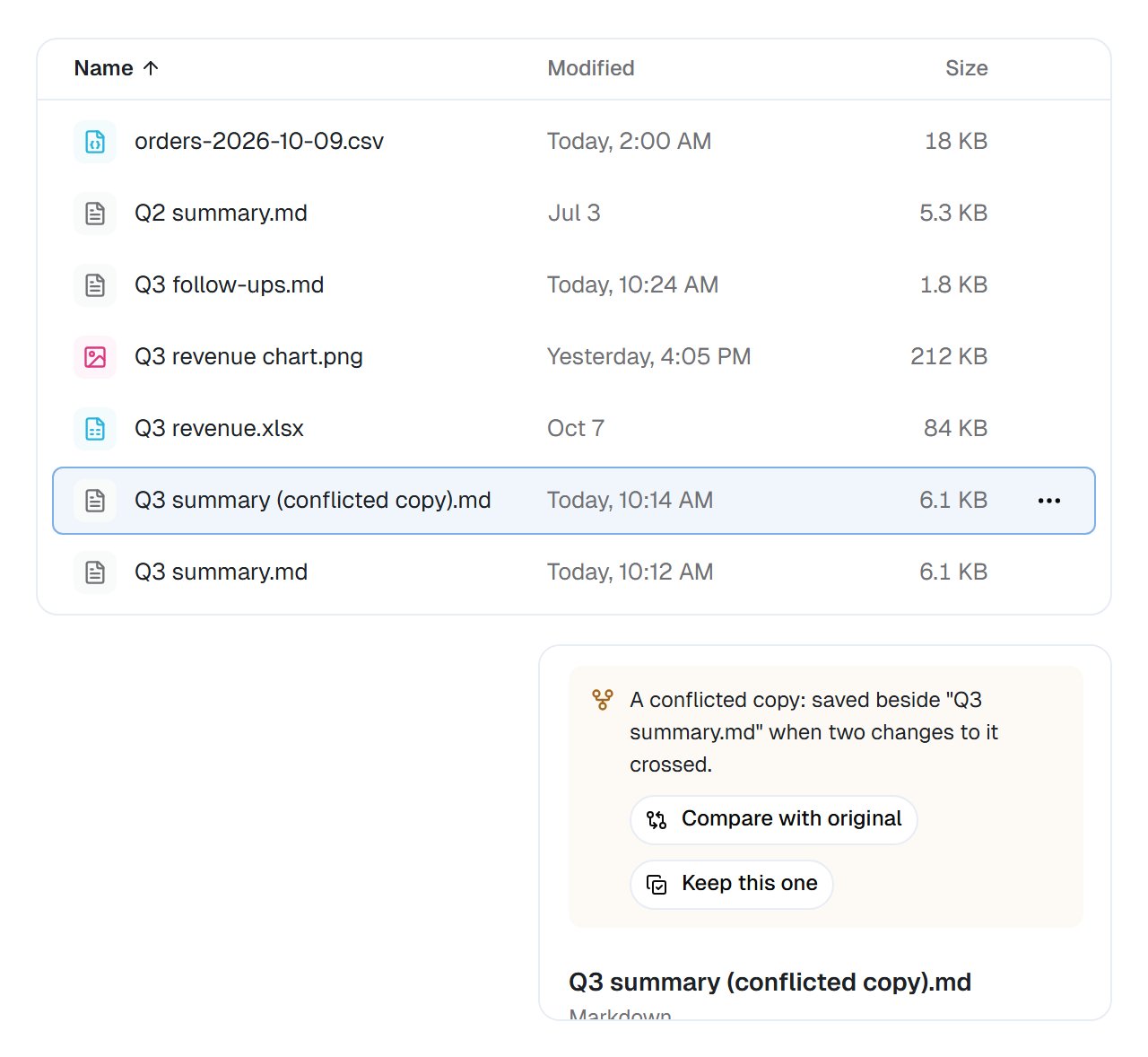 * **Compare with original** opens the two side by side.
* **Keep this one** makes the copy's content the original's new version and moves the copy to the Trash.
* To keep the original, move the copy to the Trash.
A workflow's **Workspace Files** step never makes a conflicted copy. Writing to a file that already exists adds a new version by default, so the one before stays in the history.
## Good to know
Deleting a version, or a checkpoint's version, can't be undone. To stop keeping a checkpoint but keep its version for now, choose **Remove checkpoint…** instead.
Restoring, comparing and checkpoints work on files in Workspace files. A coworker's own files and a task's files keep no change history.
## Common questions
Three recent versions cover most "undo that" moments without filling your storage. For anything you must keep, make a checkpoint: it stays until someone removes it.
No. While the editor stays open, your saves join one version, as long as each comes within 10 minutes of the last. Close it and come back, or wait longer than that, and your next save starts a new one.
A coworker can save a new version over yours, or restore a checkpoint, but it never pushes out a version you wrote. Yours stays in the file's history to restore, for up to 30 days after it's replaced, or for good as a checkpoint.
A coworker's or a code step's change that crossed someone else's, saved beside the file so neither is lost. Compare it with the original, then keep one.
## Next steps
Who may change which files.
Browse, upload and organise.
Versions written by your workflows.
What a coworker edited in a task.
This documentation is built and hosted on [Mintlify](https://mintlify.com), a developer documentation platform.
* **Compare with original** opens the two side by side.
* **Keep this one** makes the copy's content the original's new version and moves the copy to the Trash.
* To keep the original, move the copy to the Trash.
A workflow's **Workspace Files** step never makes a conflicted copy. Writing to a file that already exists adds a new version by default, so the one before stays in the history.
## Good to know
Deleting a version, or a checkpoint's version, can't be undone. To stop keeping a checkpoint but keep its version for now, choose **Remove checkpoint…** instead.
Restoring, comparing and checkpoints work on files in Workspace files. A coworker's own files and a task's files keep no change history.
## Common questions
Three recent versions cover most "undo that" moments without filling your storage. For anything you must keep, make a checkpoint: it stays until someone removes it.
No. While the editor stays open, your saves join one version, as long as each comes within 10 minutes of the last. Close it and come back, or wait longer than that, and your next save starts a new one.
A coworker can save a new version over yours, or restore a checkpoint, but it never pushes out a version you wrote. Yours stays in the file's history to restore, for up to 30 days after it's replaced, or for good as a checkpoint.
A coworker's or a code step's change that crossed someone else's, saved beside the file so neither is lost. Compare it with the original, then keep one.
## Next steps
Who may change which files.
Browse, upload and organise.
Versions written by your workflows.
What a coworker edited in a task.
This documentation is built and hosted on [Mintlify](https://mintlify.com), a developer documentation platform.