> ## Documentation Index
> Fetch the complete documentation index at: https://docs.cogniagent.ai/llms.txt
> Use this file to discover all available pages before exploring further.
# Workspace files
> One shared folder for your team, coworkers and workflows, with versions, checkpoints and live updates. Edit, compare and restore your files.
One folder your whole team works in: people, coworkers, workflows and the Concierge open the same files, and every change keeps its history.
## What it does
Workspace files is the folder your workspace shares. You find it at **Cowork → Files**, under **Workspace**. Put a price list, a template or a customer database there once, and everyone who needs it reaches the same copy: you and your teammates, your coworkers, your workflows, the Concierge, and the AI tools you connect.
Nothing is lost quietly. A file keeps its last three versions, you can name a version as a checkpoint that stays until someone removes it, and the Files page shows who changed what, with a link to the task or workflow run that did it.
## When you'd use it
* "Every coworker should quote from this year's price list, and I want to change it in one place."
* "Nora writes the weekly report. I want to fix a figure myself and still have her original."
* "Supplier invoices land in a folder, and a workflow should read each one as it arrives." See [Workspace files in workflows](/cowork/files/in-workflows).
* "We keep a small customer database that a workflow updates every night." See [Use a SQLite database with Workspace files](/guides/sqlite-workspace-files).
* "I want to ask the Concierge about a report without copying it into the chat." See [Workspace files and the Concierge](/cowork/files/with-the-concierge).
* "A coworker made something in a task that I want to keep." Find it under the task on the Files page, choose **Save to Workspace…** and pick a folder: a copy lands in the shared folder.
## Who works in it
| Who | What they can do |
| - | - |
| **You and your teammates** | Every member browses, uploads, edits, moves, renames, moves files to the Trash and restores them. Deleting for good is for owners and admins. See [The Files page](/cowork/files/files-page). |
| **Your coworkers** | A coworker with **Code and files** on works in the folder from its tasks, at `files/`. You choose whether it **Can edit** or only **Can view**. See [Sharing and access](/cowork/files/sharing-and-access). |
| **Your workflows** | A workflow can start when a file arrives in a folder, save and organise files, read them with AI, and update them from code. See [Workspace files in workflows](/cowork/files/in-workflows). |
| **The Concierge** | It reads text files you point it at, and saves the files it writes once you approve. See [Workspace files and the Concierge](/cowork/files/with-the-concierge). |
| **Your AI tools** | Claude, Cursor or any tool connected to your workspace can list, search, read, upload, move and trash files, acting as you. See [Workspace files from your AI tools](/cowork/files/mcp-tools). |
In a chat message, a file in the folder is named as `@files/` and its path, so a coworker or the Concierge knows exactly which file you mean.
## What it looks like
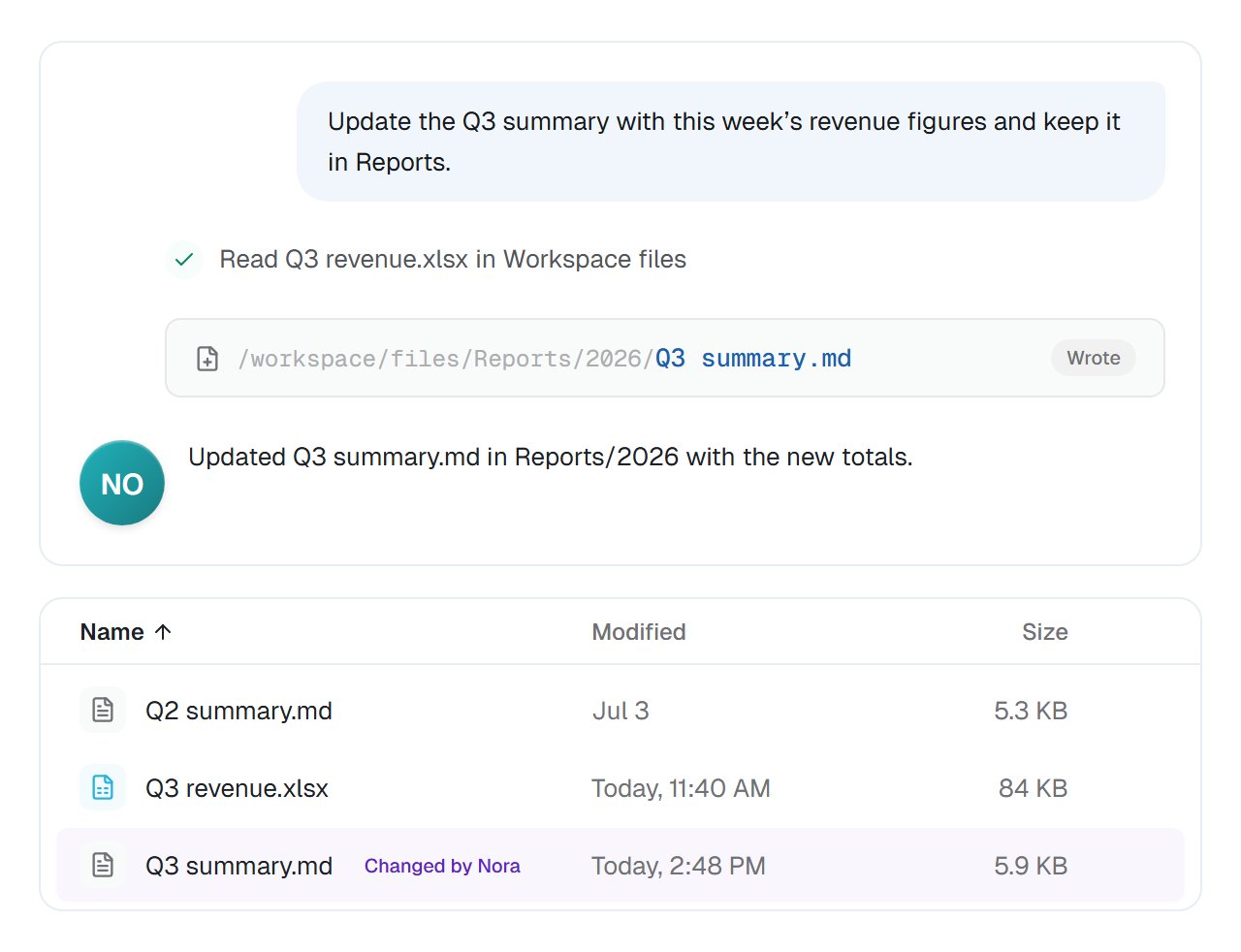
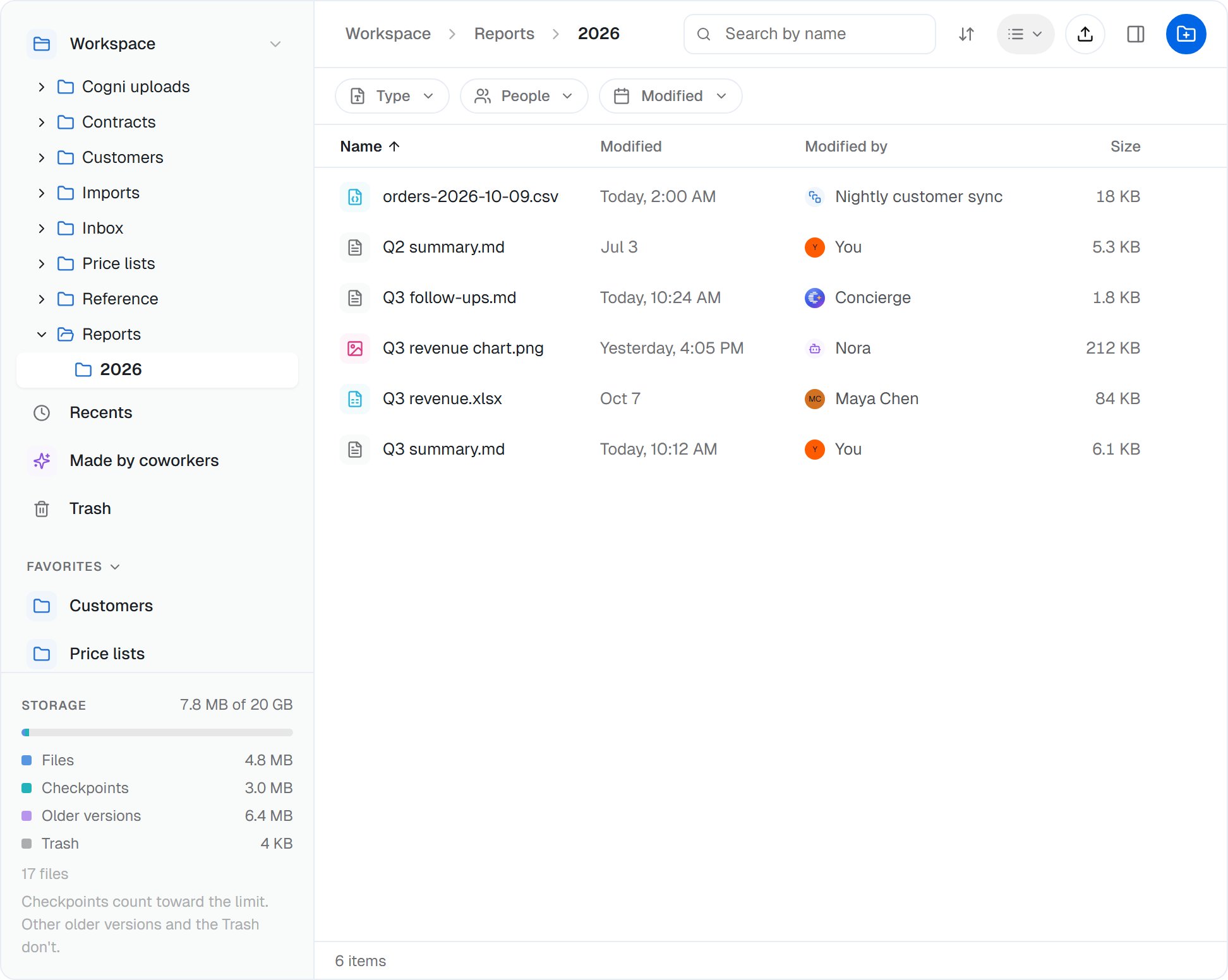 When a coworker writes into the folder, the file shows up on the Files page within seconds, marked with who changed it.
 ## Good to know
**Keep shared reference files here instead of uploading them to every task.** A price list in Workspace files is one file every coworker reads, and when you update it, the next task reads the new one.
A workspace holds up to 20 GB, and the storage bar on the Files page shows how much is used. Older versions and the Trash don't count toward it; checkpoints do.
Deleting a file moves it to the Trash, where anyone in the workspace can restore it for 30 days. After that it is removed for good.
Each task still has its own files on the coworker's cloud computer, private to that task. Workspace files is the one folder they all share. The **shared workspace** a coworker offers in a [handover](/cowork/capabilities/working-with-coworkers) is something else: two coworkers working in the same task files.
## Common questions
Every coworker with **Code and files** on reads the whole folder from its tasks. You choose, per coworker, whether it can also change files there. With **Can view**, what it changes stays on its cloud computer and never reaches the folder. See [Sharing and access](/cowork/files/sharing-and-access).
If someone saves while you're editing, the editor tells you before you save and lets you choose: compare, save yours as a copy, reload theirs or overwrite. When a coworker's save, or a workflow's **Execute Code** step, crosses someone else's change, theirs is saved beside the file as a conflicted copy, so neither is lost. A **Workspace Files** step that writes over a file adds a new version by default, so the earlier one stays in the history. See [Editing and file history](/cowork/files/editing-and-history).
A file keeps its last three versions, the current one included. Replaced versions are kept for up to 30 days. To keep a version for good, make it a checkpoint: up to three per file, kept until someone removes them.
The Files page uploads files up to 5 GB each. The workspace as a whole holds up to 20 GB.
A coworker's or a workflow's save becomes a new version, and it never pushes out a version a person wrote. However often an automation saves, your edit stays in the file's history to restore, for up to 30 days after it's replaced, or for good as a checkpoint.
## Next steps
Browse, upload, organise and find files.
Versions, checkpoints, compare and restore.
Who sees which files, and what coworkers may change.
Start, save and update from your workflows.
This documentation is built and hosted on [Mintlify](https://mintlify.com), a developer documentation platform.
## Good to know
**Keep shared reference files here instead of uploading them to every task.** A price list in Workspace files is one file every coworker reads, and when you update it, the next task reads the new one.
A workspace holds up to 20 GB, and the storage bar on the Files page shows how much is used. Older versions and the Trash don't count toward it; checkpoints do.
Deleting a file moves it to the Trash, where anyone in the workspace can restore it for 30 days. After that it is removed for good.
Each task still has its own files on the coworker's cloud computer, private to that task. Workspace files is the one folder they all share. The **shared workspace** a coworker offers in a [handover](/cowork/capabilities/working-with-coworkers) is something else: two coworkers working in the same task files.
## Common questions
Every coworker with **Code and files** on reads the whole folder from its tasks. You choose, per coworker, whether it can also change files there. With **Can view**, what it changes stays on its cloud computer and never reaches the folder. See [Sharing and access](/cowork/files/sharing-and-access).
If someone saves while you're editing, the editor tells you before you save and lets you choose: compare, save yours as a copy, reload theirs or overwrite. When a coworker's save, or a workflow's **Execute Code** step, crosses someone else's change, theirs is saved beside the file as a conflicted copy, so neither is lost. A **Workspace Files** step that writes over a file adds a new version by default, so the earlier one stays in the history. See [Editing and file history](/cowork/files/editing-and-history).
A file keeps its last three versions, the current one included. Replaced versions are kept for up to 30 days. To keep a version for good, make it a checkpoint: up to three per file, kept until someone removes them.
The Files page uploads files up to 5 GB each. The workspace as a whole holds up to 20 GB.
A coworker's or a workflow's save becomes a new version, and it never pushes out a version a person wrote. However often an automation saves, your edit stays in the file's history to restore, for up to 30 days after it's replaced, or for good as a checkpoint.
## Next steps
Browse, upload, organise and find files.
Versions, checkpoints, compare and restore.
Who sees which files, and what coworkers may change.
Start, save and update from your workflows.
This documentation is built and hosted on [Mintlify](https://mintlify.com), a developer documentation platform.