> ## Documentation Index
> Fetch the complete documentation index at: https://docs.cogniagent.ai/llms.txt
> Use this file to discover all available pages before exploring further.
# Running a skill
> Type /skill-name to make your AI coworker follow a procedure exactly — instead of hoping it picks the right approach on its own.
Most of the time your coworker picks the right skill by itself. When you want to be sure, call it by name.
## Calling one by name
Type `/` in the message box and the menu appears. Your coworker's skills are in it, each described as **"Use the *name* skill"**.
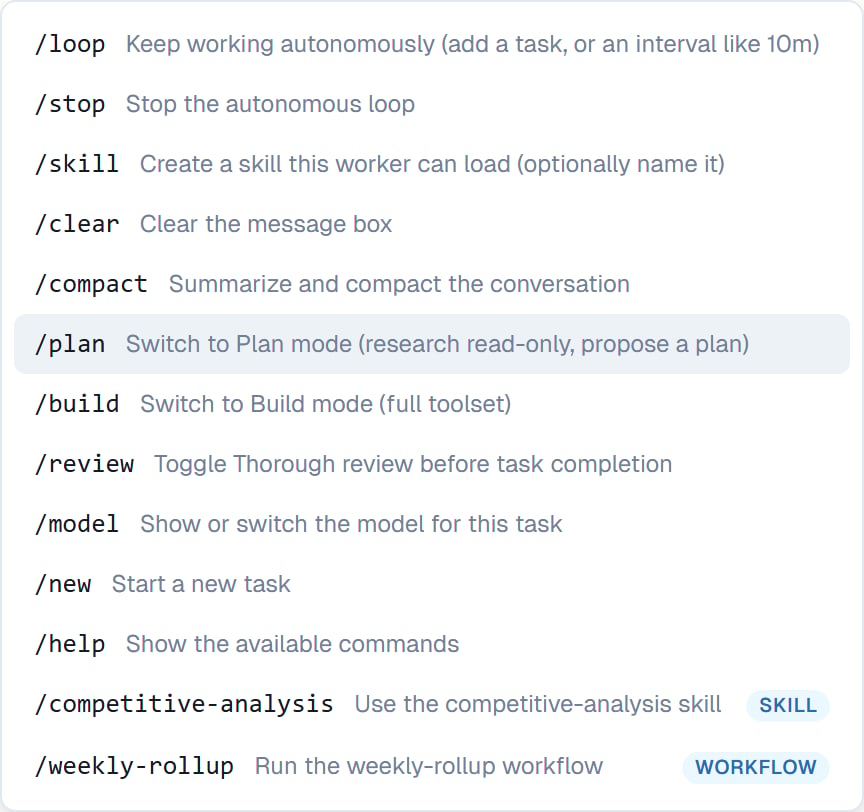 Pick one and it inserts `/skill-name ` so you can add the specifics before sending:
```
/competitive-analysis Northwind Logistics
```
That runs your procedure against that subject. Without anything after the name, it runs the skill and asks for what it needs.
## When to call one deliberately
* The task is ambiguous and more than one skill could apply
* You want the formal version of something your coworker would otherwise do casually
* You're testing a skill you just wrote
* The output has to match a house format exactly — a client-facing report, a board summary
* Your coworker did it the wrong way last time
## When not to bother
Most of the time. If a skill's description is well written, your coworker recognises the moment on its own — and a task where it chooses correctly is a task where the skill is doing its job.
If you find yourself always calling a skill by name because your coworker never picks it, the fix is the **description**, not the habit. See [Creating a skill](/cowork/skills/creating).
## Good to know
A skill name that clashes with a built-in command or a saved workflow doesn't get its own menu entry, so nothing is ambiguous. You can still ask for it in plain words: "use the competitive-analysis skill for Northwind".
Calling a skill doesn't restrict your coworker to it. It follows the procedure and still uses judgement around the edges — if the skill's step 5 doesn't apply, it says so.
## Common questions
Type `/` and start typing — the menu filters as you go. Or just describe what you want; your coworker usually finds the right one.
Yes. Ask for the second one when you get there, or describe a job that needs both and let your coworker sequence them.
No. Your coworker reads that procedure either way — you're just removing the guesswork about which.
Yes — saved workflows appear in the same menu as **"Run the *name* workflow"**. See [Slash commands](/cowork/chat/slash-commands).
## Next steps
Everything else in the menu.
Write one worth calling.
Back to the basics.
The ones already there.
Pick one and it inserts `/skill-name ` so you can add the specifics before sending:
```
/competitive-analysis Northwind Logistics
```
That runs your procedure against that subject. Without anything after the name, it runs the skill and asks for what it needs.
## When to call one deliberately
* The task is ambiguous and more than one skill could apply
* You want the formal version of something your coworker would otherwise do casually
* You're testing a skill you just wrote
* The output has to match a house format exactly — a client-facing report, a board summary
* Your coworker did it the wrong way last time
## When not to bother
Most of the time. If a skill's description is well written, your coworker recognises the moment on its own — and a task where it chooses correctly is a task where the skill is doing its job.
If you find yourself always calling a skill by name because your coworker never picks it, the fix is the **description**, not the habit. See [Creating a skill](/cowork/skills/creating).
## Good to know
A skill name that clashes with a built-in command or a saved workflow doesn't get its own menu entry, so nothing is ambiguous. You can still ask for it in plain words: "use the competitive-analysis skill for Northwind".
Calling a skill doesn't restrict your coworker to it. It follows the procedure and still uses judgement around the edges — if the skill's step 5 doesn't apply, it says so.
## Common questions
Type `/` and start typing — the menu filters as you go. Or just describe what you want; your coworker usually finds the right one.
Yes. Ask for the second one when you get there, or describe a job that needs both and let your coworker sequence them.
No. Your coworker reads that procedure either way — you're just removing the guesswork about which.
Yes — saved workflows appear in the same menu as **"Run the *name* workflow"**. See [Slash commands](/cowork/chat/slash-commands).
## Next steps
Everything else in the menu.
Write one worth calling.
Back to the basics.
The ones already there.