> ## Documentation Index
> Fetch the complete documentation index at: https://docs.cogniagent.ai/llms.txt
> Use this file to discover all available pages before exploring further.
# Wait and Combine Node
> Wait for parallel branches to complete before continuing
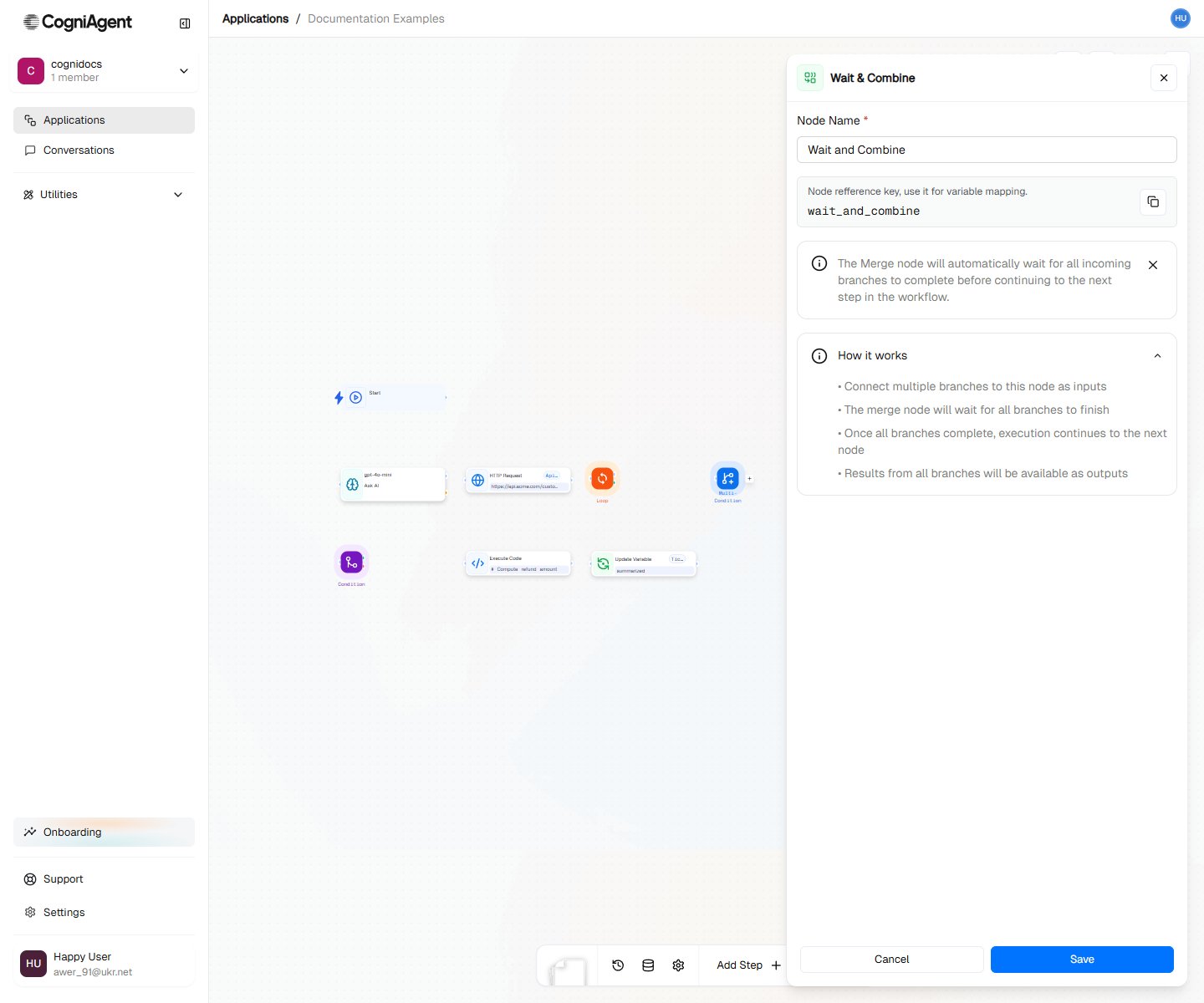
The Wait & Combine node waits for all incoming branches to complete before allowing the workflow to continue. Use it when you've split execution into parallel paths (via Condition or Multi-Condition) and need to synchronize before the next step.
 ## When to Use
* **Parallel processing** - Run multiple operations simultaneously, then continue
* **Branch rejoining** - Bring conditional branches back together
* **Data aggregation** - Collect results from multiple paths
* **Synchronization** - Ensure all prerequisite tasks complete before next step
## How It Works
Without Wait & Combine, parallel branches execute independently:
```
├── Condition
│ ├── Met: Path A → Completes independently
│ └── Unmet: Path B → Completes independently
└── [No synchronization]
```
With Wait & Combine, branches synchronize:
```
├── Condition
│ ├── Met: Path A ─────┐
│ └── Unmet: Path B ───┴─→ Wait & Combine → Continue
```
Only the branch that actually executes needs to complete. If a Condition evaluates to "met", only the "met" branch runs and the Wait & Combine waits for just that branch.
## Example: Parallel Data Fetching
Fetch data from multiple sources simultaneously:
After the trigger, create multiple HTTP Request nodes that run in parallel.
Connect all HTTP Request outputs to a single Wait & Combine node.
Use Execute Code to combine the results:
```python theme={null}
customers = input["http_request_1"]["body"]["customers"]
orders = input["http_request_2"]["body"]["orders"]
products = input["http_request_3"]["body"]["products"]
return {
"customers": customers,
"orders": orders,
"products": products,
"summary": f"{len(customers)} customers, {len(orders)} orders"
}
```
**Workflow:**
```
├── Start
├── HTTP Request 1 (get customers) ─────┐
├── HTTP Request 2 (get orders) ────────┼─→ Wait & Combine → Execute Code (combine)
├── HTTP Request 3 (get products) ──────┘
```
## Example: Conditional Branch Rejoin
Bring conditional paths back together:
```
├── Webhook (incoming request)
├── Condition (is premium customer?)
│ ├── Met:
│ │ ├── Ask AI (premium analysis)
│ │ └── Update Variable (analysis = premium result) ───┐
│ └── Unmet: │
│ ├── Ask AI (standard analysis) │
│ └── Update Variable (analysis = standard result) ──┴─→ Wait & Combine
└── External API (send analysis email)
```
Both paths set the same variable, then Wait & Combine ensures the workflow continues only after whichever path executed completes.
## Example: Multi-Channel Notification
Send notifications to multiple channels, then confirm:
```
├── Ask AI (generate alert)
├── External API (Slack) ────────┐
├── External API (Email) ────────┼─→ Wait & Combine → Update Variable (notificationsSent = true)
├── External API (SMS) ──────────┘
```
All three notifications send in parallel. Wait & Combine waits for all to complete before logging success.
## Wait & Combine Modes
### Wait for All (Default)
Waits for every incoming connection to complete:
```
├── Branch A (takes 2s) ─────┐
├── Branch B (takes 5s) ─────┼─→ Wait & Combine (waits 5s total)
├── Branch C (takes 1s) ─────┘
```
The workflow continues after the slowest branch finishes.
### Wait for Any
Continues as soon as any branch completes:
```
├── Branch A (takes 2s) ─────┐
├── Branch B (takes 5s) ─────┼─→ Wait & Combine (waitFor: any) (waits 1s)
├── Branch C (takes 1s) ─────┘
```
Use case: Racing API calls to use the fastest response.
With "any" mode, other branches continue executing in the background. Their results won't be available to subsequent nodes.
## When You Don't Need Wait & Combine
If branches truly diverge and don't need to rejoin, skip Wait & Combine:
```
├── Multi-Condition (route by type)
│ ├── Type A: [Complete process A]
│ ├── Type B: [Complete process B]
│ └── Type C: [Complete process C]
```
Each path handles its case completely. No Wait & Combine needed.
## Accessing Branch Results
After Wait & Combine, access results from all completed branches:
```python theme={null}
# In Execute Code after Wait & Combine
branch_a_result = input["llm_1"]["response"] # From branch A
branch_b_result = input["llm_2"]["response"] # From branch B
# Combine results
return {
"combined": f"{branch_a_result}\n\n{branch_b_result}"
}
```
## Common Patterns
### Fan-Out / Fan-In
Process items in parallel, then aggregate:
```
├── Execute Code (split items into groups)
├── Call Agent (process group 1) ─────┐
├── Call Agent (process group 2) ─────┼─→ Wait & Combine → Execute Code (combine results)
├── Call Agent (process group 3) ─────┘
```
### Conditional Parallel Processing
Only run branches that are needed:
```
├── Condition (need enrichment?)
│ ├── Met: HTTP Request (enrich data) ────┐
│ └── Unmet: (skip enrichment) ───────────┴─→ Wait & Combine
├── Condition (need validation?)
│ ├── Met: HTTP Request (validate data) ──┐
│ └── Unmet: (skip validation) ───────────┴─→ Wait & Combine
```
## Tips
Use Wait & Combine when you need to "wait for things to finish" before continuing. Without Wait & Combine, the first completed branch would trigger the next step.
The slowest branch determines overall time. If speed matters, consider which operations can be parallelized vs. which are dependencies.
Don't create cycles (branch → merge → back to branch). This creates infinite loops.
## Settings
Display name shown on the canvas.
Unique identifier for referencing outputs.
Wait & Combine behavior:
* **all** - Wait for ALL incoming branches to complete
* **any** - Continue as soon as ANY branch completes
## Outputs
List of branch names/IDs that completed.
Results from each branch, keyed by branch name.
## Related Nodes
Create branches that Wait and Combine can rejoin.
Create multiple branches for parallel processing.
## When to Use
* **Parallel processing** - Run multiple operations simultaneously, then continue
* **Branch rejoining** - Bring conditional branches back together
* **Data aggregation** - Collect results from multiple paths
* **Synchronization** - Ensure all prerequisite tasks complete before next step
## How It Works
Without Wait & Combine, parallel branches execute independently:
```
├── Condition
│ ├── Met: Path A → Completes independently
│ └── Unmet: Path B → Completes independently
└── [No synchronization]
```
With Wait & Combine, branches synchronize:
```
├── Condition
│ ├── Met: Path A ─────┐
│ └── Unmet: Path B ───┴─→ Wait & Combine → Continue
```
Only the branch that actually executes needs to complete. If a Condition evaluates to "met", only the "met" branch runs and the Wait & Combine waits for just that branch.
## Example: Parallel Data Fetching
Fetch data from multiple sources simultaneously:
After the trigger, create multiple HTTP Request nodes that run in parallel.
Connect all HTTP Request outputs to a single Wait & Combine node.
Use Execute Code to combine the results:
```python theme={null}
customers = input["http_request_1"]["body"]["customers"]
orders = input["http_request_2"]["body"]["orders"]
products = input["http_request_3"]["body"]["products"]
return {
"customers": customers,
"orders": orders,
"products": products,
"summary": f"{len(customers)} customers, {len(orders)} orders"
}
```
**Workflow:**
```
├── Start
├── HTTP Request 1 (get customers) ─────┐
├── HTTP Request 2 (get orders) ────────┼─→ Wait & Combine → Execute Code (combine)
├── HTTP Request 3 (get products) ──────┘
```
## Example: Conditional Branch Rejoin
Bring conditional paths back together:
```
├── Webhook (incoming request)
├── Condition (is premium customer?)
│ ├── Met:
│ │ ├── Ask AI (premium analysis)
│ │ └── Update Variable (analysis = premium result) ───┐
│ └── Unmet: │
│ ├── Ask AI (standard analysis) │
│ └── Update Variable (analysis = standard result) ──┴─→ Wait & Combine
└── External API (send analysis email)
```
Both paths set the same variable, then Wait & Combine ensures the workflow continues only after whichever path executed completes.
## Example: Multi-Channel Notification
Send notifications to multiple channels, then confirm:
```
├── Ask AI (generate alert)
├── External API (Slack) ────────┐
├── External API (Email) ────────┼─→ Wait & Combine → Update Variable (notificationsSent = true)
├── External API (SMS) ──────────┘
```
All three notifications send in parallel. Wait & Combine waits for all to complete before logging success.
## Wait & Combine Modes
### Wait for All (Default)
Waits for every incoming connection to complete:
```
├── Branch A (takes 2s) ─────┐
├── Branch B (takes 5s) ─────┼─→ Wait & Combine (waits 5s total)
├── Branch C (takes 1s) ─────┘
```
The workflow continues after the slowest branch finishes.
### Wait for Any
Continues as soon as any branch completes:
```
├── Branch A (takes 2s) ─────┐
├── Branch B (takes 5s) ─────┼─→ Wait & Combine (waitFor: any) (waits 1s)
├── Branch C (takes 1s) ─────┘
```
Use case: Racing API calls to use the fastest response.
With "any" mode, other branches continue executing in the background. Their results won't be available to subsequent nodes.
## When You Don't Need Wait & Combine
If branches truly diverge and don't need to rejoin, skip Wait & Combine:
```
├── Multi-Condition (route by type)
│ ├── Type A: [Complete process A]
│ ├── Type B: [Complete process B]
│ └── Type C: [Complete process C]
```
Each path handles its case completely. No Wait & Combine needed.
## Accessing Branch Results
After Wait & Combine, access results from all completed branches:
```python theme={null}
# In Execute Code after Wait & Combine
branch_a_result = input["llm_1"]["response"] # From branch A
branch_b_result = input["llm_2"]["response"] # From branch B
# Combine results
return {
"combined": f"{branch_a_result}\n\n{branch_b_result}"
}
```
## Common Patterns
### Fan-Out / Fan-In
Process items in parallel, then aggregate:
```
├── Execute Code (split items into groups)
├── Call Agent (process group 1) ─────┐
├── Call Agent (process group 2) ─────┼─→ Wait & Combine → Execute Code (combine results)
├── Call Agent (process group 3) ─────┘
```
### Conditional Parallel Processing
Only run branches that are needed:
```
├── Condition (need enrichment?)
│ ├── Met: HTTP Request (enrich data) ────┐
│ └── Unmet: (skip enrichment) ───────────┴─→ Wait & Combine
├── Condition (need validation?)
│ ├── Met: HTTP Request (validate data) ──┐
│ └── Unmet: (skip validation) ───────────┴─→ Wait & Combine
```
## Tips
Use Wait & Combine when you need to "wait for things to finish" before continuing. Without Wait & Combine, the first completed branch would trigger the next step.
The slowest branch determines overall time. If speed matters, consider which operations can be parallelized vs. which are dependencies.
Don't create cycles (branch → merge → back to branch). This creates infinite loops.
## Settings
Display name shown on the canvas.
Unique identifier for referencing outputs.
Wait & Combine behavior:
* **all** - Wait for ALL incoming branches to complete
* **any** - Continue as soon as ANY branch completes
## Outputs
List of branch names/IDs that completed.
Results from each branch, keyed by branch name.
## Related Nodes
Create branches that Wait and Combine can rejoin.
Create multiple branches for parallel processing.