
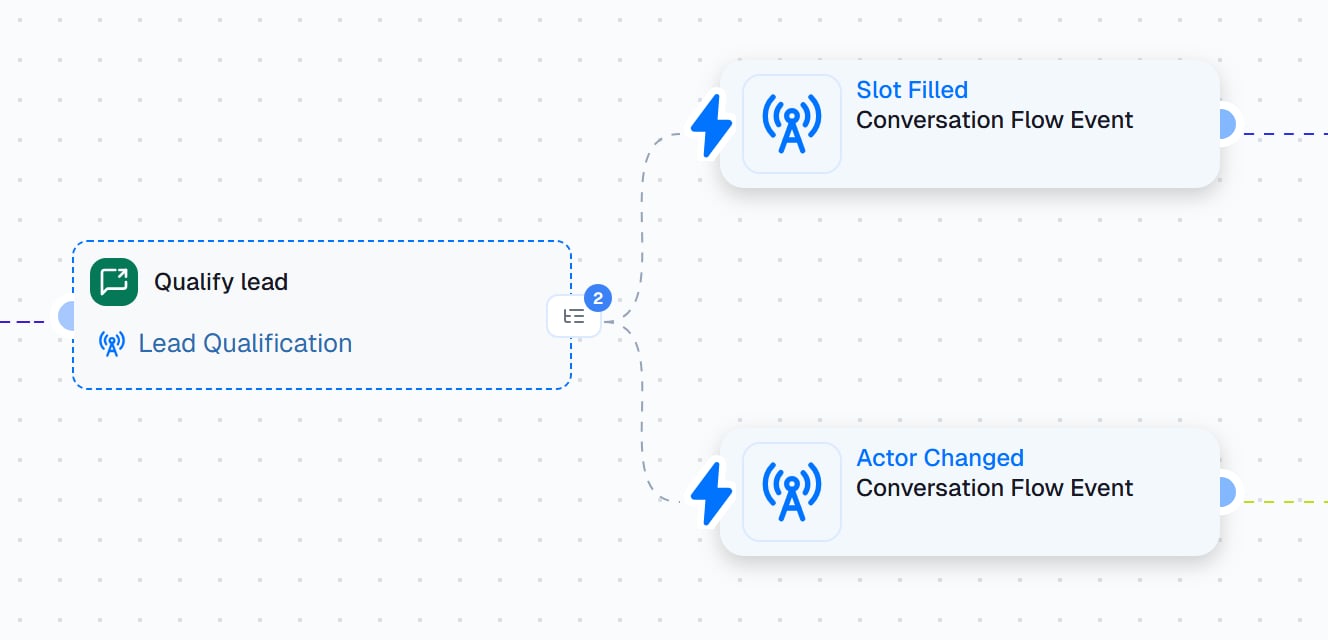
The Qualify lead node with two event branches. The steps connected after a branch run every time its event happens.
When to use
Use it when the workflow needs a real back-and-forth with someone, and you’ve built the conversation as a Chat & Voice Agent:- Qualify a lead: a form comes in, and the agent emails the lead and asks about budget and timing.
- Follow up with a customer: after a delivery, the agent checks in on WhatsApp and handles any problem.
- Run a check-in: each week, the agent asks a teammate a few questions on Slack.
Before you start
The node starts an agent that already exists. Check two things on that agent first:- It has an outbound channel. Open the agent and click Channels in the rail on the left of its canvas. The node can use a Gmail, Outlook, Slack, Teams, or WhatsApp Business channel. A website widget can’t start a conversation with someone, so it doesn’t count.
- It knows what you’ll pass in. To hand the agent details such as the person’s company or the order number, define them as Initial Parameters in the agent’s Flow settings. The agent’s prompts use each one as
@param.<name>.
Set it up
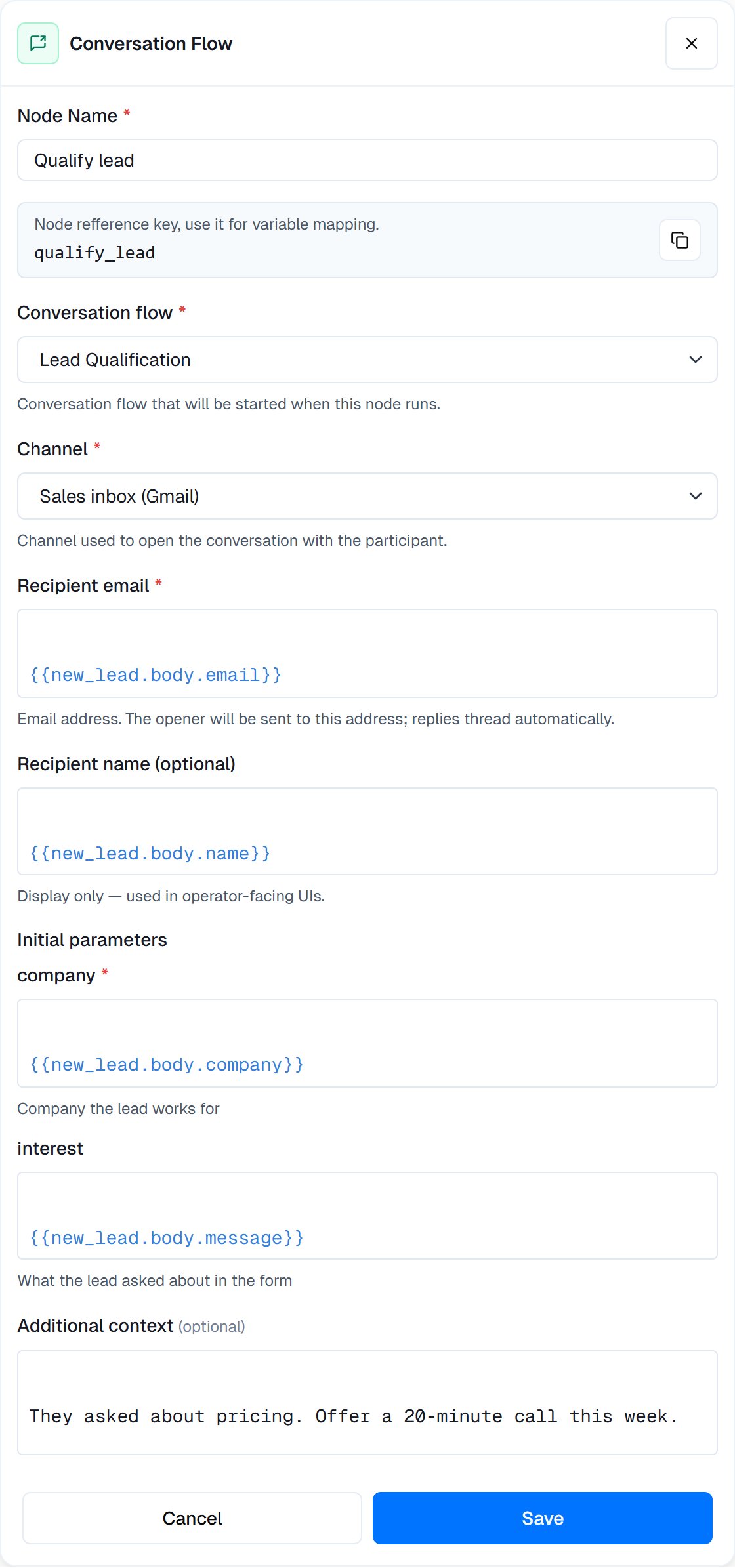
A configured node: the agent, the channel, the recipient from the form that triggered the workflow, two initial parameters, and a note for the agent.
Add the node
Pick the agent
Pick the channel
Say who to reach
{{ }} to fill them from an earlier step, for example {{new_lead.body.email}}.Fill in the initial parameters
{{ }} too.Add context (optional)
Save, then add event branches
Widget: create a link instead
Pick the agent’s Widget channel to create a widget link instead of sending a message. There’s no recipient: set the optional Name, Your reference and Link expires after. The node’s outputsurl, embedHtml, launchId and expiresAt go to the step connected to its output, so the next step can email the link. Conversation Started runs when the person opens it.
Who to reach, by channel
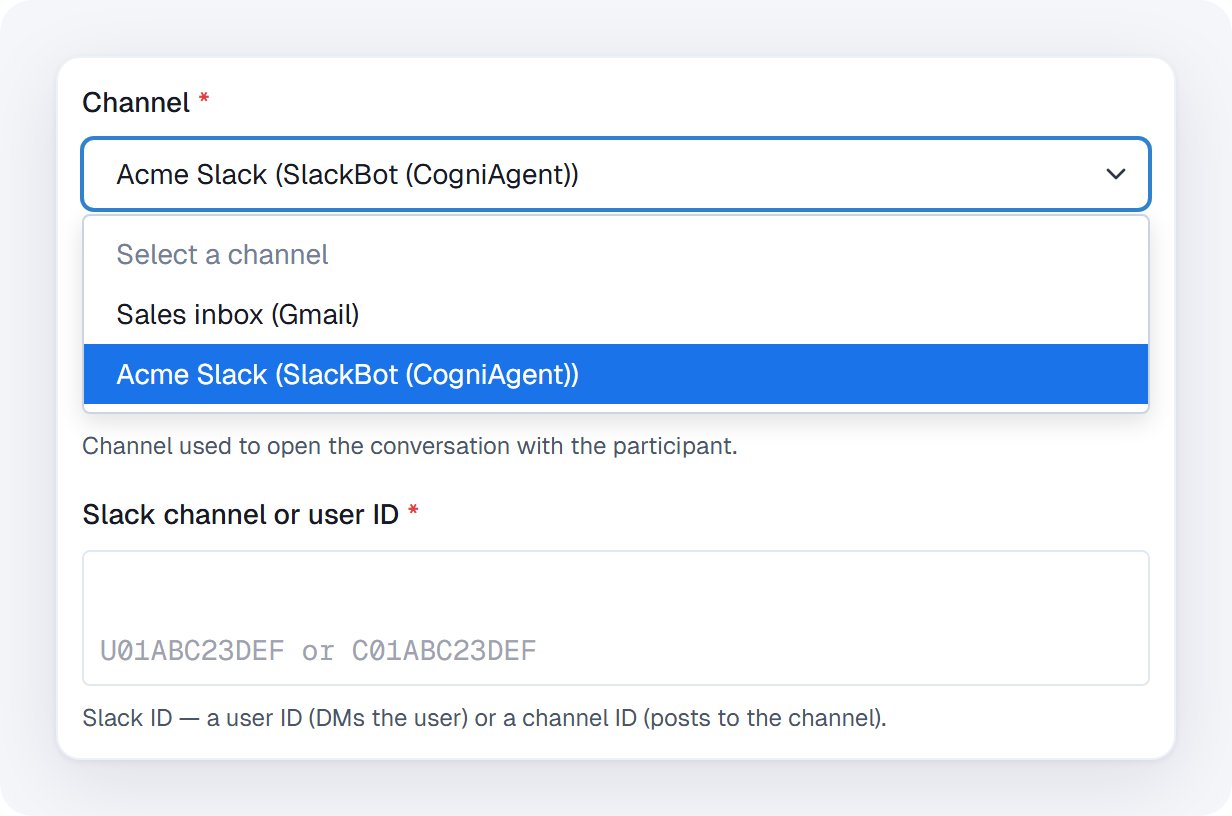
Pick a Slack channel and the recipient field changes to a Slack ID.
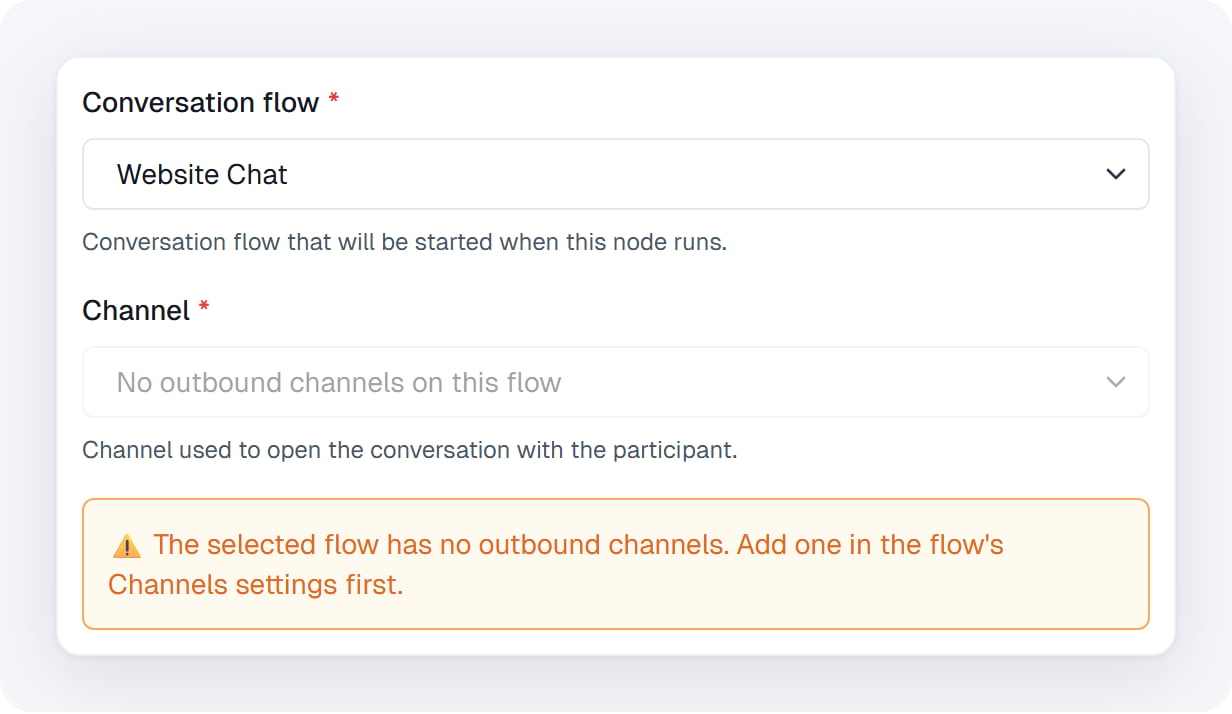
This agent only has a website widget, so there is no channel to start a conversation on.
What happens when the node runs
- The node starts a conversation between the agent and the person, then finishes. It has no branch of its own; everything after it hangs off its event branches.
- The agent sends its opening message on the channel. From then on, the agent and the person talk directly; the workflow isn’t involved in each reply.
- Each time an event you added a branch for happens, that branch runs, with the event’s details as its data.
- One active conversation per person. If the person already has an active conversation with this agent on the same kind of channel, the node ends it and starts a new one. This applies whether that conversation was started by hand, by another workflow, or by an earlier run. The replaced conversation doesn’t run a Conversation Ended branch.
- Branches belong to this node. A branch runs only for conversations this node started, never for conversations the same agent has elsewhere.
- The run stays open. A workflow with a Chat & Voice Agent step keeps running until you stop it, so that later events can still reach its branches. Stopping the run also ends every conversation it started, and those don’t run Conversation Ended either.
React to the conversation
To add a branch, point at the small list icon on the node’s right edge, open Add Actions & Events, and click an event under Events. The branch appears to the right of the node, already connected. Connect the steps that should run to it.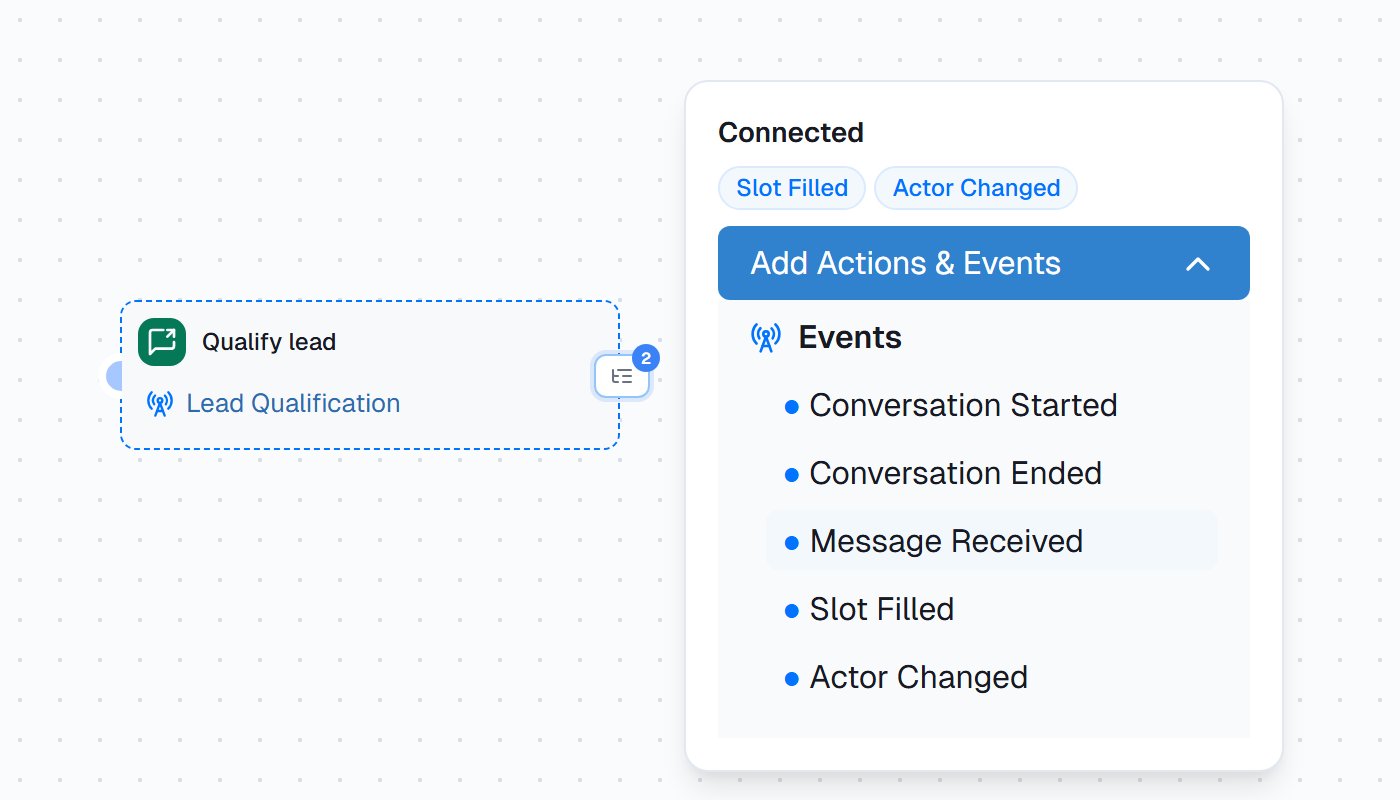
The events menu. Slot Filled and Actor Changed are already connected; click any event to add its branch.
Know when the agent is done
The agent doesn’t end the conversation when it finishes; the person can always write again. Conversation Ended therefore runs only when someone stops the conversation. It doesn’t run when the agent completes its steps, when a conversation goes quiet for 24 hours, when it’s replaced, or when the opening message can’t be delivered. To act once the agent has finished, use Actor Changed. When the agent’s last actor completes its job, the branch runs with an emptycurrentActorId. Put a If / else on it:
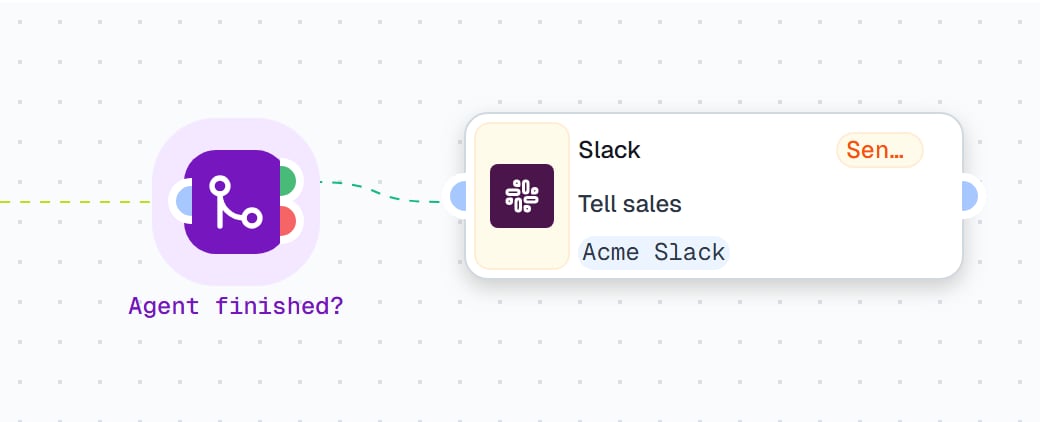
After Actor Changed: an If / else that passes only when no actor is left, then Slack. Sales hears about the lead once, when the agent is done.
Use the event’s data
Each branch has a key of its own, named after its event:conversation_started_handle, message_received_handle, slot_filled_handle, actor_changed_handle, and conversation_ended_handle. If you add the same event twice, the second gets a number: slot_filled_handle_1. Steps after the branch read its data with that key:
{{new_lead.body.email}} from the trigger. Outputs lists every field.
Scenarios
Qualify every new lead by email
A website form posts each new lead to a Webhook trigger named New lead (so its key isnew_lead). The Lead Qualification agent asks about company size, budget, and timing, and saves each answer to a slot.
- Channel: Sales inbox (Gmail)
- Recipient email:
{{new_lead.body.email}} - Recipient name:
{{new_lead.body.name}} - company:
{{new_lead.body.company}} - interest:
{{new_lead.body.message}}
Email, Headers to Email and {{slot_filled_handle.slotName}}, and the one row in Rows to {{new_lead.body.email}} and {{slot_filled_handle.value}}. Each answer lands in the lead’s row, in the column named after the slot, and the sheet fills in while the conversation is still going.
Tell sales when it’s done. The Slack message can say “{{new_lead.body.name}} from {{new_lead.body.company}} has finished qualifying. Answers are in the Leads sheet.”
Watch for: set the workflow to Multi instance, so each lead’s answers stay in its own run. Name the agent’s slots after your sheet’s columns; Upsert Rows adds a column it doesn’t find.
Follow up after a delivery on WhatsApp
Your store calls a Webhook trigger when an order is delivered (order_delivered). The Delivery check-in agent asks the customer how it went and handles simple questions itself.
- Channel: Store WhatsApp (WhatsApp Business)
- Recipient phone (E.164):
{{order_delivered.body.phone}} - order_number:
{{order_delivered.body.order_number}} - Additional context: “The order was delivered today. Ask whether everything arrived in good condition.”
{{message_received_handle.content}} in AI mode. The Slack alert can quote the message and give {{order_delivered.body.order_number}}, so support can step in straight away.
Watch for: Message Received runs for every message the customer sends, so keep the steps after it light. Phone numbers must include the country code (+44…), or the agent can’t reach the customer.
Run a weekly check-in on Slack
A Scheduled Trigger fires every Monday at 09:00. The Weekly check-in agent asks a team lead three questions on Slack.- Channel: Acme Slack (SlackBot (CogniAgent))
- Slack channel or user ID: the team lead’s Slack user ID, for example
U01ABC23DEF - Additional context: “Ask about progress, blockers, and plans for next week. Keep it short.”
Troubleshooting
Settings
{{ }}.@param.<name>. A red asterisk marks the parameters the agent expects, but the node lets you save with one empty; an empty parameter becomes blank text in the prompt. Supports {{ }}.{{ }}.Outputs
Each event branch passes on its event’s details. Every branch includessessionId (the conversation’s ID), conversationFlowId, and eventType.
Conversation Started
Conversation Started
channelType: the kind of channel, for examplegmailparticipantIdentifier: who the conversation is withstartedAt: when it startedinitialParameters: the Initial Parameters the conversation started with, for example{{conversation_started_handle.initialParameters.company}}parameterSources: where each value came from —page(the widget’s embed code),url(the widget’s page address),launch(a widget link); empty when the values came from this node or the Start Conversation form
Message Received
Message Received
content: the text of the message. An image or file arrives as[Sent file: …].participantIdentifier: who sent itmessageId: the message’s IDrole: alwaysuser, since only the person’s messages trigger this branchtimestamp: when it arrived
Slot Filled
Slot Filled
slotName: the slot the agent saved, for examplebudgetvalue: the saved answerpreviousValue: what the slot held before this turn (empty the first time)actorId: the actor that saved ittimestamp: when it was saved
Actor Changed
Actor Changed
previousActorId: the actor before; empty on the conversation’s first turncurrentActorId: the actor now; empty when the agent has finished its jobreason:sequential-transfer(an actor handed off),global-router-direct(the router picked another actor), orturntimestamp: when it changed
Conversation Ended
Conversation Ended
reason: why it ended, for exampleoperator_stoppedwhen someone clicked StopfinalState: every slot’s value at the end, for example{{conversation_ended_handle.finalState.budget}}endedAt: when it endedinitialParametersandparameterSources: as in Conversation Started
sessionId, channelType, participantIdentifier, and timestamp in the run’s history. With a Widget channel it outputs url, embedHtml, launchId and expiresAt instead, and sessionId stays empty until the person opens the link. Like every output, the link is kept in the run’s history, so anyone who can view the workflow’s runs can open it. In a branch, read sessionId from the branch ({{slot_filled_handle.sessionId}}); that way it’s always the conversation the event came from.