
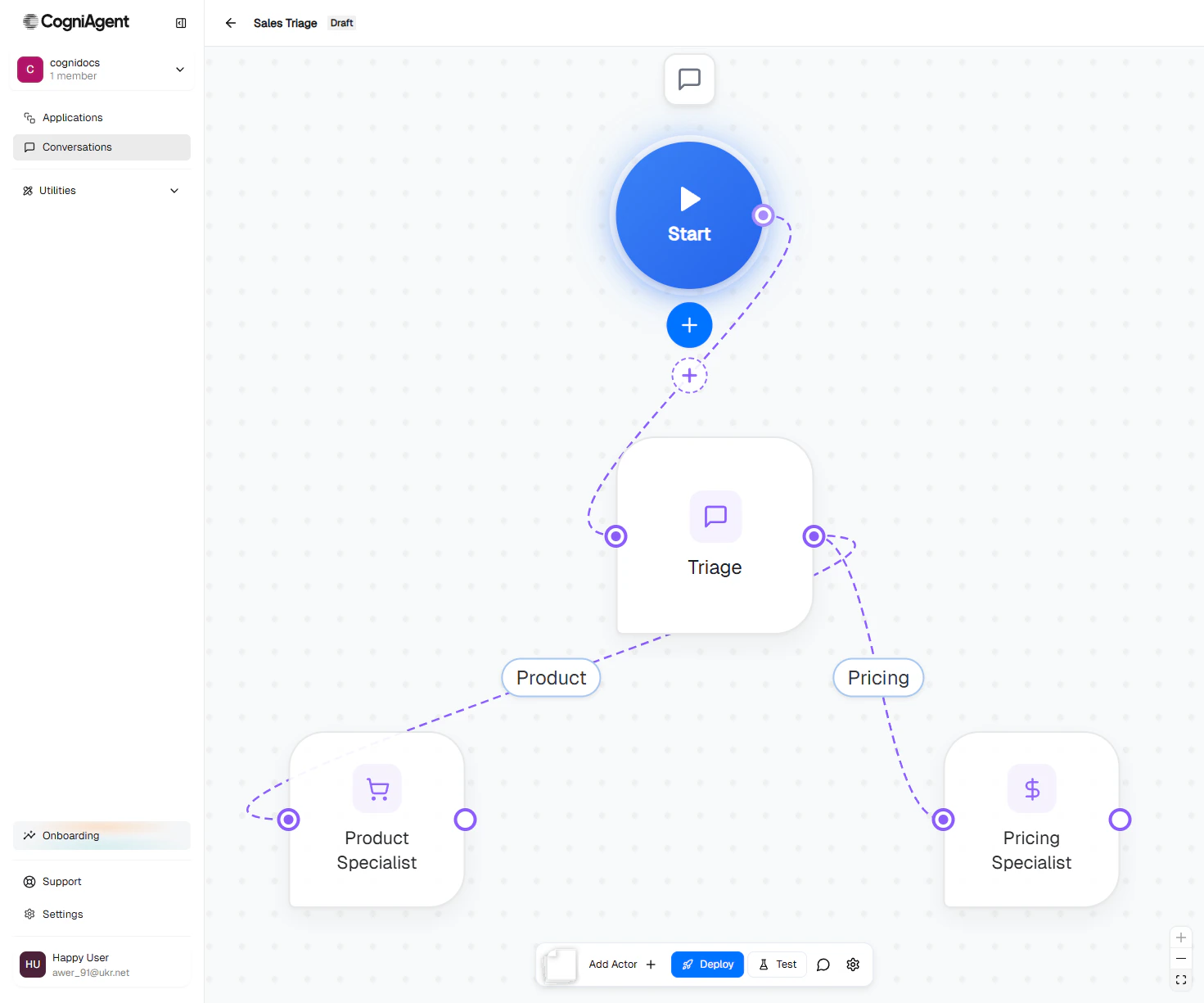
The Sales Triage agent on the canvas: Start, a Triage actor and two specialists.
When to use Chat & Voice Agents
Customer support with specialists
Triage agent routes billing questions to a billing specialist, product questions to a product expert.
Lead qualification + booking
One agent qualifies the lead; another schedules the demo. Each is good at one job.
Returns and refunds
A returns intake agent collects details, a policy agent checks eligibility, a refund agent issues credits.
Voice-first phone flows
Inbound calls land on a receptionist agent, transfer to the right specialist mid-call.
What makes it different
A team, not a script
Each agent — called an actor — has its own system prompt, model, knowledge bases, and integrations. You connect actors with routes that say “when X happens, hand off to Y.” The platform handles the routing decisions automatically using the conversation context.Context that travels with the user
Information collected by one actor flows to the next. The user doesn’t repeat themselves. Each actor decides how much of the previous conversation it wants to inherit.One canvas, every channel
Connect the same flow to Widget, Email, Slack, Teams, or Phone. The conversation logic stays the same — only the delivery channel changes.Start the conversation, or wait for it
A flow can run two ways:- Inbound (Responder) — the agent listens on its channels and replies when users write in (support inbox, web widget).
- Outbound (Initiator) — your team or another workflow kicks off the conversation (outbound sales call, follow-up email).
How it works
Every flow has three parts:1
A Start node
The entry point. Owns the channel configuration — Widget, Gmail, Slack, Phone, and so on. Every flow has exactly one.
2
One or more actors
The AI agents. Each has a name, an icon, a model, a system prompt, and a set of capabilities (knowledge bases, integrations, custom tools).
3
Routes between actors
You write a short description of when this route should fire (the activation prompt). The platform auto-generates a short label and uses the prompt to decide routing during conversations.
Core concepts at a glance
Flows and actors
The building blocks: Start node, actors, routes, and the canvas.
Context and inheritance
How information flows between actors so the user never repeats themselves.
Focus modes
How strictly each actor sticks to its job when users switch topics.
Execution modes
Inbound or Outbound — does your agent wait for conversations, or start them?
Get started
Quickstart
Build your first two-actor flow in 10 minutes.
Sales triage walkthrough
A worked example: lead intake → product specialist or pricing specialist.
Connect a channel
Wire your flow to Widget, Email, Slack, Teams, or Phone.
Deploy your agent
Publish it so real users can talk to it.