
The four building blocks
The Start node
The single entry point. Owns the channel configuration (Widget, Gmail, Slack, etc.). One per flow.
Actors
AI agents. Each has a name, an icon, a system prompt, a model, and a set of capabilities. You can have as many as you need.
Routes
Connections between actors. Each route carries an activation prompt — a short description of when this route should fire.
The canvas
The visual map where you arrange actors and draw routes. Drag, zoom, fit-to-view.
Start node
Every flow has exactly one Start node. It owns the channels configuration — where users reach your flow:- A Widget embedded on your website
- A Gmail or Outlook inbox the flow polls for new emails
- A Slack channel where the bot listens
- A Teams chat
- A phone number
Actors
An actor is one AI agent. Each actor is independently configured:
You set all of it in the actor’s panel, one section at a time: Instructions, Steps, Tools, Knowledge, Integrations and Hooks. See Configure an actor.
The model each actor uses is set at the workspace level. You don’t pick a model per actor — that keeps the configuration simple and lets the workspace owner upgrade models centrally.
Routes
Routes connect one actor to another. They’re how you say “from here, the conversation can go there.” Each route has an activation prompt — a plain-language description of when this route fires:When the user asks about price, plans, seats, discounts, free trial, or wants a quote for an Enterprise contract.The platform reads the activation prompt during routing decisions, then auto-generates a short label (1–3 words) that appears on the route. In this case: “Pricing”.
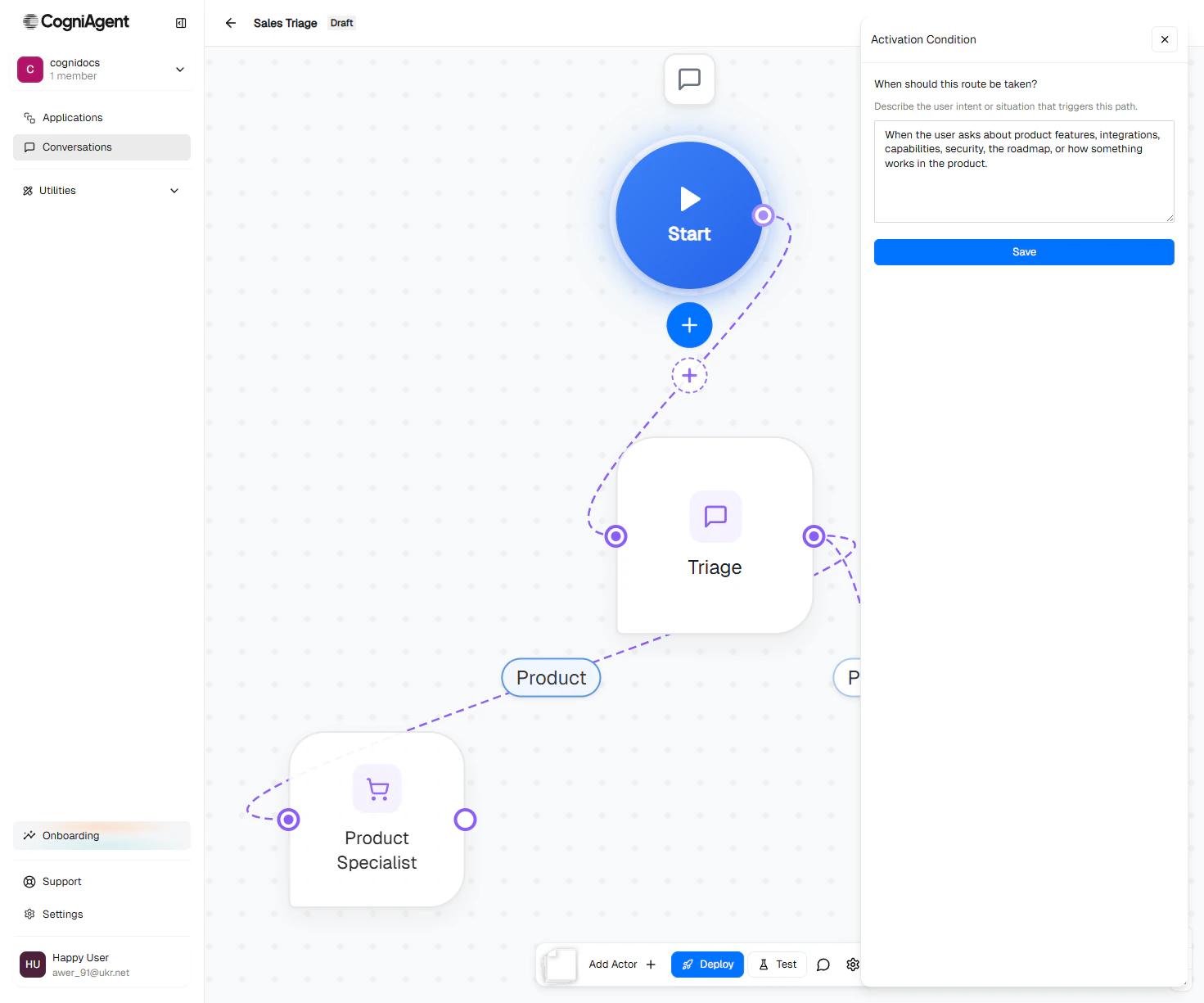
The route panel. The activation prompt goes under When should this route be taken?
How routing actually works
At each turn, the platform asks:- Is the current actor still on-topic? If yes → keep talking.
- If no, is there a sibling actor whose activation prompt fits? If yes → hand off.
- Otherwise → escalate to the global router, which can pick any top-level actor or reply directly for cross-cutting questions.
Canvas basics
The canvas is where you lay the agent out: Start, the actors, and the routes between them. The control rail runs down the left side of the canvas. Hover a button to see its name.An empty agent
A new agent shows Start and a dashed Add your first actor card next to it. Click the card to create your first actor.Add an actor
You can add an actor from four places:- Add Actor in the rail. It suggests a name (Actor 1, Actor 2…) that you can type over.
- The + under Start.
- The Add your first actor card on an empty agent.
- Add actor in a selected actor’s toolbar. The new actor hangs off that actor.
Select, open and close
- Click an actor to select it. A toolbar appears above it: Edit, Add actor, Color and Delete. Color shows only on actors routed straight from Start.
- Double-click an actor, press Enter on it, or click Edit to open its panel. While a panel is open, clicking another actor opens that actor instead.
- Click an empty part of the canvas to close the actor, route, settings, Issues and version history panels.
- Click Start to open the agent’s channels, or click one of the channel icons around it to open that channel. An icon with a red border needs attention.
Routes on the canvas
- Connect two actors by dragging from the dot on the right side of one actor onto another. The route panel opens, so you can say when the router should take it. A route can’t loop back to the same actor, and two actors can’t have two routes between them in the same direction.
- Solid or dashed. A route is a solid line. It’s dashed only when it has an Only when… condition.
- When? A route with no label yet shows a When? pill. Click it, or a route’s label, to open the route panel.
Colors
Each route out of Start begins a branch, and every actor down that branch shares one color. To change it, select the branch’s first actor (the one routed straight from Start) and pick a color from Color. A new branch saves its color with its first actor, and so does picking one, so a branch keeps its color when you add or delete other branches.Tidy up, minimap and undo
- Tidy up the canvas in the rail lays Start and the actors out along their routes. Sticky notes and actors with no route stay where they are. A toast offers Undo.
- The minimap appears in the bottom-left corner once the agent has four actors. Drag or zoom inside it to move around.
- Ctrl+Z (⌘Z on a Mac) undoes the last move, tidy, new actor, new route or delete on the canvas. Ctrl+Shift+Z or Ctrl+Y redoes it. While you’re typing in a field, these keys undo your typing instead.
Delete
Select an actor and click Delete in its toolbar, or press Delete or Backspace while no panel is open. Its steps and routes go with it. Nothing asks first: a toast offers Undo, and Ctrl+Z works too. Deleting three or more actors at once, with a selection box, asks you to confirm. To delete a route, click its line, then the trash icon above its label (or press Delete). You can also click Delete route in the route panel.Issue dots
An actor with a problem shows a dot on its bottom-right corner: red when the problem blocks a deploy, amber when it’s only worth a look. Hover the dot for the count, and click it (or Issues in the rail) to open the list with the details.A simple worked example
The flow used throughout these docs: What happens when a user opens the widget and types “how much does Acme Pro cost?”:- The Start node receives the message and routes it into the first actor (Triage).
- Triage’s activation isn’t matched on this turn — but the Pricing edge’s activation prompt clearly fits. The platform routes directly to Pricing Specialist.
- Pricing Specialist replies using the pricing info from global context.
Next
Context and inheritance
How information moves between actors so the user never repeats themselves.
Focus modes
How strictly an actor sticks to its job when the user changes topics.
Execution modes
Inbound or Outbound — does your agent wait for conversations, or start them?
Configure an actor
The full field-by-field guide to setting up an actor.