
Documentation Index

Fetch the complete documentation index at: https://docs.cogniagent.ai/llms.txt

Use this file to discover all available pages before exploring further.

Most conversational AI systems force you to either repeat the same context block on every agent (“you work for Acme Inc., we sell …”) or pass state around manually. Conversation Flows handles this with layered context inheritance — write once, inherit where it matters.

The three layers

Every actor’s system prompt is built from three layers, in order:
  1. Global context — Set on the flow itself. Inherited by any actor that opts in.
  2. Parent actor context — If actor B inherits from actor A, B sees A’s context too. Inheritance is explicit, not automatic up the chain.
  3. The actor’s own context + instructions — Always included.
This means you can write your company introduction once at the flow level and have every actor inherit it, while still letting each actor have its own specialised knowledge.

Context vs Instructions

A subtle but important distinction:

Context (inheritable)

Background knowledge. What’s true about the world this actor lives in.Example: “Acme sells two products: Pro at $49/seat/month and Enterprise on annual contract.”Child actors can inherit it.

Instructions (private)

Behaviour rules. What this specific actor should do, this turn.Example: “Greet the user and figure out whether they want product or pricing help. Hand off as soon as you know.”Never inherited.
Why the split? Behaviour is actor-specific by design — if a child inherited a parent’s instructions, both would try to do the same job. Context is universally useful, so it’s the part that travels.

Setting global context

Open Flow settings → General and fill in Global Context:
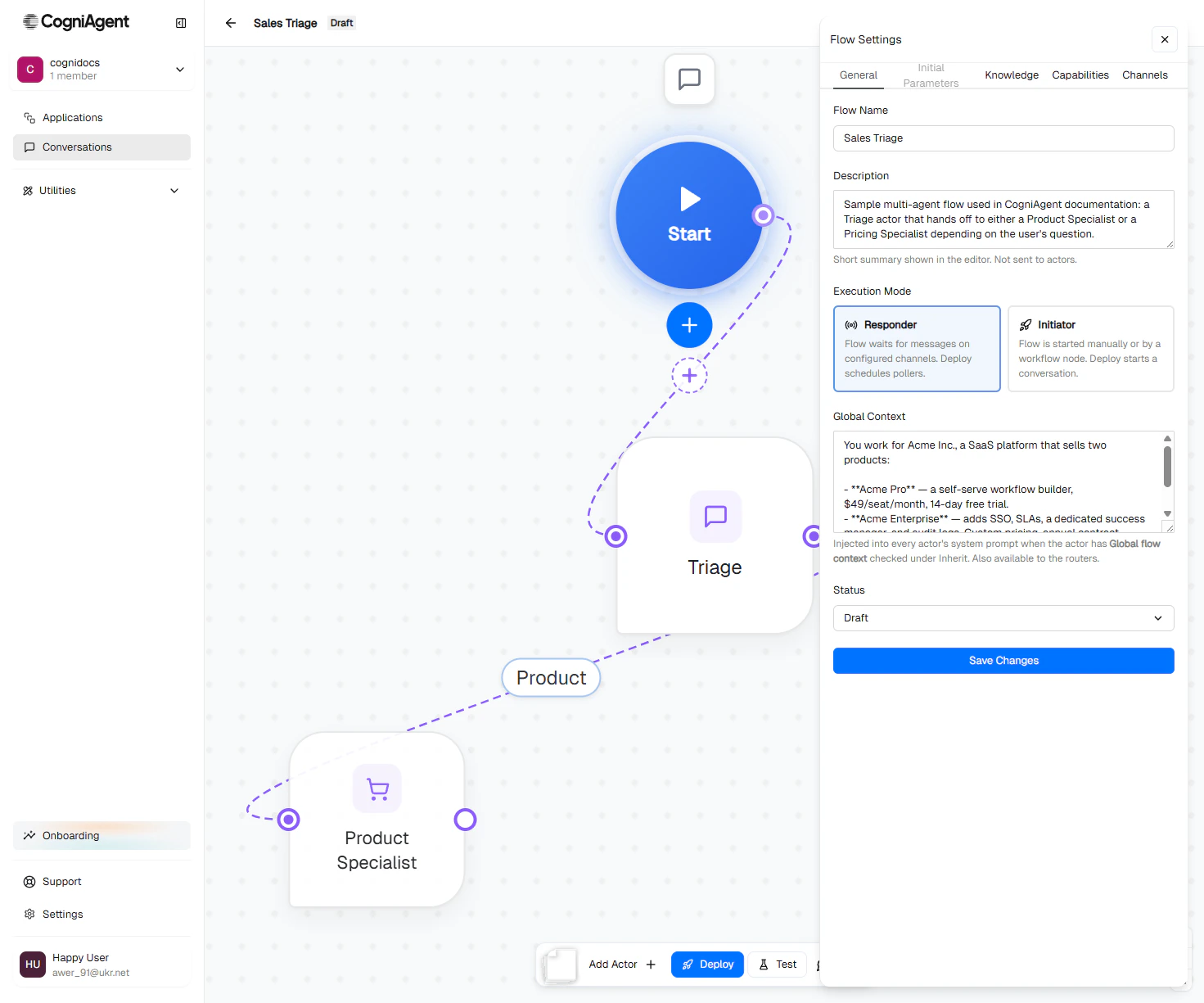
Flow settings with global context filled in
This text gets injected into every actor whose Inherit Context → Global flow context checkbox is checked (the default for new actors).

Inheriting from a parent actor

When you create an actor that’s a child of another (drawn by dragging a routing edge from parent to child), the child gets an Inherit Context list:
Triage actor config showing inherit context checkboxes
Each checkbox controls one source:
  • Global flow context — opt in to the flow’s global context.
  • <Parent actor name> — opt in to a specific ancestor’s context.
  • Collected information so far — automatic slot summary (the values collected by ask-question steps, see Step builder).
Inheritance is not automatic up the chain. If actor A inherits from B, and B inherits from C, then A doesn’t get C unless you also check C on A. This sounds annoying at first but it’s the right default — it forces you to think about what each agent actually needs.

A worked example

The Sales Triage flow has three actors. Their context wiring:
  • Triage has only the global context. It’s a router — doesn’t need product-specific knowledge.
  • Product Specialist has the global context plus its own detailed knowledge of features and integrations.
  • Pricing Specialist has the global context plus its own knowledge of pricing tiers and the Enterprise commercial model.
When a user asks “how much does Pro cost?”, Pricing Specialist’s compiled prompt looks like:
You work for Acme Inc., a SaaS platform that sells two products:
- Acme Pro — a self-serve workflow builder, $49/seat/month, 14-day free trial.
- Acme Enterprise — adds SSO, SLAs, a dedicated success manager, ...
Always be friendly, concise, and professional.

You handle pricing questions for Acme Inc. You know the seat-based Pro pricing,
the volume discount tiers, the Enterprise commercial model (annual contract,
custom quote), and the free-trial mechanics.

[Pricing Specialist's instructions go here...]
If you edit the global context, every actor that inherits picks up the change on its next turn — no redeploy needed.

Slots — automatic memory

There’s a fourth layer that works differently: slots. Slots are pieces of information collected during a conversation — typically by ask-question steps. They include things like the user’s name, their email, the order number they’re asking about, etc. By default, every actor sees a “Collected information so far” block summarising the slots. This means:
  • Triage asks: “What’s your name?” → user says “Sarah” → slot user_name = "Sarah"
  • The conversation hands off to Pricing Specialist
  • Pricing Specialist’s prompt automatically includes: Collected information so far: user_name = Sarah
Sarah doesn’t have to repeat her name. The slot survives every handoff for the lifetime of the conversation. You can turn this off per actor (uncheck Collected information so far) for privacy-sensitive branches.

Anti-patterns to avoid

Don’t copy-paste context across siblings. If three actors all need “you work for Acme Inc.”, that goes in global context — not on each actor. Future edits become one-line changes instead of three.
Don’t put behaviour rules in Context. “Always reply in three sentences” belongs in Instructions. If you put it in Context, child actors will inherit it and behave identically to the parent — that’s almost never what you want.
Don’t forget to opt in to ancestors. If A inherits from B but you don’t also check Global, A won’t see global context. The platform doesn’t auto-walk the chain.

Next

Focus modes

How strictly each actor sticks to its job mid-conversation.

Configure an actor

The full field-by-field guide.