
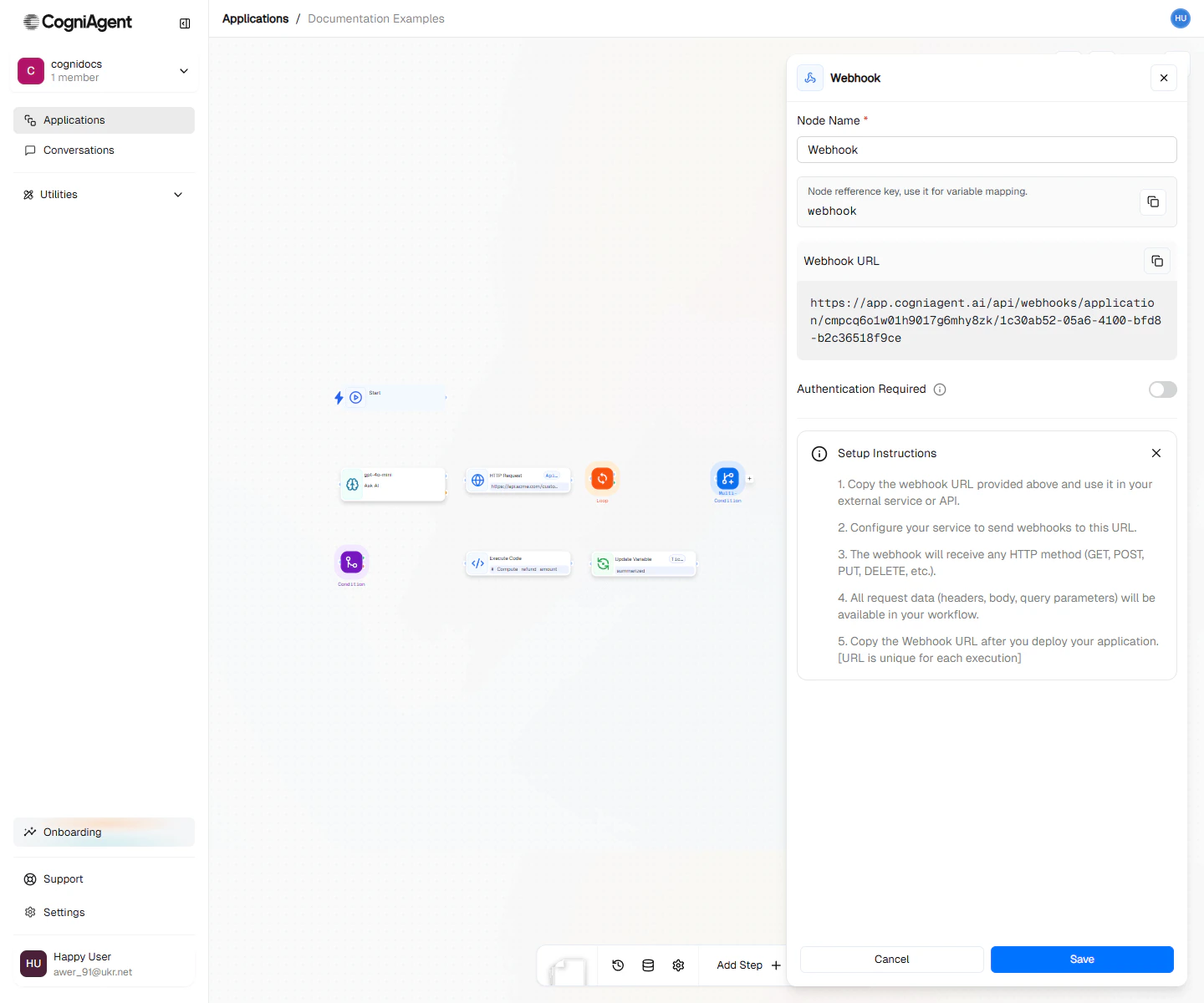
Webhook configuration — CogniAgent generates the address and shows what to send.
When to use
- Form submissions — run a workflow when someone fills out a form on your website, Typeform or a survey.
- Other apps — let Zapier, Make or any app that can send web requests start your workflow.
- Your own software — call your workflow from your website, backend or scripts.
- AI answers on demand — send a question and get the workflow’s answer back in the same call.
Get your webhook address
1
Add and save the node
Add a Webhook node to your workflow and save it.
2
Copy the address
Open the node and copy the Webhook URL.
3
Run the workflow
Start your workflow. Calls to a stopped workflow are refused.
Send data to your webhook
Your webhook accepts any method:GET, POST, PUT, PATCH or DELETE. Send JSON in the body for structured data. Anything else arrives as text.
{{webhook_1.body.email}}, {{webhook_1.headers.user-agent}} or {{webhook_1.queryParams.source}}. Replace webhook_1 with your node’s key.
Choose what the caller gets back
Pick an option under Response in the node settings.Acknowledge right away (default)
Acknowledge right away (default)
The caller gets an answer as soon as the call is received. Your workflow keeps running in the background.Use this for apps that only need to know you received their data, like GitHub, Stripe or form tools.
Return the output of one step
Return the output of one step
Choose a step that runs after the webhook. The caller gets that step’s output as soon as it finishes, even if later steps are still running.Use this when one step produces the answer, for example an LLM reply, and later steps only log or notify.
- If the step fails, the call answers with an error.
- If the step does not run for this call, for example because it sits on the other side of a condition, the call answers with an empty result.
- If the step runs inside a loop, the call answers once the loop is done, with the step’s most recent output.
- If you choose a Human Step, the call answers with the person’s decision.
- For a coworker, choose a step on its result branch. The coworker step itself only says the work started.
Return the output of the last steps
Return the output of the last steps
The caller gets an answer when everything this call started has finished. The answer holds the output of each last step: a step that ran and was not followed by another step that ran.Steps inside a loop are never last steps, including the branches a Human Step inside the loop starts. The loop is, or the steps that follow it. To return what the loop produced, add a step after it that collects the results. Tools that an LLM step calls are not last steps either; the LLM step is.Use this when the result comes from the end of the workflow, or from several branches.
Wait for the result
Wait for the result sets how long the call waits, from 0 to 50 seconds. The default is 25.- The result is ready in time: the caller gets
200with the result. - The result is not ready: the caller gets
202 Acceptedand a result link to fetch it later. The workflow keeps running. - Set 0 to always answer with the result link right away.
Location header. The Retry-After header says how many seconds to wait before you ask again.
Fetch a result later
Send aGET request to the result link. Repeat it until the status is no longer 202.
Choose the answer body
Answer body sets the shape of a successful answer.- Result with run details
- Result only
The default. The result sits under
result, next to the run’s details.424 Failed Dependency, whatever the answer body. The workflow failed, not the webhook, so callers and proxies do not mistake it for a temporary outage and retry it:
What counts as finished
A call is finished when nothing it started is still queued or running.- Conditions, branches and merges — every branch the call took counts.
- Loops — the call waits for every iteration and for the steps after the loop.
- Pause steps — the call waits through the pause. Keep Wait for the result short and fetch the result later.
- Human Step — the call waits for the person to answer. Fetch the result later. Result links expire after 24 hours.
- Coworkers — a step that waits for a coworker’s result keeps the call open until the result arrives.
- Conversations — a Chat & Voice Agent can keep sending events for days, so the call does not wait for it, and the steps its events start are never part of the answer.
- Custom events and variable changes — a branch that one of these starts runs on its own and is not part of the call.
- Retries — when CogniAgent retries part of a run after a temporary error and the retry succeeds, the call does not fail.
- Stop — if someone stops the run, the result link answers with the
execution_stoppederror.
When the webhook sends data into a workflow that is already running, for example in single-instance mode, the answer belongs to the most recent run. Any other runs that received the data are listed under
dispatchedExecutions.Keep your webhook secure
Turn on Authentication Required and generate an Auth Token. Callers then send it with every request:X-Api-Key, to send the bare token in that header instead. Calls without the right token get 401.
Treat result links like passwords:
- Each link carries its own secret token. Anyone with the link can read that one result.
- Links expire 24 hours after the run’s last activity.
- You can send the token in an
X-Webhook-Run-Tokenheader instead of the link, to keep it out of logs.
Example: answer a website question with AI
1
Receive the question
Add a Webhook node. Under Response, choose Return the output of one step.
2
Write the answer
Connect an LLM node with the prompt:
3
Pick the answer step
Back in the Webhook node, choose the LLM node as Step to answer with. Set Answer body to Result only.
4
Log the question
Connect an HTTP Request after the LLM node to save the question to your CRM. The caller already has the answer and does not wait for it.
Example: triage new GitHub issues
GitHub only needs to know you received each event, so keep Acknowledge right away. Point GitHub at your webhook address and select issue events.Tips
Settings
string
default:"Webhook"
What to call this node on the canvas.
string
default:"webhook_1"
A short code to reference this node’s data, like
{{webhook_1.body}}.string
default:"new_execution"
In multi-instance workflows, whether each call starts a new run or joins a running one. See Execution modes.
boolean
default:"false"
Refuse calls that do not carry the auth token.
string
The token callers send as
Authorization: Bearer <token>.string
Send the bare token in this header instead of
Authorization.string
default:"acknowledge"
What the caller gets back:
- acknowledge — answer right away.
- node_output — answer with the output of the step in
responseNodeId. - last_nodes — answer with the output of the last steps.
string
The step whose output answers the call. Used with
node_output.number
default:"25"
How long the call waits for the result, from 0 to 50 seconds. After that the caller gets a result link.
string
default:"envelope"
- envelope — the result with run details.
- raw — the result only.
Outputs
object
The data that was sent: JSON fields, or the text itself.
object
The request headers, with lowercase names.
object
Values from the address, like
?userId=123, which gives userId: "123".Related nodes
HTTP Request
Call other services from your workflow.
If / else
Check incoming data before you act on it.
Loop
Process every item a caller sends.
Execution modes
Decide whether each call starts its own run.