
Inbox/Invoices, a coworker writes a report to Reports, a scanner uploads a batch: the workflow takes it from there.
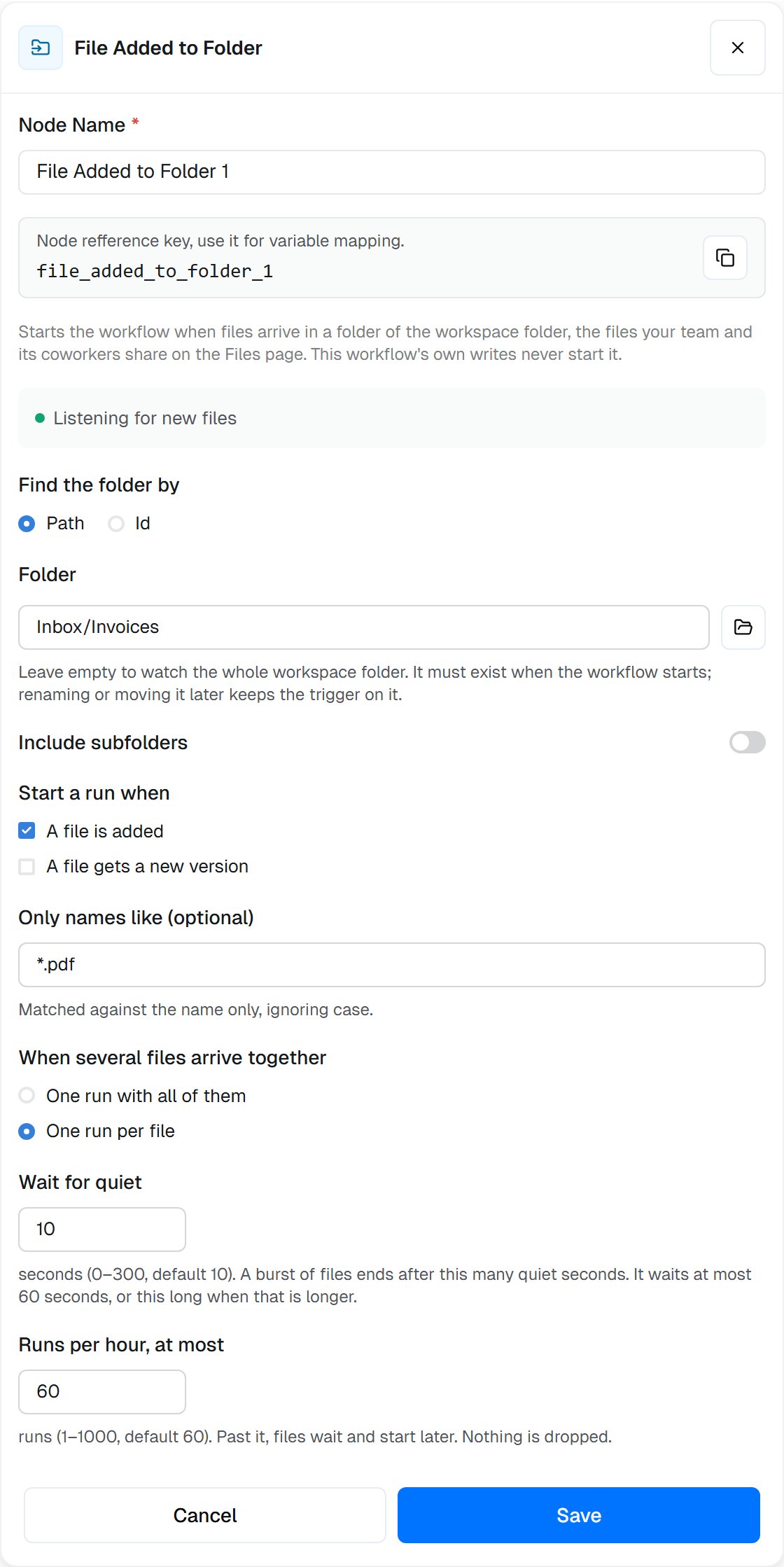
A trigger that starts one run for each PDF added to Inbox/Invoices, and says it is listening.
The trigger is offered in the step picker only where your workspace has Workspace files. See Workspace files for the folder itself.
When to use
- Process what people drop in a folder: invoices into
Inbox/Invoices, signed contracts intoContracts/Signed - React to a coworker’s work: summarize or send on each report a coworker writes to
Reports - Handle uploads in bulk: a batch of 200 scans arrives, and one run handles them all
- Follow changes: start a run each time a price list gets a new version
When not to use it
- Files already in the folder never start it. To process those, run a Workspace Files List a folder step on a schedule, or from a Start trigger.
- Files an app receives, like Gmail attachments or Google Drive uploads, use that app’s App Trigger.
Settings
string
default:"path"
Find the folder by: Path or Id.
string
Folder to watch, like
Inbox/Invoices. Leave it empty to watch the whole workspace folder. It must exist when the workflow starts; renaming or moving it later keeps the trigger on it. Pick it with the folder button, or type it. A trigger is set up once, when the workflow starts, so it can’t use {{…}}.string
The folder’s id, when Find the folder by is Id: picked from the folder, or pasted from the Files page.
boolean
default:"false"
Include subfolders: also start on files in folders inside it. A folder moved or copied in brings its files along.
array
default:"[\"added\"]"
Start a run when: A file is added and, or, A file gets a new version. At least one.
string
Only names like (optional): only names that match, like
*.pdf or invoice-*.{pdf,png}. Matched against the name only, ignoring case.string
default:"batch"
When several files arrive together: One run with all of them (
batch) or One run per file (each).number
default:"10"
Wait for quiet, in seconds (0–300). A burst of files ends after this many quiet seconds. It waits at most 60 seconds, or this long when that is longer.
number
default:"500"
Files per run, at most (1–1,000), with One run with all of them. A larger burst starts more runs.
number
default:"60"
Runs per hour, at most (1–1,000). Past it, files wait and start later. Nothing is dropped.
What starts a run
A file counts as added when it is uploaded or created in the folder, copied or moved into it, renamed into it, or restored from the Trash into it. It gets a new version when someone saves it again.- This workflow’s own writes never start it, also when it writes into the folder it watches.
- Other writers do. People, coworkers and other workflows all start it, including a workflow or coworker this one asks to do something. Don’t let them write back into the watched folder, or each run starts the next.
- Each version starts at most one run. Moving a file out and back in doesn’t start it again.
- Files that were there before the workflow started, or that arrived while it was stopped or the trigger was turned off, never start it.
- A file that leaves before its run starts (deleted, or moved out while its burst is still waiting) doesn’t start one. A file renamed inside the folder while it waits starts its run under the new name.
- Nothing is dropped. Past the hourly limit, files wait and start runs as the hour frees up.
On the canvas
While the workflow is running, the trigger’s card shows the folder it watches, the choices that differ from the defaults, and what it is doing:- Listening for new files: it starts runs as files arrive.
- Paused: 60 runs an hour reached: the hourly limit holds files back. Hover the line to see how many are waiting and when they start. They start on their own.
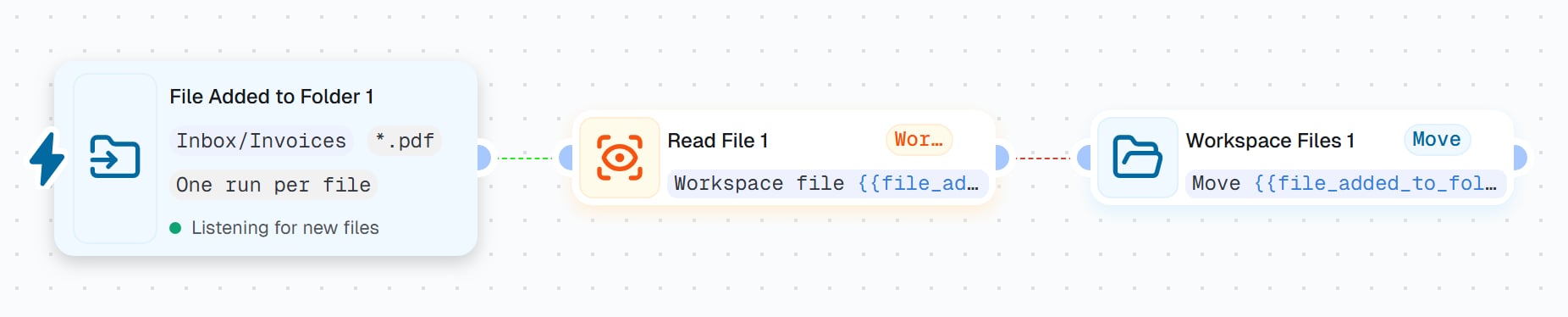
Invoice intake: each PDF added to Inbox/Invoices is read, then moved to Inbox/Done.
Example: invoice intake
1
Watch the folder
Add File Added to Folder: Folder
Inbox/Invoices, Start a run when A file is added, Only names like *.pdf, One run per file.2
Read the invoice
Add Read File: Read Workspace file, Find it by Id or earlier step,
{{file_added_to_folder_1.file}}.3
Pull out the fields
Add an LLM step that extracts the invoice number, supplier and total from
{{read_file_1.content}}, and send them on to your accounting app.4
File it away
Add Workspace Files: Move, Find it by Id or earlier step,
{{file_added_to_folder_1.file}}, Destination folder Inbox/Done. Inbox/Done is outside the watched folder, and this workflow’s own writes never start it anyway.{{file_added_to_folder_1.files}} instead and use {{loop_1.currentItem}} in each step.
Outputs
array
The files of this run, oldest first, ready for a Loop, Read File or an LLM attachment.
files[0] is the first.object
The first file (the only one when each file starts its own run), with
fileId, versionId, path, name, size and mimeType. file.path, file.name and file.fileId are offered on their own too. To act on the file, use its id: it survives a rename or a move.number
How many files this run received.
array
What happened to each file, oldest first:
event (added or changed), file, actor (who: user, coworker or workflow) and at (when). {{file_added_to_folder_1.events[0].actor.type}} says who added the first file.object
The watched folder:
id and path.string
batch (one run per burst of files) or each (one run per file).boolean
true when a folder that arrived held more files than one run lists.string
When the run was started, in ISO format.
file_added_to_folder_1, the key a trigger gets when you keep its default name. Yours is shown under Node Name.
Related
Workspace Files
Write, list, move, copy and delete files from a workflow.
Read File
Read the text of the file that arrived.
Workspace files in workflows
Every way a workflow works with the shared folder.
Loop
Handle each file of a batch in turn.