
What’s on screen
Three things, and you’ll use all of them. The conversation in the middle — your messages, your coworker’s replies, and every step it took in between. Nothing is hidden; if it opened a file or searched for something, that’s a row you can expand. The files panel beside it — everything in the task. Anything your coworker produces lands here. See Files. The message box at the bottom, which does more than it looks like./ opens the command menu, @ points at a file or another coworker, and the paperclip attaches a file.
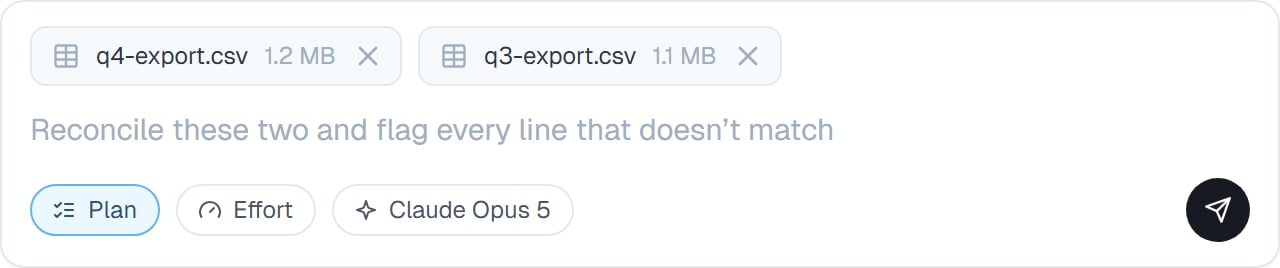
Two files attached, and the controls that shape the answer — mode, effort and model — sitting under the box.
Asking well
The single biggest difference in output quality comes from the first message. Say what you want to end up with. “A one-page summary I can send to my boss” produces something different from “look into this”. Attach the real thing. Upload the export rather than pasting three rows of it. Say what you already know. Saving your coworker from re-deriving context you have is free speed. Say what to avoid. “Don’t email anyone” is worth writing if that matters.Steering while it works
You don’t have to wait for it to finish before saying something. Type while it’s working. Your message is queued and picked up as soon as the current step settles. Queued messages appear above the box, and you can edit or cancel one before it’s sent. Correct it mid-task. “Stop doing it that way” lands and it adjusts. Stop it. If it’s clearly off track, stop it and re-ask. Faster than watching it finish something wrong.Finishing
When your coworker considers the job done, it posts a short wrap-up you can expand for the detail. A finished task isn’t closed. Send another message and it picks straight back up with everything it knew — which is why “actually, also do X” works without re-explaining. You can mark a task done from the header, and even then a new message re-opens it.Common questions
Can I close the tab while it works?
Can I close the tab while it works?
Yes. It keeps working. Come back whenever and the whole conversation is there.
Will it ask before doing something significant?
Will it ask before doing something significant?
Anything leaving your workspace waits for approval. See Approvals and Permission rules.
What if I change my mind halfway?
What if I change my mind halfway?
Just say so. Mid-task changes of direction are normal and it doesn’t need to start again.
Should one task cover several jobs?
Should one task cover several jobs?
Related work, yes — the shared context helps. Genuinely separate jobs are better as separate tasks. See Managing your tasks.
Can I see what it actually did?
Can I see what it actually did?
Every step is in the conversation and can be expanded. See Watching progress.
Next steps
Slash commands
Everything you can type.
Watching progress
Following the work.
Plan mode and Build mode
Agree the approach first.
Attaching and mentioning files
Getting files into the conversation.