
The task genuinely stops and waits — as long as you take. Approve, and it carries straight on.
What needs your yes
The default is straightforward, and worth knowing exactly:Sends, changes, and deletions pause for your approval.So reading, searching, analysing and drafting all happen freely. Sending the email, updating the record, deleting the row — those wait. A few things always ask, whatever else you’ve set:
- Starting a conversation with a person — see Talking to people
- Creating or changing one of your automations
- Letting a dynamic workflow use one of your apps — once per run, before it starts
What an approval looks like
A card in the conversation showing what your coworker wants to do, before it does it. Not “may I send an email” — the actual recipient and what it wants to ask. A handover card is the exception. It shows your coworker’s one-line summary and what approving costs, not its full request. You approve, or you don’t. Declining isn’t a failure: your coworker carries on with the rest of the job and tells you what it skipped.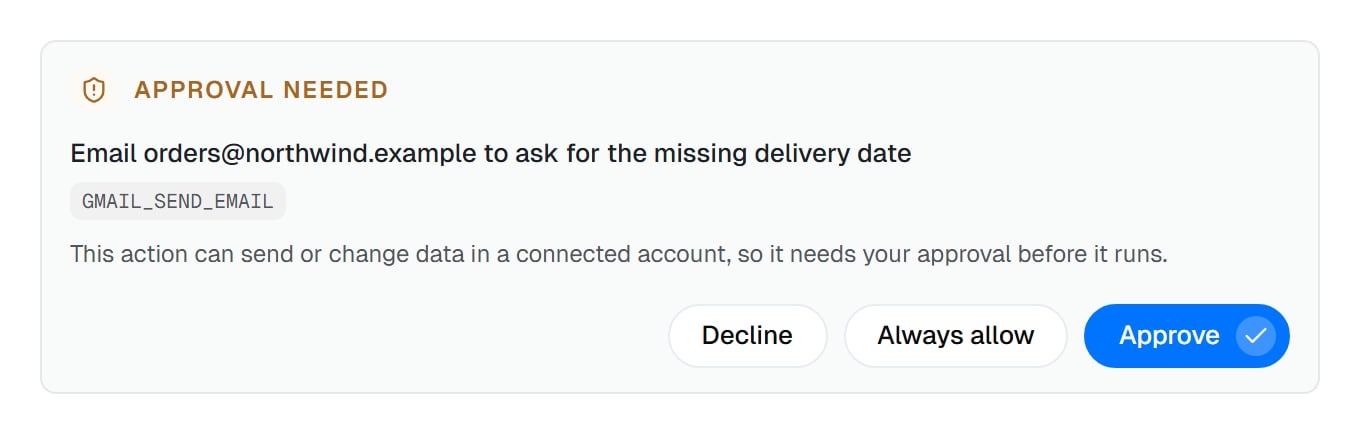
Not "may I send an email" — the actual recipient, what it wants to ask, and why it needs your approval.
A different kind of pause: being asked a question
Sometimes your coworker doesn’t want permission, it wants information. Which of two files is the current one. Whether an unusual figure is real. Which of three approaches you’d prefer. That’s a question card rather than an approval, and it’s a good sign — a coworker that asks is one that isn’t guessing on your behalf.Being asked less
Approving the same thing every day is a waste of your attention, and the fix isn’t to switch safety off.Permission rules
Say once that a specific action is always fine, or always forbidden. The precise tool.
Standing permission
For handovers, choose Always allow once and your coworker stops asking. Follow-ups and stops ask separately.
Narrow the connection
Turn off the actions you never want. Nothing to approve if it can’t be done.
Switch a capability off
The blunt instrument, for capabilities a coworker genuinely doesn’t need.
The three ways a person gets involved
Easy to confuse, so plainly:Common questions
What happens if I never answer?
What happens if I never answer?
The task waits. It doesn’t time out and act anyway, and it doesn’t fail — it sits there until you get to it.
Can I approve something in advance?
Can I approve something in advance?
Not a specific action before it exists, but a permission rule does exactly this for a whole class of action.
What if I approve something by mistake?
What if I approve something by mistake?
Tell your coworker immediately — it can often undo or follow up. This is the argument for reading the card rather than clicking through it.
Does declining stop the whole task?
Does declining stop the whole task?
No. Your coworker carries on with everything else and tells you what it couldn’t do.
Can a coworker do something risky without asking?
Can a coworker do something risky without asking?
Only where you’ve allowed it — with a permission rule, by granting standing permission, or by approving a dynamic workflow’s apps for one run. The default is to ask.
Next steps
Permission rules
Decide once instead of every time.
Automatic checks
Rules that run without asking at all.
Connecting your apps
Control at the action level.
Talking to people
What always asks first.