
What opens in place
Click a file in the panel and it opens beside the conversation.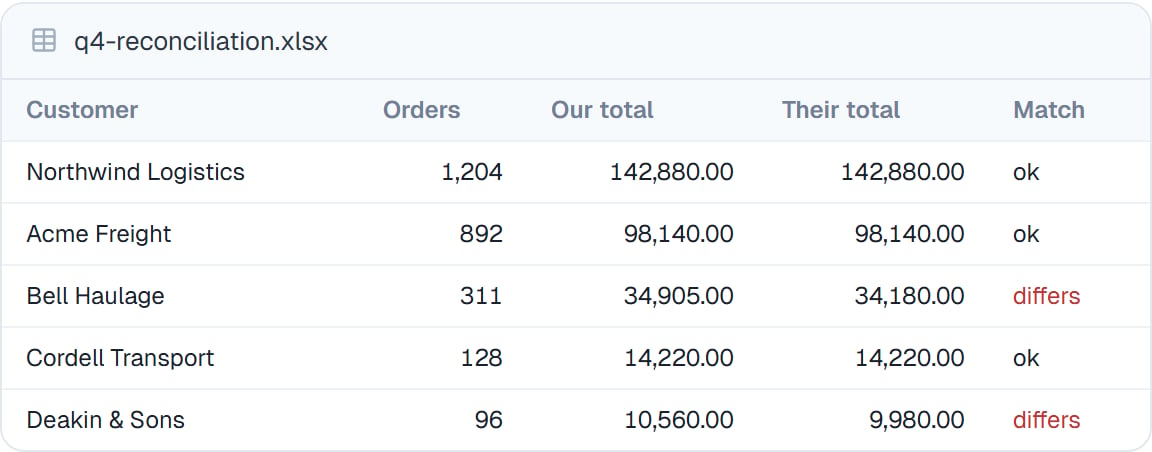
A result opened in place. You can read the numbers your coworker is talking about while you talk about them.
Why this matters
The point isn’t convenience. It’s that checking your coworker’s work should be easier than doing it yourself, or you won’t check. A result you have to download, find in your downloads folder and open in another application is a result you’ll skim and accept. One that opens next to the conversation, where you can read the number and compare it against what your coworker said, is one you’ll actually verify.Good to know
Previewing doesn’t change anything. To edit, use the editor for text files — see The file manager — or ask your coworker.
Common questions
Can I search inside a PDF?
Can I search inside a PDF?
Yes. The viewer has a search box that finds text in the document, and a page rail for jumping straight to a page.
What if a file will not open?
What if a file will not open?
Download it and open it locally. Anything unusual still downloads fine even when there’s no preview for it.
Can I see an image my coworker generated?
Can I see an image my coworker generated?
It appears inline in the conversation and as a file in the panel. See Generating images.
Does previewing a large file slow things down?
Does previewing a large file slow things down?
Large files load progressively rather than all at once, so a long PDF opens quickly and fills in as you page through.
Next steps
Seeing what changed
Compare before and after.
The file manager
Where previews open from.
Working with code and files
How the files got made.
Files overview
Back to the basics.