
What it does
An edit appears in the conversation as a card showing the before and the after, line by line. Removed lines on one side, added lines on the other, unchanged content in between for context. You don’t have to open the file, remember what it used to say, or trust a summary. The change is right there in the conversation, at the moment it happened.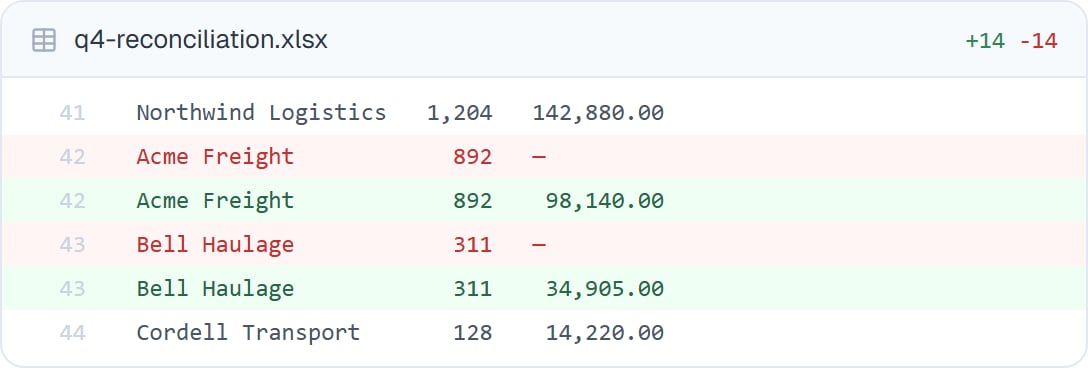
Two rows that had no total now have one. You can see which lines changed and what they changed to.
Why it’s the most important thing on this page
“I’ve updated the report” is not a verifiable statement. Six changed lines are. The difference matters most when your coworker does something almost right — fixing four figures correctly and one incorrectly. A summary says “corrected the figures”. The change shows you the one that’s wrong.When you’d look
- Any edit to a file you’ll send to someone else
- The first few times a coworker edits this kind of file, to calibrate
- When the summary sounds broader than you expected
- After a long autonomous run, to skim what actually happened
- When a number changed and you want to know which
Good to know
Your coworker edits its own copy in the task’s private workspace. Your original file isn’t touched until you download the result and replace it yourself.
Common questions
Can I undo a change?
Can I undo a change?
Ask your coworker to revert it — it can, and the original is still in the task. Or download the earlier version.
What about a spreadsheet, where lines are not the point?
What about a spreadsheet, where lines are not the point?
Open the result in the preview and read it as a table. For a spreadsheet, seeing the finished thing is usually clearer than a line comparison.
Does it show every change?
Does it show every change?
Every edit it makes to a file appears in the conversation as it happens. Nothing is changed off the record.
What if there are hundreds of changes?
What if there are hundreds of changes?
That’s normal on a bulk job. Skim for the unexpected, or ask your coworker to summarise the kinds of change it made and check one of each.
Next steps
Previewing files
Open the finished result.
Thorough review
Have it check before you do.
Watching progress
Everything else it did.
Files overview
Back to the basics.