
/ in the message box and a menu appears: the shortcuts that steer your coworker, plus everything you’ve taught it.
The commands
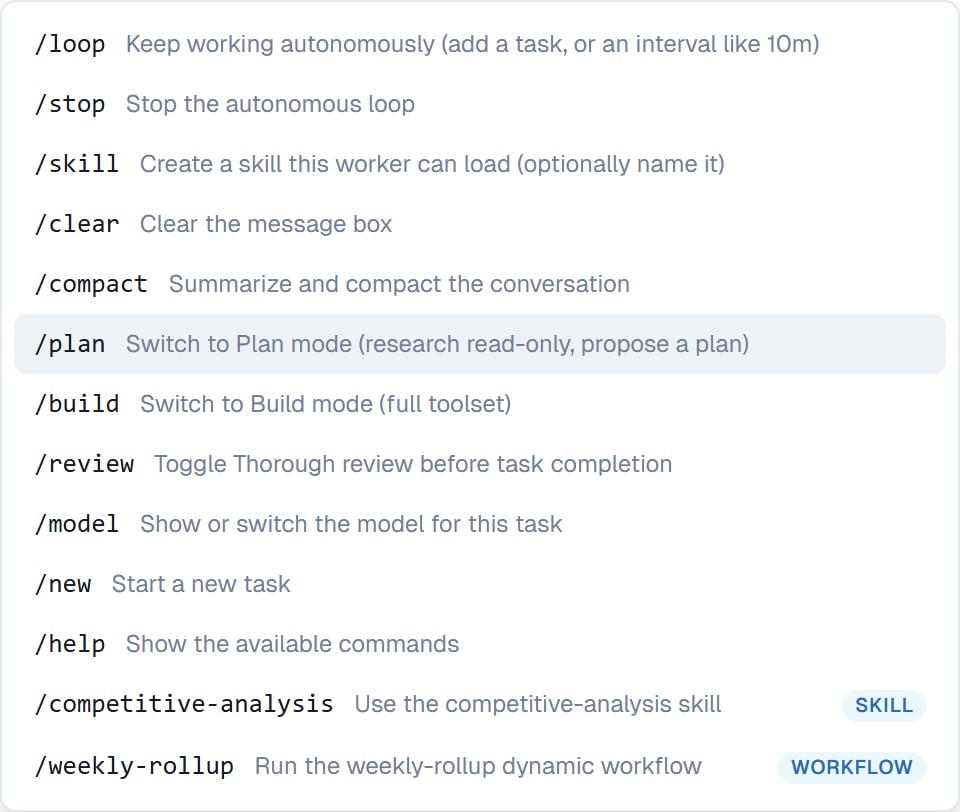
The command menu. Every entry carries its own one-line description, so there's nothing to memorise.
Your own commands too
The menu isn’t only the built-in list. It also holds:- Your skills — each shown as “Use the name skill”. See Running a skill.
- Your saved dynamic workflows — each shown as “Run the name dynamic workflow”. See Dynamic workflows.
/competitive-analysis Northwind runs your procedure against that subject.
If a dynamic workflow’s name clashes with a built-in command or one of your skills, it doesn’t get a second row in the menu — one
/deploy that does two different things would be worse. You can still ask for it in plain words.The four worth knowing
Most people only ever use a handful./plan before anything expensive or irreversible. Your coworker researches and proposes an approach without changing anything, and you agree it first. See Plan mode and Build mode.
/review when being wrong is costly. It checks its own work properly before handing back. See Thorough review.
/loop for a long job you want finished in one go rather than in check-in-sized pieces. See Keep working.
/compact when a conversation has gone on a long time and you’d rather not start a fresh task. See Long conversations.
Good to know
/clear empties the message box you’re typing in. It doesn’t clear the conversation.Common questions
Do I need commands at all?
Do I need commands at all?
No. Plain English covers almost everything — “plan this first” works as well as
/plan. Commands are quicker once you know them.Can I add my own commands?
Can I add my own commands?
Yes, by writing a skill or saving a dynamic workflow. To save one, click Make repeatable on its run card once the run completes. Both appear in the menu by name.
What is the difference between /loop and a schedule?
What is the difference between /loop and a schedule?
/loop keeps working on the task in front of you. A schedule starts a fresh task on a timetable.Does /new lose the current task?
Does /new lose the current task?
No. It starts a fresh one; the old task stays and can be returned to at any point.
Next steps
Plan mode and Build mode
The two most useful commands.
Running a skill
Your own entries in the menu.
Effort and model
What /model changes.
Keep working
What /loop does.