
The two modes
Plan mode — your coworker can look but not touch. It researches, reads files, works out what’s involved, and comes back with a proposed approach. Nothing is changed, nothing is sent. Build mode — the full toolset. This is the normal way a coworker works. Switch with/plan and /build. The current mode shows as a chip under the message box, so you always know which one you’re in.
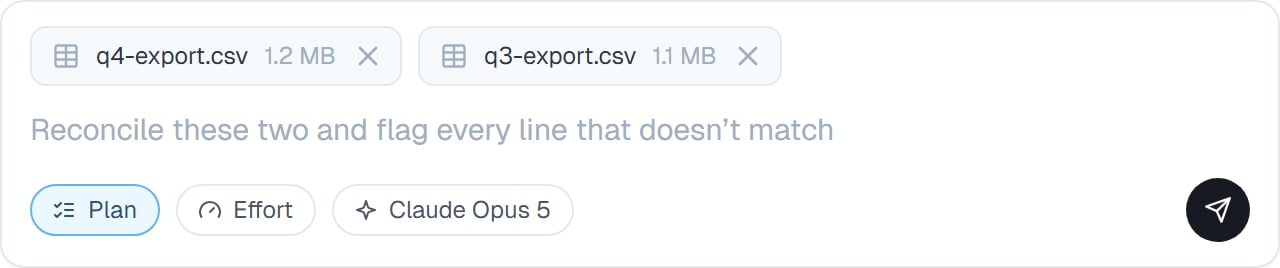
Plan mode is on — your coworker will research and propose, not act.
Why plan first
Your coworker is fast, which is exactly the problem on a job where the wrong approach is expensive. Plan mode puts a checkpoint between “I understand the task” and “I’ve done it”. It’s also the fastest way to find out you were misunderstood. A plan takes seconds to read; an afternoon’s work takes an afternoon to undo.When you’d use it
- Anything touching live customer data
- A job you can’t easily undo — sending, deleting, publishing
- Work you’re going to be judged on
- A task you’ve described badly and know it
- The first time you give a coworker an unfamiliar kind of job
- Anything expensive, so you’re not paying for the wrong thing twice
How it goes
1
Ask in Plan mode
Type
/plan, then describe the job. Your coworker researches without changing anything.2
Read what it proposes
Steps, and usually the assumptions it’s making. The assumptions are the interesting part — that’s where a misunderstanding shows.
3
Correct it
“Skip step 3” or “the file is the second one, not the first”. Still nothing has happened.
4
Switch to Build
/build, and it does the work you agreed.Good to know
Plan mode is genuinely read-only, not a promise to behave. It’s a safe way to point a coworker at something sensitive.
Common questions
Does the plan get followed exactly?
Does the plan get followed exactly?
It’s the agreed approach, not a script. If reality differs — a file isn’t what it expected — your coworker adapts and tells you, rather than following a plan that’s stopped making sense.
Can I go back to Plan mode mid-task?
Can I go back to Plan mode mid-task?
Yes. Switch back at any point, which is useful when a task turns out bigger than expected.
Does planning cost extra?
Does planning cost extra?
A little, and it routinely saves more by preventing work you’d have thrown away.
How is this different from Thorough review?
How is this different from Thorough review?
Plan mode checks the approach before. Thorough review checks the result after. On genuinely important work, use both.
Next steps
Thorough review
The check at the other end.
Approvals
What pauses for you anyway.
Slash commands
How to switch.
Watching progress
Following the plan as it runs.