
What it does
After enough work, patterns show up. The same correction three tasks running. A method that worked well and is worth keeping. Two skills that have drifted into saying almost the same thing. Your coworker spots those and proposes a change. It never makes one on its own — every proposal waits on the Improvements tab for your yes.The four kinds of proposal
The tab shows a count when something’s waiting.
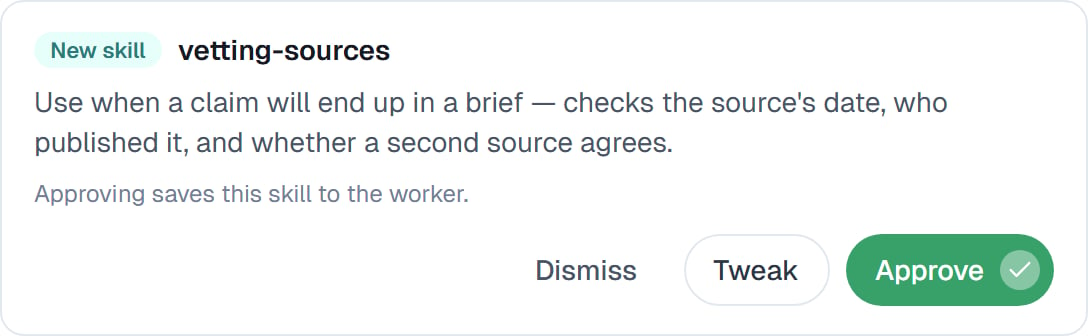
A proposed skill. The line underneath tells you exactly what approving will do.
Your three options
1
Approve
The change is made. A new skill is saved, an edit applied, a note kept.
2
Tweak, then approve
You can edit the proposal before accepting it. Most useful on a new skill that’s close but phrased loosely — fix the wording, then approve.
3
Dismiss
Nothing changes. Worth doing when the proposal is genuinely wrong, so it stops cluttering the tab.
Skill consolidation
Separate from the above, there’s a switch on the Capabilities tab called Skill consolidation, and it’s off by default:A periodic review proposes merges and cleanups of the skills this worker authored. Every change needs your approval.With it on, your coworker periodically reviews the skills it has written for itself and proposes tidying them up — merging two that overlap, retiring one that’s obsolete. It’s worth switching on for a coworker that’s been working for months and has accumulated a lot of skills. There’s little point on a new one.
It reviews skills the coworker wrote itself. Skills you wrote by hand are yours, and it doesn’t propose rewriting them.
Retired skills come back
A skill that’s been retired isn’t gone. There’s an archive on the Improvements tab, and you can restore any of them — or delete one permanently once you’re sure. Useful when a consolidation turns out to have merged away something you wanted.Common questions
Can it change anything without asking?
Can it change anything without asking?
No. Every proposal waits for you. That’s the whole design — a coworker that quietly rewrote its own instructions would be impossible to trust.
What if I ignore the Improvements tab?
What if I ignore the Improvements tab?
Nothing breaks. Proposals accumulate and your coworker carries on as it is. It’s worth a look every couple of weeks.
Does it cost anything?
Does it cost anything?
Proposals come out of work it was doing anyway. Skill consolidation is a separate periodic pass that costs a little, which is why it’s off by default.
Can I undo an approval?
Can I undo an approval?
Edit the skill directly, or restore an earlier one from the archive. Nothing is one-way.
Next steps
How a coworker gets better
The bigger picture.
What a coworker remembers
Where memory notes land.
Creating a skill
Writing one yourself.
Capabilities overview
Where the switch lives.