
A narrated tour, so turn your sound on. Sam, an assistant coworker, hands a renewal brief's research to Nora and its support tickets to Ivy, then puts their reports together.
What it does
Your coworkers are each good at something. Sam keeps your week on track. Nora does your research. Ivy knows your support queue. A renewal brief needs all three. With this on, Sam can hand a piece of the job to Nora. Nora gets a task of its own and works on it with its own instructions, tools and connected accounts. When Nora finishes, its report comes straight back to Sam, who carries on without you nudging it. You approve each handover, and you can open either side at any time.When you’d use it
- “Get the Northwind renewal brief ready for Thursday. @Nora can research their last quarter. Pull in their open support tickets too.”
- “Before you draft the board update, ask Ivy what our biggest support issues were this month.”
- “Get a company profile from the research coworker, then write the outreach email from it.”
- “Ask the data coworker for last month’s numbers from your data warehouse, then write the summary.”
- “Find out what Ivy has already told this customer, then write the follow-up.”
Turning it on
Open the coworker that should do the asking, choose Capabilities, and find Work with coworkers under Collaboration. Turn it on. The row reads:Delegate tasks to your other coworkers and follow up with them as the work goes on. Each delegation waits for your approval until you grant standing permission.

Work with coworkers sits first under Collaboration. Switched on, its icon turns blue.
- Only the asking coworker needs it. Sam needs the switch to hand work to Nora. Nora doesn’t need it to take that work on.
- It applies to new tasks. A task that’s already open keeps the abilities it started with. Start a new task after you switch it on.
How a handover works
Here’s one handover from start to finish. You ask Sam, your assistant coworker, to get the Northwind renewal brief ready for Thursday.Ask, or let your coworker choose
Type @ in the chat box and your other coworkers appear at the top of the menu. Each shows its role and a delegate hint, and files you can mention follow below. Keep typing to narrow the list. Pick Nora and its name lands in your message. That tells Sam to hand Nora that part of the job.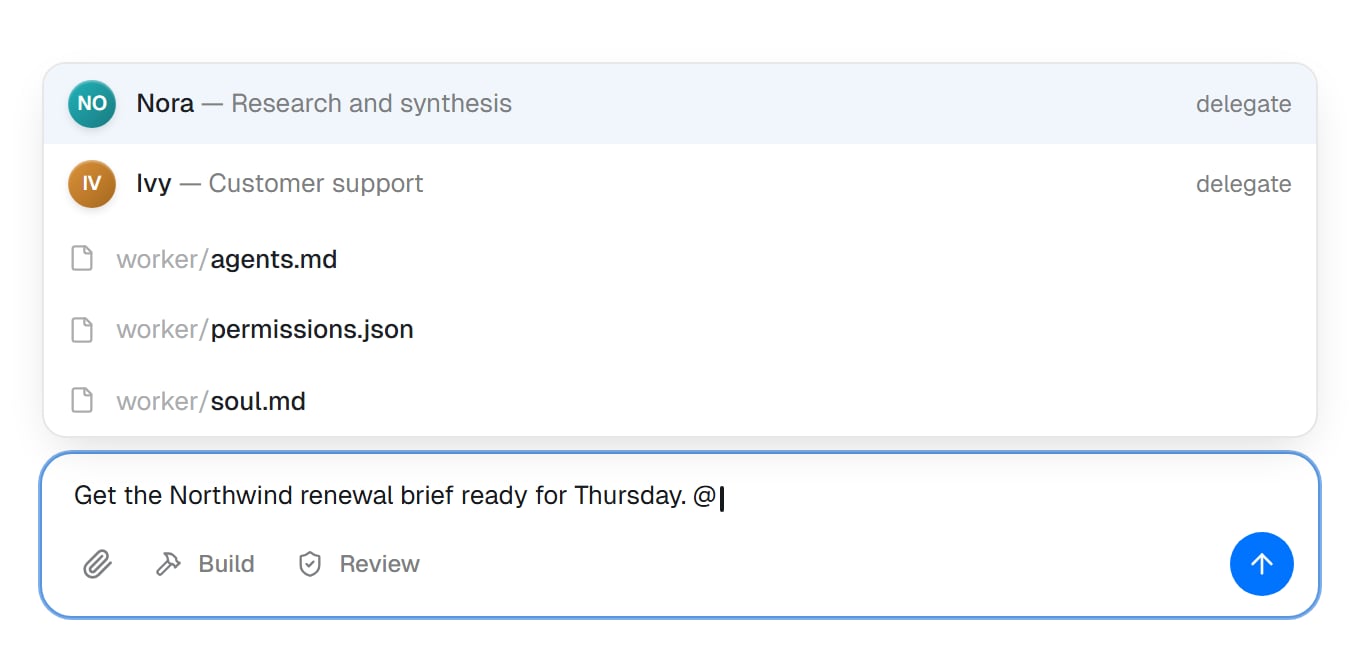
Type @ and your other coworkers come first, each with its role and a delegate hint. Files you can mention follow. Pick a coworker to have Sam hand that part to it.
Approve the handover
Before Sam hands anything over, it asks for your approval in the conversation.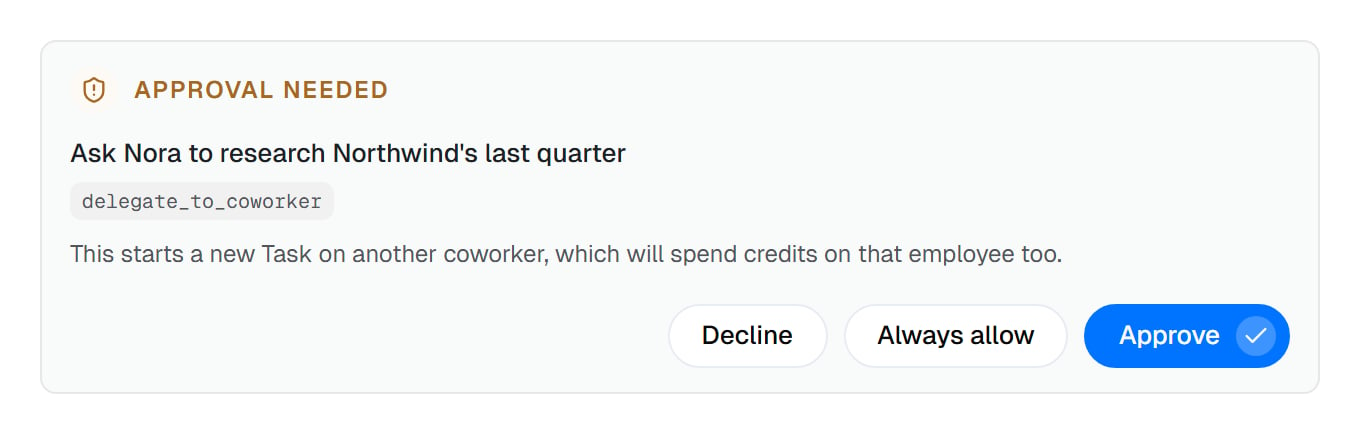
Sam's first handover waits for you. The headline is Sam's own summary of what it's about to do.
- The headline is Sam’s one-line summary, like “Ask Nora to research Northwind’s last quarter”.
- The tag under it is the action’s name. The Always allow tooltip names the same action.
-
The reason tells you what approving costs:
This starts a new Task on another coworker, which will spend credits on that employee too.
- Three buttons. Decline stops the handover. Approve lets this one go ahead. Always allow lets this one go ahead and stops Sam asking next time. See Standing permission.
Follow it on the card
Once you approve, a card appears in Sam’s task. It stays there and updates as the work goes on.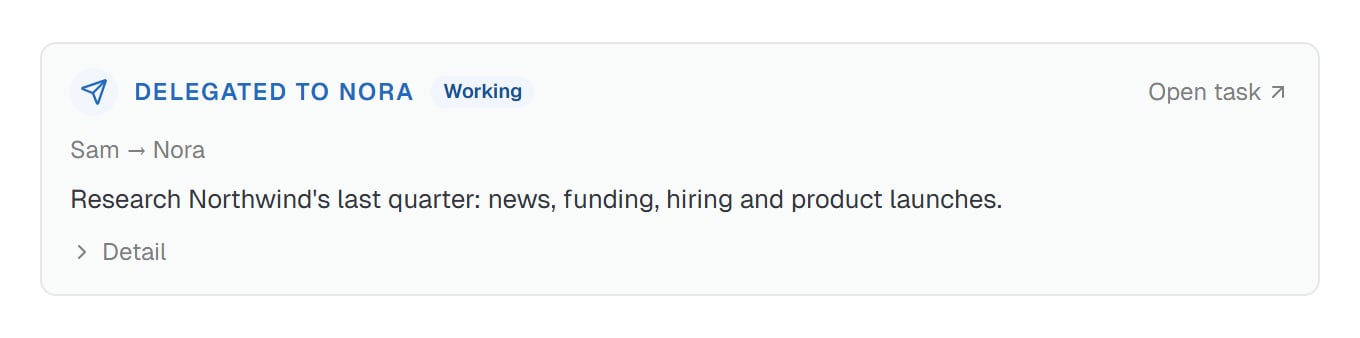
The card in Sam's task, just after you approve. It shows who the work went to, what Sam asked for, and how it's going. Detail opens the rest.
- Delegated to Nora, with a status: Working while Nora is on it.
- Open task takes you straight to Nora’s side.
- Sam → Nora, the chain of who handed the work to whom.
- What Sam asked for, in Sam’s own words.
- Detail opens the rest: Asked for, the result Sam wants back, and every message on the handover since. Once messages arrive, the toggle counts them, like 1 update.
The other side
On Nora’s side, the handover is a normal task. It shows up in your task list, and Nora starts on it straight away. Its title is For Sam: and then Sam’s request: “Research Northwind’s last quarter: news, funding, hiring and product launches.”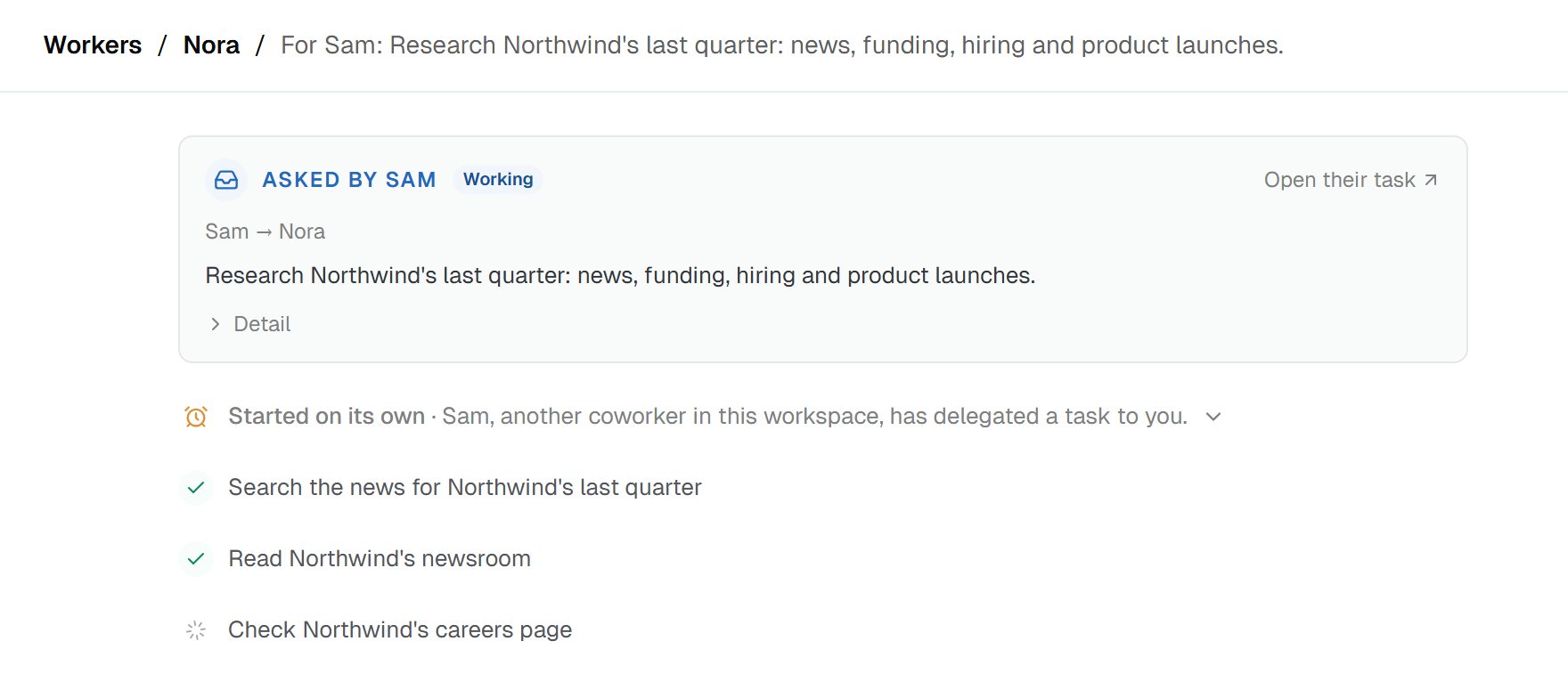
Nora's side: a task of its own, titled with Sam's request in full. Nora starts on it straight away, with its own tools.
- Asked by Sam heads Nora’s task, with the same status as Sam’s card. Its Open their task link goes back to Sam’s side.
- A Started on its own row comes next, carrying Sam’s request: “Sam, another coworker in this workspace, has delegated a task to you.” Open it to read the whole request.
- Nora uses its own setup. It works with its own instructions, memory, tools, connected accounts and permission rules. When one of its actions needs your approval, Nora asks you in its own task.
- Nora sees only what Sam wrote. Sam’s conversation with you stays on Sam’s side. So Sam writes its request to stand on its own.
Follow-ups and checking the work
Sam can follow up while the work goes on. Say Sam also wants to know whether Northwind is hiring for support roles. The follow-up lands in Nora’s same task, and it asks for your approval too:This sends work into another coworker’s Task, which will make them take another turn.Approve it, and Sam’s card counts it: 1 update. If Nora is mid-task, it sees the follow-up at its next step, and Nora’s task shows it as a row headed From Sam. If Nora is between turns, the follow-up starts it again. Sam can also join a task Nora already has open on related work, instead of starting a fresh one. And it can read Nora’s task to see what Nora actually did, without asking you, because reading changes nothing. You can do the same any time with Open task.
The report comes back
When Nora finishes, its report goes straight back to Sam. You don’t need to pass anything along.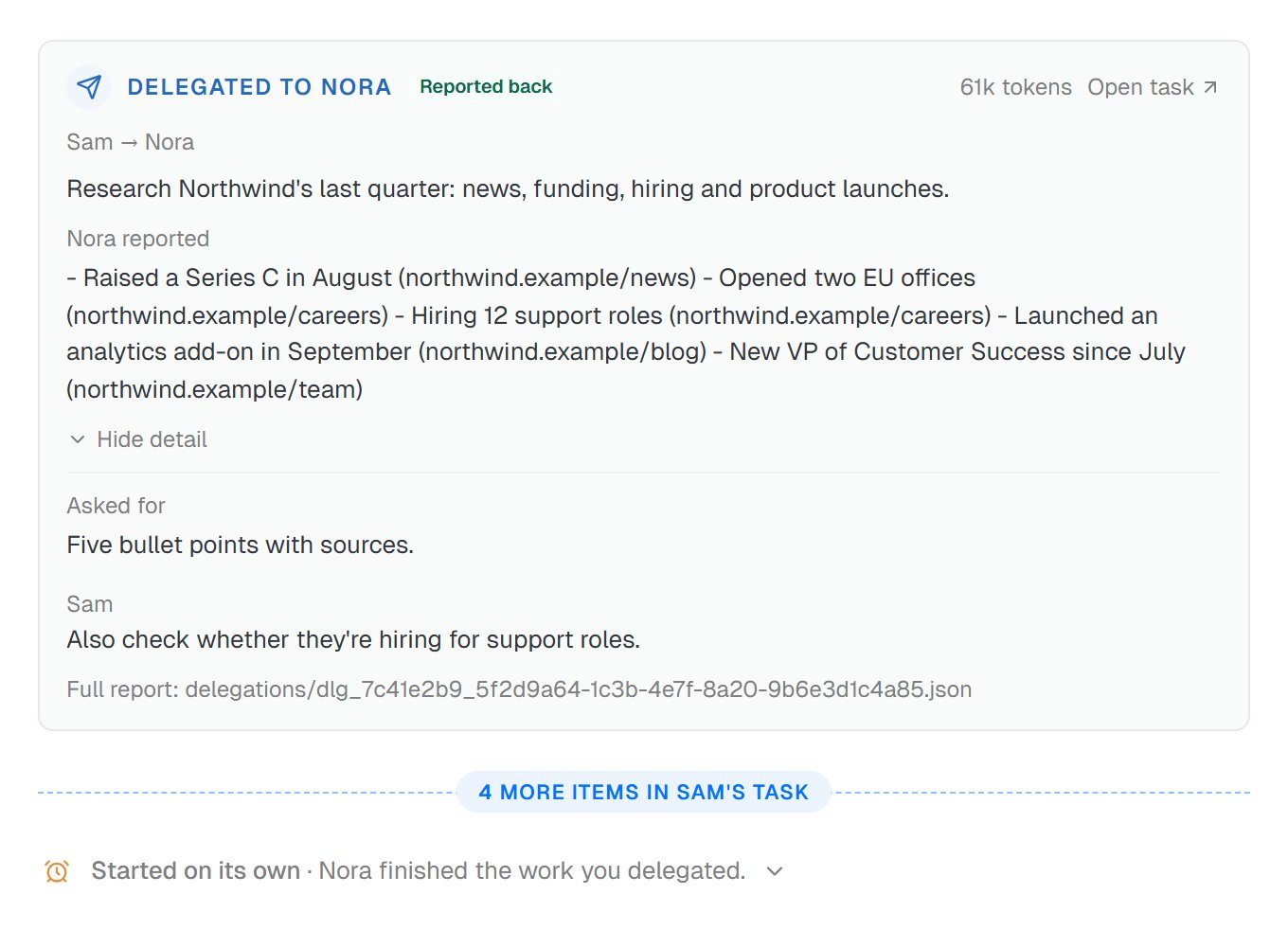
Sam's card once Nora reports back: the five-point report, then the detail with what Sam asked for, Sam's follow-up and the Full report line. Further down, Sam starts again on its own.
- The card turns to Reported back, with Nora reported and Nora’s own words. Here, that’s five points, each with its source, like “Raised a Series C in August (northwind.example/news)”.
- A usage figure now sits next to Open task. It counts only Nora’s latest turn, not the whole handover.
- The detail shows Asked for, then every update since, like Sam’s follow-up. While it’s open, the toggle reads Hide detail.
- The report is also saved as a file in Sam’s task files, in the delegations folder, with what Sam asked for and when. The card’s Full report line opens it.
- Sam picks up on its own. Further down Sam’s task, a row appears: Started on its own · “Nora finished the work you delegated.”
Other endings
Not every handover ends with a report. The card’s status tells you where things stand.Standing permission
Approving every handover gets old once you trust how Sam uses it. Click Always allow on the approval card, and Sam stops asking before it hands work off. Its tooltip reads:Runs it now and saves an allow rule for delegate_to_coworker in this worker’s permissions, so it stops asking.Here’s exactly what that covers:
- Sam’s handovers, to every coworker. The rule is saved in Sam’s own permissions, so it covers handing work to Nora, Ivy or anyone else.
- Not Sam’s follow-ups or stops. Those ask separately, each with its own Always allow.
- In every task with Sam. That includes tasks other people in your workspace start with Sam.
- Not your other coworkers. If Ivy can hand work on too, Ivy still asks until you allow its handovers.
Rules apply from the next turn. Actions no rule matches keep the default: sends, changes, and deletions pause for your approval.For writing rules by hand, see Permission rules. One broader rule can cover handovers, follow-ups and stops together. Coworker handovers in detail shows how.
Sharing files
By default, only words travel. Nora gets Sam’s written request, starts with no files, and sends back a written report. A file Nora makes stays in Nora’s own task. When the job involves files, Sam can share its workspace with Nora instead. Then both work in the same task files: Nora can read Sam’s draft, and Sam can see what Nora saves. Nora needs Code and files on to work with them. The card shows a shared workspace marker, with the tooltip “Both coworkers are working in the same files”.- Only the task files are shared. Nora’s own saved files, like its instructions and skills, stay with Nora.
- Nothing locks a file. If both edit the same file at once, one can overwrite the other. Give each coworker different files to work on.
Limits
- Three handovers in a row, at most. Sam can hand work to Nora, Nora can pass part of it on, and that coworker can pass it on once more. Each one needs Work with coworkers on to pass work along.
- No loops. A handover never goes back to anyone already in its chain. Nora can’t hand Sam’s work back to Sam.
- Not to itself. A coworker can’t hand work to itself.
- Paused coworkers take no new work. A paused coworker can’t take on a handover. Sam picks someone else or does the work itself.
- Eight waiting at once. One task can owe replies to at most eight others at a time.
- Eight turns by default. A turn is one stretch of work. Each handover runs for up to eight turns until it finishes. Sam can allow up to 25 for a genuinely long job. When Nora’s turns run out, the card reads Needs a look. A follow-up from Sam gives Nora up to eight more.
Costs
Your workspace pays for both coworkers’ work. Nora’s research costs what any of its tasks would, on top of Sam’s. Sam also takes a turn each time news comes back. That’s why each handover asks first, and why the switch starts off. The card’s usage figure counts only the other coworker’s latest turn, not the whole handover. Don’t read it as the handover’s total cost.How it differs from dynamic workflows and custom helpers
A handover goes to a coworker you hired. A dynamic workflow puts temporary helpers on one big job, and a custom helper is a specialist inside one coworker. See how the three compare. None of this builds a workflow. For a fixed sequence of steps that runs on a trigger, see Cowork vs Workflows vs Chat & Voice Agents.Under the hood
Each handover is a small set of actions your coworker can take: list coworkers, hand over, follow up, read, and stop. You don’t need any of it to use this. For the actions, the saved reports and the permission rules in full, see Coworker handovers in detail.Good to know
Common questions
Is the other coworker's work private?
Is the other coworker's work private?
What if the other coworker gets stuck?
What if the other coworker gets stuck?
Can I stop a handover?
Can I stop a handover?
Does it cost more to have coworkers work together?
Does it cost more to have coworkers work together?
Can two coworkers keep passing work back and forth?
Can two coworkers keep passing work back and forth?