
What you see
As your coworker works, the conversation fills with a row per step. Searched for something. Opened a file. Ran the numbers. Sent a message. Each row is a summary you can expand for the detail — what it actually searched for, what came back, what it changed. Nothing is hidden behind a spinner. You’ll also see rows where it was thinking rather than doing. Those are collapsed by default; expand one when you want to know why it made a particular choice.
A few steps from a reconciliation task. Each row expands for the detail.
The checklist
On a job with several parts, your coworker keeps a visible to-do list and ticks items off as it goes. This is the fastest way to tell whether a long task is going well. If the list matches what you expected, you can stop watching. If item two is something you didn’t ask for, you’ve caught it early — say so and it adjusts.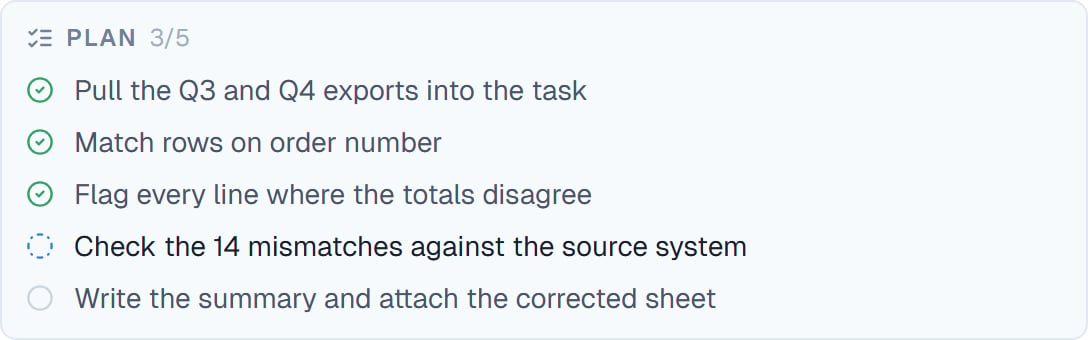
Three done, one in progress, one to go. The count in the header is the quickest read.
Special cards
Some steps get their own card rather than a plain row, because they’re worth seeing properly.Finishing
When it’s done, your coworker posts a quiet wrap-up line you can expand for the full account of what happened. It’s deliberately understated. The work is in the conversation above and in the files panel; the wrap-up just tells you it’s finished and what the outcome was.When you were away
If your coworker worked while you weren’t watching, you get a notice saying it woke up, why, and what it did. Maybe you closed the tab, it scheduled its own follow-up, or another coworker’s report came back. Nothing happens off the record. Everything it did while you were away is in the conversation, in order.Good to know
Every coworker also has an Activity tab with its complete history across all tasks, if you want the wider view rather than one conversation.
Common questions
Do I have to watch?
Do I have to watch?
No. Close the tab; it keeps working. The conversation is all there when you come back.
Can I stop it mid-step?
Can I stop it mid-step?
Yes. Stop the task and it halts. Everything done so far stays, including any files it produced.
Why is it thinking for so long?
Why is it thinking for so long?
Usually a hard problem, or a high effort setting. Expand the thinking row to see what it’s weighing.
Can I see what it changed in a file?
Can I see what it changed in a file?
Yes, line by line. See Seeing what changed.
It is doing the wrong thing. What now?
It is doing the wrong thing. What now?
Type a correction. It’s picked up as soon as the current step settles, without stopping the task. If it’s badly off, stop it and re-ask.
Next steps
Approvals
The cards that need your yes.
Managing your tasks
Several jobs at once.
Seeing what changed
Checking its work.
Long conversations
When a task runs long.